
DRAGON CENTER User Guide
Setting Network Speed 1. Select the Network Test control panel. 2. Click Test Network Speed. 3. cFos Speed Test web page will be opened. 4. Click to test Upload speed, and click to test Download speed. 5. Fill in the speed test results in the Upload speed and Download speed input boxes. 6. Check the Enable Bandwidth Control checkbox.
Download DRAGON CENTER User Guide

Information
Domain:
Source:
Link to this page:
Documents from same domain
Optix Series - download.msi.com
download.msi.com3 Stand Base with Screw 4 Wall Mount Screws x 4 5 Stand Screws x 4 6 VESA Cover 7 Power Cord ... 15 Camera Cradle with Rotatable Ball Head * Contact your place of purchase or local distributor if any of the items is damaged or ... It doesn’t support data transmition function. 5 USB3.1 Gen1 Type B Upstream Port For USB Upstream Cable.
Optix Series - download.msi.com
download.msi.com(2014/35/EU), ErP Directive (2009/125/EC) and RoHS directive (2011/65/ EU) This product has been tested and found to comply with the harmonized standards for Information Technology Equipment published under Directives of Official Journal of
Optix Series - download.msi.com
download.msi.comto Electromagnetic Compatibility (2014/30/EU), Low-voltage Directive (2014/35/EU), ErP Directive (2009/125/EC) and RoHS directive (2011/65/ EU) This product has been tested and found to comply with the harmonized standards for Information Technology Equipment published under Directives of Official Journal of the European Union

Quick Start - download.msi.com
download.msi.comAudio y Realtek® ALC892 Codec 7.1-Channel High Definition Audio Back Panel Connectors y 1x PS/2 keyboard/ mouse combo port y 2x USB 2.0 Type-A ports y 1x VGA port y 1x DVI-D port y 1x DisplayPort y 1x USB 3.1 Gen2 Type-A port y 1x USB 3.1 Gen2 Type-C port y 1x LAN (RJ45) port y 2x USB 3.1 Gen1 Type-A ports y 6x audio jacks Continued on next page
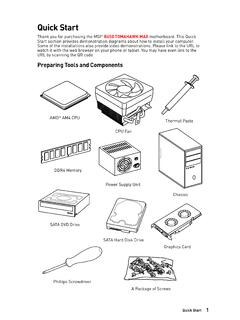
Quick Start - download.msi.com
download.msi.comInternal Connectors y 1x 24-pin ATX main power connector y 1x 8-pin ATX 12V power connector y 6x SATA 6Gb/s connectors y 2x USB 2.0 connectors (support additional 4 USB 2.0 ports) y 1x USB 3.2 Gen1 connectors (support additional 2 USB 3.2 Gen1 ports) y 1x 4-pin CPU fan connector y 1x 4-pin water-pump-fan connector y 4x 4-pin system fan connectors

Contents
download.msi.com4x USB 3.2 Gen 1 5Gbps Type-A ports on the back panel Internal Connectors ∙ 1x 24-pin ATX main power connector ∙ 1x 4-pin ATX 12V power connector ∙ 4x SATA 6Gb/s connectors ∙ 1x M.2 slots (M-Key) ∙ 1x USB 3.2 Gen 1 5Gbps connector (supports additional 2 …

Inleiding - download.msi.com
download.msi.comInleiding 4 5 1. Webcam/ Webcam-LED/ interne microfoon • Deze ingebouwde webcam kan worden gebruikt voor beeld, video-opname, conferencing, enz. • De webcam-LED indicator die zich naast de webcam bevindt, licht op wanneer de webcamfunctie wordt geactiveerd en de LED gaat uit als deze functie wordt uitgeschakeld.

Quick Start - download.msi.com
download.msi.comBIOS Features ∙ 1x 256 Mb flash ∙ UEFI AMI BIOS ∙ ACPI 6.0, SMBIOS 2.8 ∙ Multi-language Software ∙ Drivers ∙ DRAGON CENTER ∙ MSI APP Player (BlueStacks) ∙ Open Broadcaster Software (OBS) ∙ CPU-Z MSI GAMING ∙ Google Chrome™, Google Toolbar, Google Drive ∙ Norton™ Internet Security Solution Dragon Center Features ∙ ...

User's Manual
download.msi.comEuropean Union: Batteries, battery packs, and accumulators should not be disposed of as unsorted household waste. Please use the . public collection system to return, recycle, or treat …

CREATOR CENTER User Guide - download.msi.com
download.msi.comThe screenshots for the UI in this user guide are for reference only and the actual UI design may vary. Operation Panel Information Bar Display System ... Base Clock frequency (BCLK). You can also fill out the value in the input box. ... Please refer to the instructions on page 28.
Related documents

Q-See QT Series Remote Monitoring Quick Set Up Guide
static.highspeedbackbone.netFixed Local Network Address. STEP 3. Static Internal IP (Network) Address. Most routers assign connected devices a random IP address that is not . currently in use by another device on your internal network. With the exception of 2Wire brand routers, when a router or networked device reboots due to a power loss or other issue, the addresses ...
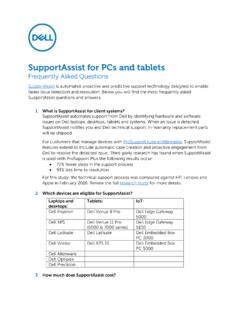
SupportAssist for PCs and tablets
i.dell.comNetwork security — all monitoring components are located behind a firewall and are managed by a Dell network security team. All network traffic is tightly controlled, requiring all inbound traffic to be transmitted via specific ports and sent only to …

Device Inclusion Upon successful Device Inclusion to the ...
shelly.cloudChoose “Add Device”. In order to add more Devices later, use the app menu at the top right corner of the main screen and click “Add Device”. Type the name (SSID) and password for the WiFi network, to which you want to add the Device. Step 3 If using iOS: you will see the following screen: Press the home button of your iPhone/iPad/iPod. Open

Continental Belt Monitoring Systems Conveyor Belt ...
www.continental-industry.comTHE RIGHT MONITORING SYSTEM FOR EVERY CONVEYOR SYSTEM. › Best-in-class sensor technology › Reliability and high quality data output › User-friendly graphical interfaces Our web-based monitoring technologies can be accessed via an Ethernet network connection, making it available to multiple users.

THE TOP 20 CYBERATTACKS - FireEye
www.fireeye.comprotection” illustration at right reflects a proposed change to the security program to incorporate modern ICS best practices, including: a strict removable media control policy, Unidirectional Security Gateways and Unidirectional CloudConnect appliances at network perimeters, and an upgrade to the control system test bed.

How to Configure PTZ Function - Hikvision
www.hikvision.comproblems. To choose the right Min. Focus Distance according to the actual monitoring distance. 2. Lens Initialization 1) Go to Configuration->Image->Display Setting->Other interface, the lens get initialized when you enable the Lens Initialization. The Lens initialization can solve the focus issue caused by poor focus curve.
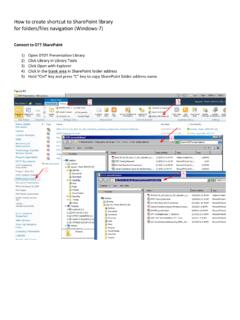
How to create shortcut to SharePoint library for folders ...
www.ott.nih.govAdd Network Location Where do you want to create this network location? Choose a custom network location the address of a website, network location, or FTP site. Next Add Network Location Add Network Location Specify the location of your website Type the address of the website, FTP site, or network location that this shortcut will open.