
Fetch Remote 3
4 TV Power and AV Fetch Power: Press to turn on/off Fetch box. TV Power: Press then press to turn on/off TV. AV Source: Press then press to change the input source, e.g. HDMI switch on TV. Some buttons may not work with your TV. You may wish to try each code through the Direct Remote Set Up process (page 4) for your remote.
Download Fetch Remote 3

Information
Domain:
Source:
Link to this page:
Documents from same domain
Wi-Fi User Guide - Fetch TV
www.fetchtv.com.au4 1 Connect Fetch to your home Wi-Fi To set up your Fetch with Wi-Fi You’ll need your Wi-Fi network name and password to connect. Before you start, check you can browse

Quick Start Guide - Fetch TV
www.fetchtv.com.au5 Connection Option 3 – PLC Adaptors You can use this option if you cannot connect using Ethernet Cable and you ordered PLC Adaptors with your Fetch
Mighty Quick Start Guide - Fetch TV
www.fetchtv.com.au• The remote control works up to 6m away from the Fetch box in Infrared mode. The voice remote control works up to 10m away in Bluetooth mode. • Unplug the Fetch box from the power source before cleaning. • Clean using a dry cloth only - don’t use water or chemicals. • Don’t try to open the Fetch box - it’s dangerous and will void ...

My Media Hub Quick Start Guide for USB Devices
www.fetchtv.com.au(see the “Fetch My Media Hub Quick Start Guide for Media Servers”) • See your folders, album artwork, playlists in My Media Hub • Play a slideshow of photos • Play your music or videos with full playback controls About this document This guide will help play your media off a USB device from your Fetch Box to your connected TV. Related ...
Multiroom User Guide - Fetch TV
www.fetchtv.com.auFetch through Optus, iiNet, Internode, Westnet, Aussie Broadband or iPrimus. Before you can use your Fetch box, you’ll need to create an account directly with us. Go to fetch.com.au/activate. Once you have entered in your personal details and credit card details, you will be given an Activation Code (also called your Fetch ID).

New Software Update - Fetch
www.fetchtv.com.auThis update to Fetch introduces the ability to watch sport via the Paramount + app. Menu > Apps > All > Paramount + > All Shows > Sports • From October 14, there will be sport highlights, mini matches and full match replays from AFC Road to Qatar Qualifier as well as Socceroo and Matildas friendly matches available to watch.

Mini Quick Start Guide - Fetch TV
www.fetchtv.com.auConnect the Fetch Mini to your broadband modem Connect the Fetch Mini to your TV Antenna Connect the Fetch Mini to your TV Power up your Fetch Mini Start up Fetch This guide tells you all you need to know about setting up and turning on Fetch. It also has important safety and usage information. It’s Fetch and it’s ready when you are. 1 2 3 ...
Fetch Voice Remote
www.fetchtv.com.aufront of your box to pair the remote. • You can pair one Fetch Mighty or Fetch Mini at a time to use voice control through the remote. • Fetch will prompt you to pair the remote using Bluetooth the first time you use it with your Fetch Mighty or Fetch Mini. • Bluetooth pairing is not supported on Gen 2 Fetch boxes.

Mini User Guide - Fetch TV
www.fetchtv.com.au3. 12 You can go back a day in the TV Guide and watch programs you missed. You can set a reminder to alert you when your favourite programs are about to start. TV Guide – Reverse EPG Set Reminders In the TV Guide or Live TV Info Bar press to browse backwards into the ... Fetch Mighty or Gen 2 box.
Related documents
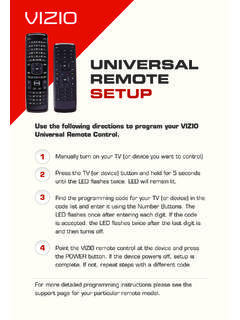
UNIVERSAL REMOTE SETUP - Vizio
cdn.vizio.comManually turn on your TV (or device you want to control) Press the TV (or device) button and hold for 5 seconds until the LED flashes twice. LED will remain lit. Find the programming code for your TV (or device) in the code list and enter it using the Number Buttons. …

TAS List August 2021 - LA Traffic School Info
www.latrafficschoolinfo.comTitle: TAS List August 2021.cdr Author: Mario Quintanilla Created Date: 7/20/2021 10:51:51 AM

P020111018525755526455 | Haier TV
image.haier.comthe TV and connect the DVD audio outputs to the AUDIO jacks on the TV’ as shown in the figure. distance between the VCR and TV. HDMI 2 IN ANT IN Mini USB VIDEO HDMI 1 IN AV1 IN LR- AUDIO-AV OUT L VIDEO R AUDIO SPDIF USB Connection Option 1 Set VCR output switch to channel 3 or 4 and then tune the TV to the same channel number. Connection Option 2

Sample 'Treatment/Synopsis' For A Reality TV Show Proposal ...
nashvillefilmfestival.orgSample "Treatment/Synopsis" For A Reality TV Show Proposal: [the following original concept is protected by the Library of Congress and Writers Guild of America Author: fsd034 Created Date: 2/27/2018 4:48:00 PM
ARRIS Wireless TV Receiver Product Manual
www.att.comWireless TV Receivers as specified by your service provider. The Access point uses Wi-Fi Protected Setup (WPS) protocols to identify, authorize and manage traffic to and from the Wireless TV Receivers. Register the TV Receiver with the Access Point Before your Wireless TV Receiver can become operational, it must be paired as an
Mighty Quick Start Guide - Fetch TV
www.fetchtv.com.auFetch Mighty. 1 2 Step 3. Connect to your TV Antenna You get your Free-to-Air Digital TV channels using your normal TV antenna. They are not delivered over broadband Internet. You’ll need your existing TV antenna cable, so unplug it from the back of your TV.
Channel Lineup - TV, Phone and Internet Support Home
www.optimum.netTV Chile6,7 1032 Nuestra Tele6,7 1033 Caracol TV Internacional6,7 1034 SUR Perú6,7 1039 Teleformula6,7 1041 Canal Sur6,7 1042 TVE Internacional6,7 1043 Antena 36,7 1044 Azteca America6,7 1047 TeleXitos 1048 • • • • • Kids Street SAP6,7 1049 Cine Mexicano6,7 1057 Cine Latino6,7 1058 ViendoMovies6,7 1059 Gol TV (Spanish)6,7 1068 ...
TV Connection Guide - Optimum
www.optimum.netcable box to your TV. Complete every step before moving to the next. Start by selecting your cable box below: Samsung cable box With an HD TV 6 With a non-HD TV 8 Scientific Atlanta cable box With an HD TV 10 With a non-HD TV 12 Additional Information Using a cable splitter 14 A few tips to keep in mind 15 Help 16 3

XFINITY® TV Channel Lineup - Somerville, MA
www.somervillema.gov183 Jewelry TV 184/640 XFINITY Latino 209 WGBH World 217 WGBH Kids 229 Trinity Broadcasting Network 237 WGBH Create 268 CatholicTV 3 283 Leased Access 288 WBIN-Live Well Network 289 WBIN-COOL TV 290 WNEU-Exitos 291 WLVI-TCN 292 WCVB MeTV 297 WHDH-This TV 299/724 WUNI-LATV 300/721 WFXZ-24 (Mundo Fox) Expanded Basic 24 …