Getting started with Logitech® Wireless Mouse M325
the mouse is not in use, you can store the Unifying receiver inside the mouse. * On a Mac® the Internet back/forward feature is not supported. You can assign Dashboard, Exposé, or Spaces to the tilt wheel features within System Preferences. Deutsch Funktionen 1. Scrollrad 2. Mittlere Taste: Die Funktion dieser Taste hängt von Ihrem ...
Download Getting started with Logitech® Wireless Mouse M325

Information
Domain:
Source:
Link to this page:
Documents from same domain

Activities Want to know more? - Logitech
www.logitech.comLogitech Gaming Software - Help Center file:///E|/Help/en_US/front_page.htm[4/28/2014 8:07:32 PM] Activities... Want to know more? Create a new profile Getting started

On - logitech.com
www.logitech.com1 2 Logitech® Wireless Mouse M217 Setup Guide Guide d’installation English Mac® OS X Users: When plugging in the Unifying receiver, the Keyboard Assistant

圧倒される 超・高解像度 - logitech.com
www.logitech.comLogicool BRIO Ultra HD 4K画像センサー 4K(Ultra HD)@ 30 fps、1080p(フルHD)@ 30/ 60 fps および 720p(HD)@ 30/60/90 fpsを含めた複 数の解像度をサポートし、お使いのアプリケーションや

SMALL GROUPS. BIG POTENTIAL. - Logitech
www.logitech.comSmall group video conferencing deserves more than huddling around PC webcams or begging for time on overbooked conference room systems. The ConferenceCam BCC950

Logicool ゲーム ソフトウェア - logitech.com
www.logitech.com快適な作業および安全性 file:///E¦/Help/ja_JP/comfort_and_safety.htm[4/26/2014 9:19:02 PM] 快適な作業および安全性 ここでは快適な作業 ...

Logitech® USB Headset H390
www.logitech.comEnglish Know your product 1. USB Headset H390 2. Microphone boom 3. Microphone 4. Volume controls (+/–) 5. Mute button 6. Mute light 7. USB connector

SUPER-WIDE FIELD OF VIEW FOR SMALL SPACES.
www.logitech.comMeetUp’s integrated audio is optimized for huddle room acoustics and delivers an exceptional sound experience. Three horizontally-aimed beamforming mics and

Introducing the Logitech MeetUp
www.logitech.com3 TalkingPointz July 21, 2017 What’s a MeetUp? Logitech currently offers three small room conferencing products in its ConferenceCam lineup .

Setup Guide Guide d’installation Logitech® HD …
www.logitech.com4 English English 5 Getting started with Logitech® HD Pro Webcam C920 Thank you for buying your c920! Use this guide to set up and begin using your Logitech webcam.

Logitech Addresses and Phone Numbers
www.logitech.comLogitech ® G 27 Racing Wheel © 2013 Logitech. All rights reserved. Logitech, the Logitech logo, and other Logitech marks are owned by Logitech …
Related documents

Dell Mobile Pro Wireless Mouse MS5120W User's Guide
dl.dell.com5 If you are pairing the mouse with the USB dongle, ensure that the USB dongle is directly connected to your computer. • Avoid using the port replicators, USB hubs, and so on. • Change the USB port. 6 If you are pairing the mouse using Bluetooth for the first time, refer to the “Pairing your mouse using Bluetooth” section for more ...

Dell WM527 Wireless Mouse
downloads.dell.comMouse pointer does not move The mouse pointer freezes 1. Check the battery level. • If the mouse uses a rechargeable battery, make sure the battery is fully charged. • If the battery is exhausted, replace it with a new one. 2. • Check if the battery status light is flashing amber 10 times, indicating the battery power is low. If the

Dell Premier Rechargeable Wireless Mouse MS7421W User’s …
downloads.dell.comThe connection-mode light ( ) on the wireless mouse turns on to indicate the Dell Universal pairing, and then turns off. Your Dell wireless mouse can be paired via the Dell Universal Dongle or direct . Bluetooth connection. You can pair and switch between a laptop, desktop, and a . compatible mobile device. Pairing with the Dell Universal ...

Compare and contrast - K5 Learning
www.k5learning.comTown Mouse and Country Mouse There once was a Town Mouse who went on a visit to his cousin in the country. Country Mouse led a busy life, keeping up with all his chores. But he loved his town cousin, and gave him a hearty welcome. All he had to
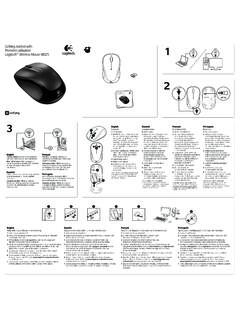
Logitech® Wireless Mouse M325 1 On On
www.logitech.comLogitech® Wireless Mouse M325 1 On On 2 3 English Help with setup: Mouse is not working 1. Is the mouse powered on? 2. Is the Unifying receiver securely plugged into a computer USB port? Try changing USB ports. 3. If the Unifying receiver is plugged into a USB hub, try plugging it directly into a USB port on your computer. 4.