
GPSMAP 76 - Garmin
Adjusting Backlight and Contrast You may want to adjust the backlight/contrast to see the display better. To adjust the backlight/contrast level: 1. Press and quickly release the POWeR key. 2. Press the ROCKeR key UP to increase the brightness or DOWN to decrease the brightness. 3. Press the ROCKeR key RIGHT to increase the
Download GPSMAP 76 - Garmin

Information
Domain:
Source:
Link to this page:
Documents from same domain

EDGE® 1030 Owner’s Manual - Garmin International
static.garmin.comCharging the Device NOTICE To prevent corrosion, thoroughly dry the USB port, the weather cap, and the surrounding area before charging or connecting to

Owner’s Manual - Garmin International
static.garmin.comIntroduction WARNING See the Important Safety and Product Information guide in the product box for product warnings and other important information.

Lidar Lite v3 Operation Manual 2 and Technical …
static.garmin.com1 Lidar Lite v3 Operation Manual and Technical Specifications Laser Safety WARNING This device requires no regular maintenance. In the event that the device

Printing a Mounting Template - Garmin
static.garmin.comPrinting a Mounting Template Notice It is not recommended that you print a mounting template on your own. Use the template that came in the product box.

GPSMAP 62 series - Garmin
static.garmin.comGPSMAP 62 Series Quick Start Manual 3 3. Replace the battery cover. For best results, after you install new batteries, update the battery type in the

Important Safety and Product Information 2 …
static.garmin.comIMPORTANT SAFETY AND PRODUCT INFORMATION WARNING Failure to heed the following warnings could result in an accident or collision resulting in death or

Important Safety and Product Information 2 …
static.garmin.comImportant Safety and Product Information 2 Informations importantes sur le produit et la sécurité 3 guida Informazioni importanti sulla sicurezza e sul

Instructions - Garmin
static.garmin.com1 GLO™ GLONASS and GPS Sensor Instructions August 2012 190-01492-00_0B Printed in Taiwan

GNS 430(A) - Garmin International
static.garmin.com190-00140-00 Rev. P GNS 430(A) Pilot’s Guide and Reference i RECORD OF REVISIONS Revision Date of Revision Description A 12/98 Initial Release B 4/99 Update to conform to recent SW changes

GNS 530(A) - Garmin International
static.garmin.com190-00181-00 Rev. H GNS 530(A) Pilot’s Guide and Reference i RECORD OF REVISIONS Revision Date of Revision Description A 5/00 Initial Release B 5/01 Update to reflect software changes through 2.06
Related documents

Adjusting Hydraulic Lifter Pre-load - Crane Cams
cranecams.com.auopen, stop and adjust that cylinder’s intake rocker arm. (Why? Because when the exhaust valve is just beginning to open, the intake lifter will be on the base circle of the lobe, the correct position for adjusting the intake.) 3. Back off the intake rocker arm adjuster and remove any tension from the pushrod. Wait a

GX240 GX270R/RT/T/U/UT GX340 GX390K1/R1/T1/U1/UT1 …
www.ipspower.com③. Insert a feeler gauge between the rocker arm and valve to measure valve clearance. Valve clearance: 0.15 ± 0.02 mm (IN) 0.20 ± 0.02 mm (EX) ④. If adjustment is necessary, proceed as follows: a. Hold the rocker arm pivot and loosen the rocker arm pivot lock nut. b. Turn the rocker arm pivot to obtain the specified clearance.

OPERATION & MAINTENANCE MANUAL
3.imimg.com1 1. FOREWORD Dear Customer, We are happy to provide you with latest revision of R1040 / R1080 series O & M manual. The R1040 / R1080 series liquid cooled engines are
GCV135 GCV160 GCV190 GSV190 Engine Adjustment …
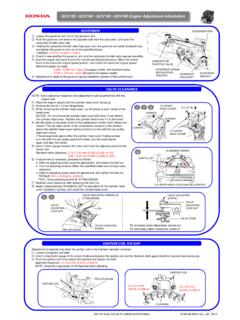
cf.hondappsv.com⑤. Insert a feeler gauge between the valve stem and the adjusting screw on the rocker arm. Standard valve clearance: 0.15 ± 0.04 mm (0.006 ± 0.002 in) (IN) 0.20 ± 0.04 mm (0.008 ± 0.002 in) (EX) ⑥. If adjustment is necessary, proceed as follows: a. Hold the adjusting screw using the special tool, and loosen the lock nut. b.
GX120 GX160 GX200 Engine Adjustment Information
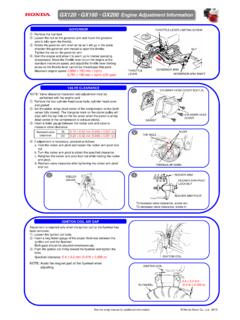
cf.hondappsv.com③. Insert a feeler gauge between the rocker arm and valve to measure valve clearance. ④. If adjustment is necessary, proceed as follows: a. Hold the rocker arm pivot and loosen the rocker arm pivot lock nut. b. Turn the rocker arm pivot to obtain the specified clearance. c. Retighten the rocker arm pivot lock nut while holding the rocker ...

SPECIAL SERVICE TOOLS FOR LYCOMING PISTON ENGINES
www.lycoming.comBlade Valve Adjusting - ST-418-3 Block - cylinder holding - 64526, 64526-1, 64526-2 thrust nut - 64607 vee - 64545 Bolt - propeller - 64982, 64983, 64984 Bracket - engine lifting -64758 Burnisher - connecting rod bushing - 64580 magneto drive idler gear - 64887 valve rocker bushing - 64541 Bushing - oil relief valve - ST-243, ST-245 C