ImageJ Basics
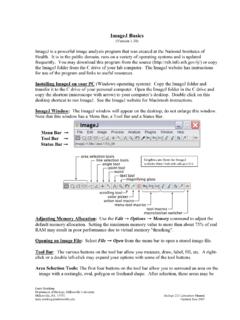
ImageJ Basics (Version 1.38) ImageJ is a powerful image analysis program that was created at the National Institutes of ... Measure (or keyboard M) transfers the area measurement to a data window. Counting Particles. As described above, convert the image to 8-bit grayscale and then
Download ImageJ Basics

Information
Domain:
Source:
Link to this page:
Documents from same domain

Automated Segmentation and Morphometry of Cell and …
imagej.nih.govAutomated Segmentation and Morphometry of Cell and Tissue Structures. Selected Algorithms in ImageJ 5 2.2Open source software There are numerous …

ImageJ User Guide - National Institutes of Health
imagej.nih.govImageJ User Guide IJ1.46r Tiago Ferreira Wayne Rasband Tuesday2nd October,2012 Foreword TheImageJUserGuide providesadetailedoverviewofImageJ(andinherentlyFiji ...
Photonic Solutions for Biotechnology and Medicine Image ...
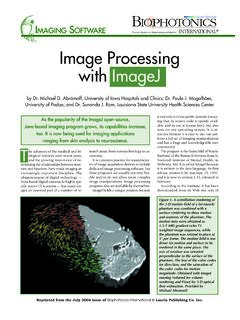
imagej.nih.govranging from skin analysis to neuroscience. by Dr. Michael D. Abràmoff, University of Iowa Hospitals and Clinics; Dr. Paulo J. Magalhães, University of Padua; and Dr. Sunanda J. Ram, Louisiana State University Health Sciences Center Image Processing with ImageJ it not only is in the public domain (mean-ing that its source code is openly avail-

ImageJ Macro Language Programmer’s Reference Guide v1
imagej.nih.govJan 01, 1970 · To test the macro, use the editor's Macros>Run Macro command (or press ctrl-r). To save it, use the editor's File>Save As command. In the Save As dialog box, enter "Hello_World.txt" as file name, then click "Save". The macro will be automatically i-nstalled as a "Hello World" command in the Plugins menu when you restart ImageJ,
Examples of Image Analysis Using ImageJ
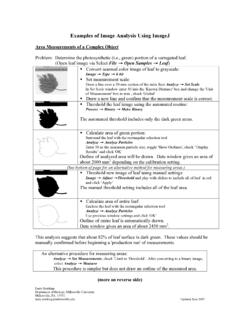
imagej.nih.govTwenty five embryos are counted, numbered and outlined. The data window lists the area (in um2) for each embryo. These data could be copied to a spreadsheet. Threshold: 0-0 Count: 25 Total Area: 3177.6 µm^2 Average Size: 127.1 µm^2 Area Fraction: 3.72% A summary of the particle count is also shown in another data window.

ImageJ Batch Processing
imagej.nih.govMACRO Uses the ImageJ macro language. This language is used by the ImageJ macro tools. This is the correct option for automatically generating script commands to use in the BATCH COMMAND plugin JAVASCRIPT Uses the JavaScript programming language. PLUGIN Uses the Java programming language. This can be used to generate a Java plugin to be ...

How to Use the ND2 Reader Image J Plugin
imagej.nih.govImageJ ND2 Reader Plugin November 2007 Page 2 5. Run through the rest of the installation of the plug-in, this should install within 1 minute. 6. Open up the ImageJ Application by double clicking on this icon: 7. The plug in to open the ND2 files will be available from the Plugins Menu and is named “ND to Image6D.” 8.
Related documents

start here - Logo of the BBC
downloads.bbc.co.ukbasics like using a mouse and a keyboard, through to searching the internet and sending emails. To help you practise these new skills, a number of the topics include links to interactive activities on the BBC WebWise website. As your confidence grows, you will be able to download more topics from the First Click website to include in your guide.
Basic Keyboarding - SCPL
www.scpl.orgKeyboard Height: upper arms should not have to extend very far forward to reach the keyboard or the mouse. The forearms should be approximately parallel to the floor when keying. There should be no more than a very slight reach up or down. If the keyboard is too …
User Guide: Windows and Mac
downloads.steelseriescdn.comSteelSeries Engine 3: The Basics Background Processes v. Interface SteelSeries Engine has a process that runs in the background on your machine, which is required to run many of the features in SteelSeries Engine 3. Automatic deployment of your custom device configurations and executing macros in game are examples of features that

Computer Basics Worksheet
mrluplow.weebly.comComputer Basics Worksheet Directions: Complete this worksheet by filling in the blanks or as directed by your instructor. To learn about each section click on the section headings then answer the section questions. Pay close attention to the directions for each section. When finished study the answers CAREFULLY.

WORD BASICS: MICROSOFT OFFICE 2010
ils.unc.eduWORD BASICS: MICROSOFT OFFICE 2010 GETTING STARTED PAGE 02 Prerequisites What You Will Learn USING MICROSOFT WORD PAGE 03 Microsoft Word Components The Keyboard SIMPLE TASKS IN MICROSOFT WORD PAGE 08 Typing Text Deleting Text Undoing and Redoing Formatting Text Spelling and Grammar Check

Basics of Computer
www.nios.ac.inBasics of Computer :: 1 Basics of Computer 1.1 INTRODUCTION In this lesson we present an overview of the basic design of a ... A keyboard (as shown in figure 1.3) is the most common input device . Several kinds of keyboards are available, but they resemble each other with

Computer Basics - University Of Cincinnati
www.uc.edu8 Computer Basics 2002 CustomGuide, Inc. How to Use the Lessons Every topic is presented on two facing pages, so that you can concentrate on the lesson without having to …

Microsoft Excel 2007 Basics For Windows
ist.mit.eduMicrosoft Excel 2007 Basics for Windows . Opening an existing workbook . 1) Click the Open tool on the Quick Access toolbar. The Open dialog box appears. 2) In the “Open” dialog box, you can navigate through the drop-down list in the Look in section, or …

Basics of Python Programming
python.mykvs.inPython basics Python 3.0 was released in 2008. Although this version is supposed to be backward incompatibles, later on many of its important features have been back ported to be compatible with version 2.7 Python Character Set A set of valid characters recognized by python. Python uses the traditional ASCII character set.

Keyboard Basics - Smooth Chords
smoothchords.comkeyboard, you will fly across the keys. It is still up to you which one you get as it needs to be something you will feel comfortable practicing on. Some keyboards are weighted as well. Keyboards can be 88 keys, 76, or 61. This is something you can decide on based on your needs and space available for the instrument.