
Inspiron 16 7610
Move your finger on the touchpad to move the mouse pointer. Tap to left-click and two fingers tap to right-click. 2. Left-click area. Press to left-click. 3. Right-click area. Press to right-click. 4. Power button with optional fingerprint reader. Press to turn on the computer if it is turned off, in sleep state, or in hibernate state.
Download Inspiron 16 7610

Information
Domain:
Source:
Link to this page:
Documents from same domain

Dell Optimizer Version 2.0 User's Guide
dl.dell.comOct 10, 2020 · Dell Optimizer is a software application that intelligently optimizes the performance of your system by using artificial intelligence and machine learning. Dell Optimizer dynamically configures your system settings to optimize the performance of your applications.

Dell Docking Station WD19DCS Dual Cable User Guide
dl.dell.comStation WD19DCS to supported Dell systems, the dock button works like your system's power button and you can use it to power on/sleep/force shutdown the system. NOTE: The dock button is not functional when connected to unsupported Dell systems or non-Dell systems. 4. 8 Identifying Parts and Features

Inspiron 15-3505 Laptop Users Guide - Dell
dl.dell.comViews of Inspiron 3505. Right. 1. SD-card slot. Reads from and writes to the SD card. The computer supports the following card types: Secure Digital (SD)

Inspiron 15 7000 Gaming Setup and Specifications
dl.dell.comInspiron 15 7000 Gaming Setup and Specifications Computer Model: Inspiron 15-7567 Regulatory Model: P65F Regulatory Type: P65F001

XPS 13 9310 Re-imaging guide for Windows - Dell
dl.dell.comExpanded compatibility Fixed device issues Support for new features However, if your computer is operating normally and there are no driver issues or updates being prompted by Windows, driver updates may be unnecessary. Updating drivers unnecessarily may create new problems.

XPS 15 9510 Re-imaging guide for Windows - Dell
dl.dell.comExpanded compatibility Fixed device issues Support for new features However, if your computer is operating normally and there are no driver issues or updates being prompted by Windows, driver updates may be unnecessary. Updating drivers unnecessarily may create new problems.

Dell Wyse USB Imaging Tool
dl.dell.comsupport for Windows 10 Enterprise LTSC 2019 (64-bit) on Wyse 5070 Thin Client, Wyse 5470 Thin Client and Wyse 5470 All-in-One Thin Client. Key features USB Imaging Tool has the following key features: Provision to push an Image from a network.

Precision 3560 Setup and Specifications
dl.dell.comS4 (Hibernate) - The computer consumes the least power compared to all other sleep states. The computer is almost at an OFF state, expect for a trickle power. The context data is written to hard drive. S5 (OFF) - The computer is in a shutdown state. 10 Views of Precision 3560

Dell Precision 5560
dl.dell.comConnect the 8K display directly to a Thunderbolt port on your computer. Power on the display and than turn off the power on the display. Daisy chain two 4K monitor via WD19TB series cannot reach 4K resolution. Question. When two 4K display is connected by Daisy chain via WD19TB series docking station, it cannot reach resolution upto 4K *2 @60 ...

Dell EMC OpenManage Enterprise Release Notes
dl.dell.comOct 01, 2021 · Enterprise's system management and monitoring is best suited for enterprise LANs and is not recommended for usage over WANs. For information about supported browsers, see the OpenManage Enterprise Support Matrix available on the support site. With OpenManage Enterprise, a web-based one‑to‑many systems management application, users can:
Related documents

User Guide - h10032.www1.hp.com
h10032.www1.hp.com2 Using the on-screen keyboard 1. To open the on-screen keyboard, touch the text field at the top of the screen. Type one or more keywords, and then tap the magnifying glass icon . 2. To use voice search, touch the microphone icon at the top of the screen, and then speak one or more keywords. NOTE: The appearance of the keyboard may vary.

Dell Docking Station WD15 User Guide
downloads.dell.comConnecting the computer to the docking station allows you to access all peripherals (mouse, keyboard, stereo speakers, external hard drive, and large-screen displays) without having to plug each one into the computer. CAUTION: Update your computer’s BIOS and the Dell Docking Station WD15 drivers to the latest versions available at
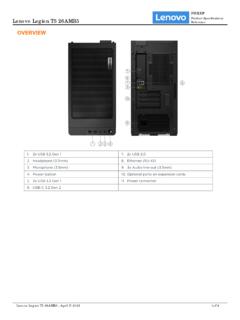
OVERVIEW - Lenovo
psref.lenovo.comKeyboard • Lenovo Calliope Keyboard (USB connector), black • No keyboard Mouse • Lenovo Calliope Mouse (USB connector), black • No mouse Mechanical Form Factor Tower (26L) Dimensions (WxDxH) Models Dimensions All models 205 x 396 x 411 mm (8.1 x 15.6 x 16.2 inches) Weight Models Weight All models 14 kg (30.86 lbs) Case Color Raven black ...

Logitech Unifying wireless technology: Q&A for the IT ...
www.logitech.commouse or keyboard communicates only with the receiver to which it is paired. In addition, Advanced 2.4 GHz helps guard against interference with other devices. Can I transfer receivers and their paired devices to another PC? Yes. Since the devices are paired to the receivers and not the notebook, just plug the receiver into the

PowerPoint 2010 - Tutorialspoint
www.tutorialspoint.comPowerPoint 2010 5 File Tab This tab opens the Backstage view which basically allows you to manage the file and settings in PowerPoint. You can save presentations, open existing ones and create new presentations based on blank or predefined templates.

Essential Access - University of York
www.york.ac.ukDelete a field: select the field and press Delete (keyboard) Move a field: select the field and drag it to a new location on the grid Selecting fields Deleting and moving fields both require the field on the grid to be selected. To do this: 1 Position the mouse pointer at the top of the grid (it changes to a black arrow) 2 Click to select the ...