
Installation and User Guide
Programming timeout after five seconds. Attempt programming procedure again. Unsuccessful programming. Keypad flashes red 15 times with 15 beeps* Three incorrect codes entered within one minute. Re-enter code after 60 second keypad lockout. Keypad flashes red with fast beeping sound for three to four seconds. Low battery. Replace batteries.
Download Installation and User Guide

Information
Domain:
Source:
Link to this page:
Documents from same domain

Programming and Troubleshooting Guide 1 Mastercode 2
kwiksetprodstorage.blob.core.windows.netTroubleshooting: Touchscreen Screen activation To activate the screen, use one of the three options below: 1. Touch screen with palm or back of hand until digits illuminate. 2. Touch lower left area of screen (where Checkmark is located) until digits illuminate. 3. Touch screen with three or more fingers until digits illuminate. One-second pause
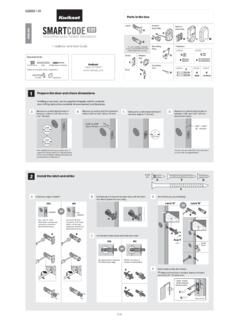
Interior A Assembly ENGLISH F W B Installation and User Guide
kwiksetprodstorage.blob.core.windows.netCAUTION: Prevent unauthorized entry. Since anyone with access to the back panel can change the user codes, you must restrict access to the back panel and routinely check the user codes to ensure they have not been altered without your knowledge. The use of a mastercode can help protect your system’s settings.
Troubleshooting Guide 1 Door Preparation 2
kwiksetprodstorage.blob.core.windows.netHanding, or latch calibration, is the way that the smart lock learns the orientation of your door (left- or right-handed). A1: The first time the battery is inserted, the lock will perform automatic calibration, or “handing.” You will know the handing is taking place when the latch bolt retracts and extends on its own.

Programming and Troubleshooting Guide 1 Mastercode 2
kwiksetprodstorage.blob.core.windows.net1. Keep door open. Press and HOLD the Program button until the keypad flashes green (about 5 seconds). 2. Enter new Mastercode. 3. Press Lock button once. 4. Re-enter Mastercode. 5. Press Lock button once. If programming is successful, the keypad will flash green once with one beep. If programming is unsuccessful, the keypad will flash red ...

Rev 03 Parts List - .NET Framework
kwiksetprodstorage.blob.core.windows.net4 Install exterior assembly A Route the cable below the latch. Insert the torque blade through the horizontal slot in the latch. D G Secure the mounting plate with the supplied screws. IMPORTANT: Hold the exterior assembly on the outside firmly (or have a second

264 Contemporary ENGLISH Electronic Deadbolt
kwiksetprodstorage.blob.core.windows.netIMPORTANT: Make sure the latch bolt is fully retracted (in the unlocked position). A2 Optional: Remove square corner face and replace with round corner face (if needed). Ensure A2 snaps into place. A2 A Install latch in door with supplied screws. 1 / 4 ENGLISH 66882 Rev 02 Installation and User Guide Kwikset Technical Support 1-800-327-5625 www ...

A B C - .NET Framework
kwiksetprodstorage.blob.core.windows.netwant to operate the lock. For new purchases, the current key is the one that was supplied in the box with the purchased lockset. The new key must be the same key type (KW1) as the current key. Consult your local hardware store for more information. Before performing this procedure, make sure the lock is installed on the door. Re-key the lock while
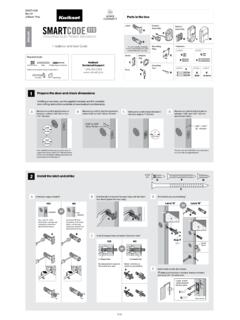
Interior A Assembly F ENGLISH W K L M B Installation and ...
kwiksetprodstorage.blob.core.windows.netand Troubleshooting Guide on the SmartCode 910 page at www.kwikset.com. 2x One green flash with one beep* Three red flashes with three beeps* Two beeps* or or Programming time out. Make sure not to pause for more than 5 seconds during programming. Tip: You can press the Lock button before entering your user code to light up the keypad at night.
Related documents

Programming and Troubleshooting Guide Mastercode 2 ...
www.weiserlock.comProgramming timeout: If no button is pressed for fi ve seconds, the system will time out (indicated by three beeps and a red fl ashing keypad), and you will need to restart the procedure. 1. Keep door open. Press and HOLD the Program button until the keypad fl ashes green (about 5 seconds). 2. Enter new Mastercode. 3. Press Lock button once. 4.
PROGRAMMING GUIDE - DMP
buy.dmp.comInstallation Guide (LT-0980). PROGRAMMING OPTIONS System programming can be done from a hardwired or wireless keypad, the Tech APP, or Dealer Admin (dealer.securecomwireless.com). This guide will focus primarily on programming from a hardwired or wireless keypad. ACCESSING THE USER MENU

Installation & Programming Guide - Emtek
emtek.comInstallation & Programming Guide EMTouch™ & EMTouch™ Classic Style ... Keypad Operation - Beeper & LED Indicators Place Sticker Here. ASSA ABLOY is the global leader in door opening solutions, dedicated to satisfying end …

Rev 03 Parts List
images.thdstatic.comKeypad flashes red 3 times with 3 beeps. Door jammed while attempting to lock. Manually re-lock door. If needed, reposition strike. Door handing code has not been entered. Enter door handing code. No User Code programmed, or User Codes are disabled. Program at least one User Code, or re-enable User Codes. Unsuccessful programming. Attempt ...
25 Code GTO Digital Keypad - Mighty Mule Keypad
www.mightymule.comWireless Installation of the Keypad NOTE: For wireless applications, the distance from the keypad to the opener’s receiver should not exceed 50 ft. Always test the keypad range before permanently mounting it. Step 1: Mount the keypad cover using the screws provided. Step 2: Slide the keypad into the cover and secure with the small screws ...

IEI 212e Standalone Keypad Installation/ Programming …
www.nortekcontrol.comIEI 212e Standalone TM Keypad Installation/ Programming Manual Contents Section 1: Features and Product Description 1.1 Features 1.2 Product Description Section 2: Specifications Section 3: Mounting Section 4: Wiring 4.1 Wire Harness Configuration 4.2 Wiring the 212e Keypad to a Maglock (Fail-Safe) 4.3 Wiring the 212e Keypad to an Electric Strike (Fail …

IEI 232e Standalone Keypad Installation/ Programming …
www.nortekcontrol.comKeypad Installation/ Programming Manual Contents Section 1: Features and Product Description 1.1 Features 1.2 Product Description Section 2: U.L. Requirements Section 3: Specifications Section 4: Mounting Section 5: Wiring 5.1 Wire Harness Configuration 5.2 Wiring the 232e Keypad to a Maglock (Fail-Safe) 5.3 Wiring the 232e Keypad to an ...

Programming and Installation Manual Wireless Alarm System
www.pyronix.comThe keypad will revert to normal display approximately 10 seconds after the key is released. 3.4 Keypads / Readers 3.4.1 The Enforcer Keypad and additional keypads (EUR-068) 3 additional wired keypads may also be connected to the Enforcer 32-WE. Refer to page: 39 for installation details. KEY FUNCTIONS: a = Exit manager menu / Selects Area A.