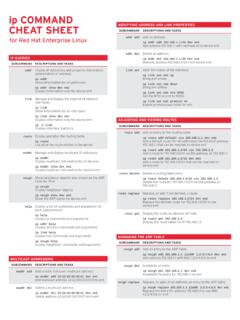
ip COMMAND - Red Hat Customer Portal
addr add Add an address ip addr add 192.168.1.1/24 dev em1 Add address 192.168.1.1 with netmask 24 to device em1 addr del Delete an address ip addr del 192.168.1.1/24 dev em1 Remove address 192.168.1.1/24 from device em1 link set Alter the status of the interface ip link set em1 up Bring em1 online
Download ip COMMAND - Red Hat Customer Portal

Information
Domain:
Source:
Link to this page:
Documents from same domain

Graphical user management Common …
access.redhat.comRED HAT ENTERPRISE LINUX 5, 6, AND 7 Common administrative commands

Guide Cloud Image Certification Policy - Red Hat
access.redhat.comThe cloud certification test suite (redhat-certification-cloud) includes three tests (supportable, configuration, security), each with a series of subtests and checks, which are explained below. For
Understanding Linux Process States - Red Hat
access.redhat.comUnderstanding Linux Process States | Yogesh Babar 3. Running State The most precious resource in the system is the CPU. The process that is executing and using the CPU at a particular moment is called a running process. You can run the ps and top commands to see the state of

Red Hat Enterprise Linux 4 System Administration …
access.redhat.comRed Hat Enterprise Linux 4 System Administration Guide For Red Hat Enterprise Linux 4 Edition 2 Red Hat Inc.

SystemTap Beginners Guide - Red Hat
access.redhat.comRed Hat Enterprise Linux 5 SystemTap Beginners Guide Introduction to SystemTap (for Red Hat Enterprise Linux 5.3 and later) Edition 1.0 Don Domingo

Red Hat Enterprise Linux 7
access.redhat.comFocused on Red Hat Enterprise Linux but detailing concepts and techniques valid for all Linux systems, this guide details the planning and the tools involved in creating a secured computing environment for the data center, workplace, and home.

Integrating Red Hat Enterprise Linux 6 with Active Directory
access.redhat.comdeploying and integrating Red Hat Enterprise Linux 6 into Windows Active Directory domains. Basic concepts are introduced, deployment and integration tasks outlined, best practices and ... Active Directory Domain Services is a suite of directory services developed by Microsoft.
Red Hat OpenStack Platform 10 Dell EMC PS Series Back End ...
access.redhat.comA Guide to Using Dell EMC PS Series Storage in a Red Hat OpenStack Platform Overcloud OpenStack Team ... 2 PR CE SC P O 3 DE N ASI G B CKEN 4 DE LOYTH C NFI U D AC D ... Red Hat OpenStack Platform 10 Dell EMC PS Series Back End Guide 4.
Red Hat Enterprise Linux Network Performance Tuning Guide
access.redhat.comInterrupts and Interrupt Handlers Interrupts from the hardware are known as “top-half” interrupts. When a NIC receives incoming data, it copies the data into kernel buffers using DMA. The NIC notifies the kernel of this data by Red Hat Enterprise Linux Network Performance Tuning Guide | Bainbridge, Maxwell 1
Red Hat Enterprise Linux 7 System Administrator’s Guide
access.redhat.com3.1.4. Changing the Time Zone 3.1.5. Synchronizing the System Clock with a Remote Server 3.2. USING THE DATE COMMAND 3.2.1. Displaying the Current Date and Time 3.2.2. Changing the Current Time 3.2.3. Changing the Current Date 3.3. USING THE HWCLOCK COMMAND 3.3.1. Displaying the Current Date and Time 3.3.2. Setting the Date and Time 3.3.3.
Related documents

Binary and IP Address Basics of Subnetting
d12vzecr6ihe4p.cloudfront.netIP Address Construct and Representation . An IP address is a thirty-two-bit binary number. The thirty two bits are separated into four groups of eight bits called octets. However, an IP address is represented as a dotted decimal number (for example: 205.57.32.9). Since an IP address is a binary number represented in dotted decimal format, an ...

RSLOGIX 5000 ERROR CODES WHEN USING ETHERNET IP …
library.e.abb.comReason: The PLC can’t locate the Drive at the given IP Address. Things to check: Check Protocol/Profile 51.02 should be programmed to EtherNet/IP protocol. Check to make sure DHCP is disabled if a Static IP Address is being programmed in the drive. Check the programming of the IP address of the Drive and Subnet. Check the

The Abstraction: Address Spaces
pages.cs.wisc.edu2 THE ABSTRACTION: ADDRESS SPACES max 64KB 0KB Current Program (code, data, etc.) Operating System (code, data, etc.) Figure 13.1: Operating Systems: The Early Days tive) program-debug cycles. The notion of interactivity became impor- tant, as many users might be concurrently using a machine, each waiting

IP Address and Subnetting Guide - Allied Telesis
www.alliedtelesis.comNETWORK ADDRESS RANGES BY CLASS IP network addresses are issued as follows: CLASSR ANGE DEFAULT MASK Class A 1-127 255.0.0.0 Class B 128-191 255.255.0.0 Class C 192-223 255.255.255.0 MAXIMUM NUMBER OF HOSTS BY CLASS The maximum number of hosts is achieved by using the default subnet mask for each class (i.e. by having only one …

How to assign an IP address and access your device - User ...
www.axis.comHow to assign an IP address and access your device - User Manual Author: AXIS Communications AB Created Date: 5/28/2020 10:42:23 AM ...
Configuring DHCP Server - Cisco
www.cisco.com5. dns-server address Specify the IP address of a DNS server that is available to a DHCP client. 6. default-router address Specify the IP address of the default router for a DHCP client. 7. exit Return to privileged EXEC mode. 8. service dhcp interface-type number Enable DHCP server on …

IP Networking Basics - Cisco
www.cisco.comIP 101 The lowest calculated address in eac h range (0 in the traditional C range) is not shown, cannot be used, and is skipped in the chart. The high est address in each range (255 in th e traditional C range) is also not shown, and is the broadcast address for the subnet.
Transform Source IP-address-based Application Access
www.zscaler.comIP address controls rely on whitelisting and blacklisting. To allow access, an application or service com-pares source IP address number of the inquiring device to approved list of numbers (e.g., within an au-thorized security zone), also known as a “whitelist,” and based on the result of the comparison, allows,