
Lab 2.5.1: Basic Switch Configuration
You can use any current switch in your lab as long as it has the required interfaces shown in the topology. The output shown in this lab is from a 2960 switch. If …
Download Lab 2.5.1: Basic Switch Configuration

Information
Domain:
Source:
Link to this page:
Documents from same domain
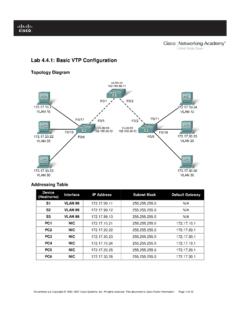
Lab 4.4.1: Basic VTP Configuration - Arvutiteaduse instituut
courses.cs.ut.eeSet the VTP domain name to Lab4 and the VTP password to cisco on all three switches . Configure S1 in server mode, S2 in client mode, and S3 in transparent mode.

Packet Tracer Configuring VPNs (Optional) - ut
courses.cs.ut.eePacket Tracer – Configuring VPNs (Optional) © 2013 Cisco and/or its affiliates. All rights reserved. This document is Cisco Public. Page 2 of 6 ISAKMP Phase 1 ...

Lab: Basic OSPF Configuration Lab
courses.cs.ut.eeThe OSPF router ID is used to uniquely identify the router in the OSPF routing domain. A router ID is an IP address. Cisco routers derive the Router ID in one of three ways and with the following precedence: 1. IP address configured with the OSPF router-id command. 2. Highest IP address of any of the router’s loopback addresses. 3.

Rui Jiang Xuegong Zhang Michael Q. Zhang Editors Basics of ...
courses.cs.ut.eeinclude useful introductions to concepts such as gene or Bayesian methods. This is a valuable aspect of the volume allowing a student various angles of approach to a new topic. Chapter 1, “Basics for Bioinformatics,” defines bioinformatics as “the storage, manipulation and interpretation of biological data especially data of nucleic acids

Lab: Basic Router Configuration
courses.cs.ut.eeR1(config-if)#interface serial 0/0/0 R1(config-if)#ip address 192.168.2.1 255.255.255.0 R1(config-if)#clock rate 64000 R1(config-if)#no shutdown R1(config-if)# Note: The interface will be activated until the serial interface on R2 is configured and activated Step 12: Return to privileged EXEC mode. Use the end command to return to privileged ...

Lab 3.5.1: Basic VLAN Configuration - ut
courses.cs.ut.eeIf necessary, refer to Lab 2.5.1, Appendix 1, for the procedure to clear switch configurations. It is a good practice to disable any unused ports on the switches by putting them in …

Lab 5.5.1: Basic Spanning Tree Protocol - ut
courses.cs.ut.eeCCNA Exploration LAN Switching and Wireless: STP Lab 5.5.1: Basic Spanning Tree Protocol ... • Configure a password of cisco for console connections. • Configure a password of cisco for vty connections. (Output for S1 shown) Switch> enable Switch# configure terminal
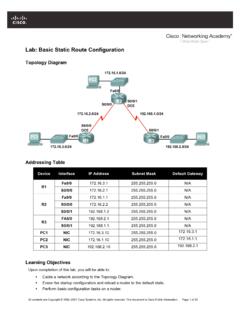
Lab: Basic Static Route Configuration
courses.cs.ut.eeIf you can answer yes to all the proceeding questions, the interface should come up. CCNA Exploration Routing Protocols and Concepts: Static Routing Lab …
Related documents
Cisco CCNA notes -- Tech Note
www.kccommunications.comCisco CCNA Check List - Training Notes KCC CCNA FastTrack – April 2014 These notes cover the current 200-120 examination as the ‘single exam option for CCNA and the two stage examination track consisting of a basic ‘ICND-1’ examination (100-101) for CCENT certification and ‘ICND-2’ examination (200-101) to complete the CCNA ...
CCNA 200-301: Official Cert Guide - cdn.ttgtmedia.com
cdn.ttgtmedia.comperformed on the CCNA 200-301 Network Simulator Lite, Volume 2 software included for free on the companion website that accompanies this book. This software, which simulates the experience of working on actual Cisco routers and switches, contains the following 13 free lab exercises, covering ACL topics in Part I: 1. ACL I 2. ACL II 3. ACL III 4 ...

COMPLETE LAB MANUAL FOR CCNP
it2.fiu.eduLab Objective: Task 1 Configure EIGRP on 2 routers in AS 100. Disable Auto-summary. R1 Router eigrp 100 Network 1.0.0.0 Network 10.0.0.0 No auto-summary R2 Router eigrp 100 Network 1.0.0.0 Network 20.0.0.0 No auto-summary Verification : Lab 1 – Basic EIGRP Configuration R1 R2 E 0 S 0/2/0 S 0 E 0

CCNA Certification Guide - mkto.cisco.com
mkto.cisco.comCCNA Certification Guide CCNA Overview If you’re looking to embark on a rewarding and lucrative information technology (IT) career, obtaining your Cisco Certified Networking Associate (CCNA) certification is a great place to start. Earning your CCNA gives you a solid foundation for any field/role/specialty you want to pursue in IT.
CCNA Routing and Switching - pearsoncmg.com
ptgmedia.pearsoncmg.comCCNA Routing and Switching Practice and Study Guide: Exercises, Activities, and Scenarios to Prepare for the ICND2 (200-101) Certification Exam Allan Johnson Cisco Press 800 East 96th Street Indianapolis, Indiana 46240 USA. ii CCNA Routing and …
Chapter 9 Lab A: Configuring ASA Basic Settings and ...
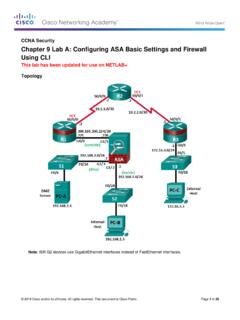
www.ccri.eduThe ASA used with this lab is a Cisco model 5506 with an 8-port integrated router, running OS version 9.8(1), Adaptive Security Device Manager (ASDM) version 7.8(1), and comes with a Base license. CCNA Security Chapter 9 Lab

Cisco CCNA Lab Guide - vmgu.ru
www.vmgu.ruThe lab exercises here can be used on their own or as a complement to my Cisco CCNA 200-125 Complete course. It has the highest review ratings of any CCNA course online and includes over 30 hours of video tutorials, flashcards and hands-on lab exercises. You can