Logitech ConferenceCam CC3000E Camera
6 Camera Presets: GROUP has 5 camera presets (1 through 3 are on both the remote and the speakerphone and 4 & 5 are on the remote) that allow you to position the camera at a preset location with a push of a button To set the camera preset, move the camera to the desired location and then press and hold the Camera Preset button until
Download Logitech ConferenceCam CC3000E Camera

Information
Domain:
Source:
Link to this page:
Documents from same domain

Activities Want to know more? - Logitech
www.logitech.comLogitech Gaming Software - Help Center file:///E|/Help/en_US/front_page.htm[4/28/2014 8:07:32 PM] Activities... Want to know more? Create a new profile Getting started

On - logitech.com
www.logitech.com1 2 Logitech® Wireless Mouse M217 Setup Guide Guide d’installation English Mac® OS X Users: When plugging in the Unifying receiver, the Keyboard Assistant

圧倒される 超・高解像度 - logitech.com
www.logitech.comLogicool BRIO Ultra HD 4K画像センサー 4K(Ultra HD)@ 30 fps、1080p(フルHD)@ 30/ 60 fps および 720p(HD)@ 30/60/90 fpsを含めた複 数の解像度をサポートし、お使いのアプリケーションや

SMALL GROUPS. BIG POTENTIAL. - Logitech
www.logitech.comSmall group video conferencing deserves more than huddling around PC webcams or begging for time on overbooked conference room systems. The ConferenceCam BCC950

Logicool ゲーム ソフトウェア - logitech.com
www.logitech.com快適な作業および安全性 file:///E¦/Help/ja_JP/comfort_and_safety.htm[4/26/2014 9:19:02 PM] 快適な作業および安全性 ここでは快適な作業 ...

Logitech® USB Headset H390
www.logitech.comEnglish Know your product 1. USB Headset H390 2. Microphone boom 3. Microphone 4. Volume controls (+/–) 5. Mute button 6. Mute light 7. USB connector

SUPER-WIDE FIELD OF VIEW FOR SMALL SPACES.
www.logitech.comMeetUp’s integrated audio is optimized for huddle room acoustics and delivers an exceptional sound experience. Three horizontally-aimed beamforming mics and

Introducing the Logitech MeetUp
www.logitech.com3 TalkingPointz July 21, 2017 What’s a MeetUp? Logitech currently offers three small room conferencing products in its ConferenceCam lineup .

Setup Guide Guide d’installation Logitech® HD …
www.logitech.com4 English English 5 Getting started with Logitech® HD Pro Webcam C920 Thank you for buying your c920! Use this guide to set up and begin using your Logitech webcam.

Logitech Addresses and Phone Numbers
www.logitech.comLogitech ® G 27 Racing Wheel © 2013 Logitech. All rights reserved. Logitech, the Logitech logo, and other Logitech marks are owned by Logitech …
Related documents
WWC Camera App CamHi User manual
camera.wyslink.comby push Reset hard ware button if the camera provide it. Reset camera to factory : Setting -> System Setting -> Reset Camera. By this procedure, the camera hotspot function will work, so you can use smart phone to connect it. Please refer to 3.2 Camera by camera Wi-Fi hot spot access point function.

Full HD SQ11 Sports Mini DV Camera
www.cyanscorpion.comPush again the on/off button and the recording stops. The state of the Led returns to blue. - To power off the camera, push the on/off button for about 6 seconds and the camera will turn off. - Change to by using the ‘Mode ’ button. Push one time the ‘Mode ’ button, the Led is turning from blue to blue/red.
Speed Dome Camera Installation Guide
www.surveillance-download.comThis camera could be used as an IP camera, a TVI camera and an AHD camera. Before connecting this camera to any recorder, you may need to manually set the camera mode, ID & baudrate for the camera to work properly. Plase check the description below for details. NOTE: The on / off of the DIP switch is shown as white. WHERE TO SET
Instruction Manual - B&H Photo
www.bhphotovideo.com1. Push the camera into the slot on the battery cover (Figure 1). 2. Open the battery cover with camera attached (Figure 2). 3. Secure the camera tightly with the provided screws (Figure 3). 4. Close the battery cover with camera, then insert the 3-pin plug to the slot on the side (Figure 4) Signal function: When the signal is weak, pull the ...

KODAK PRINTOMATIC
www.kodak.comremoved from the camera, or charged outside the camera. There is a danger of explosion if battery is incorrectly replaced, and should be replaced only with the same or equivalent type. Please contact our support team for service. – When the battery power dips below 10%, the battery LED indicator will glow red and the camera will not print.
SEE BETTER. MEET BETTER. - Logitech
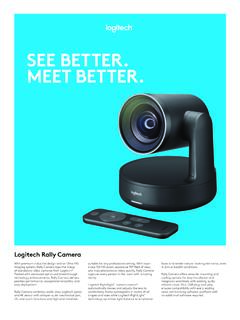
www.logitech.comOperate Rally Camera from anywhere in the room, no need to point the remote directly at the camera. 3 camera presets De!ne up to three preset locations ¨ (presets 1, 2, and Home) for the camera view and return to any of them with the push of a button on the remote control. Top-of-the-line stand alone PTZ video camera
Backup of Backup of M1球机说明书-V2.3
www.njwss.comMotion Detection and Push Alert Message 1. If you want the camera also detects a sound, please turn on “Audible alarm”. 2. If you only want the camera detect motion at night or any special time, you can go to “Advanced Setting” to set up the time range.