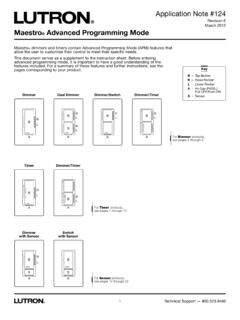
Maestro Advanced Programming Mode
There is a step-by-step example on page 6. Entering Main Menu Mode (refer to picture on page 1) 1. Pull the air gap (FASS TM) into the “Off” position. 2. Press and hold the tap button of the product you are programming. 3. Push the air gap to the “On” position while continuing to hold the tap button for approximately 5 seconds.
Download Maestro Advanced Programming Mode

Information
Domain:
Source:
Link to this page:
Documents from same domain
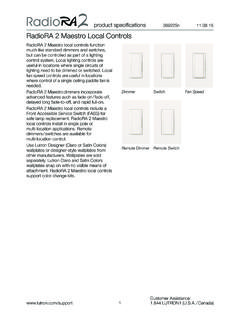
RadioRA 2 Maestro Local Controls SPEC (369225)
www.lutron.comproduct specifications 369225m 12.01.17 RadioRA 2 Maestro Local Controls 3 Customer Assistance: www.lutron.com/support 1.844.LUTRON1 (U.S.A. / …

Switching Power Module SPEC (369357) - Lutron …
www.lutron.com369357g 1 09.14.17 g ® SPECIFICATIN SUMITTAL Page Lutron Switching Power Module Description •ovides capability for a zone on a GRAFIK Pr Eye control unit (or other product) to switch a fully loaded circuit of lighting.

Lutron® and Apple® HomeKit™ certified FAQ
www.lutron.com2. Name your home (ex. Jones Residence) 3. Enter the HomeKit Accessory Setup Code found on the bottom of your Lutron Smart Bridge or
Using DALI in HWQS - Lutron Electronics
www.lutron.comUsing DALI Ballasts in HWQS – Rev A Page 2 Overview Lighting fixtures that utilize DALI digitally addressable dimming ballasts can be controlled in a

lighting control solutions switching systems
www.lutron.comLutron switching systems — designed and manufactured to provide exceptional value Ease of use Lutron switching panels are easy to program and

CL Dimmers for Dimmable CFL & LED Bulbs
www.lutron.comOffers more reliable dimming performance over incandescent dimmers when dimming CFLs and LEDs C•L Dimmers for Dimmable CFL & LED Bulbs Save up to $50 per year

Hi-lume 1% 2-Wire LED Driver Forward-Phase …
www.lutron.com®SPECIFICA AL a Job Name: Job Number: Model Numbers: LED Dimming Driver Hi-lume 1% 2-Wire LTE (K-, KL- Case) Architectural Dimming 3691081a 3 01.04.18
Lutron Electronics Co., Inc. Trademark Style Guide
www.lutron.comThe Lutron Trademark style guide is a tool used to ensure that Lutron’s trademarks are being properly represented with regard to Lutron …
Technical white paper May 2014 - Lutron Electronics
www.lutron.com3 | Lutron When the unabsorbed blue light mixes with the other colors of light it creates what your eye perceives as “white” light The choice of blue LED and yellow phosphor, and the method of placing
Maestro 0-10 V Dimmer Sensor Spec 369833
www.lutron.comMaestro Maestro 0–10 V Dimmer Sensor Sensor 369833c 3 10.09.17 ® SPECIFICATION SBMITTAL Page ob Name: ob Nmber: odel Nmbers: Load …
Related documents

Dynamic Programming 11 - Massachusetts Institute of …
web.mit.eduexample in some detail. We then give a formal characterization of dynamic programming under certainty, followed by an in-depth example dealing with optimal capacity expansion. Other topics covered in the chapter include the discounting of future returns, the relationship between dynamic-programming problems

PROGRAMMING WORKBOOK
www.engr.psu.eduAn example of this is a round part that has it™s datum lines running through the center. The setup of such a part may need machining to be performed in all four quadrants of a part. This is why you would want to make use of all four quadrants of the X and Y axes on a milling machine. As you gain more experience in machine tool programming and ...
Nonlinear Programming 13 - Massachusetts Institute of ...
web.mit.eduFigure 13.2 illustrates another feature of nonlinear-programming problems. Suppose that we are to minimize f (x) in this example, with 0 ≤x ≤10. The point x =7 is optimal. Note, however, that in the indicated dashed interval, the point x =0 is the best …

A New Era of SSRF - Exploiting URL Parser in Trending ...
www.blackhat.comTrending Programming Languages! Orange Tsai. Taiwan No.1 About Orange Tsai. The most professional red team in Taiwan About Orange Tsai. The largest hacker conference in Taiwan founded by chrO.ot ... Quick Fun Example CR-LF Injection on HTTP protocol Smuggling SMTP protocol over HTTP protocol