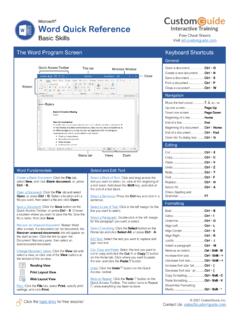
Microsoft Word Quick Reference - CustomGuide
Microsoft® Word Quick Reference Basic Skills The Word Program Screen Word Fundamentals Create a Blank Document: Click the File tab, select New, and click Blank document; or, press Ctrl + N. Open a Document: Click the File tab and select Open, or press Ctrl + O. Select a location with a file you want, then select a file and click Open.
Download Microsoft Word Quick Reference - CustomGuide

Information
Domain:
Source:
Link to this page:
Documents from same domain

Microsoft PowerPoint 2013 - CustomGuide
www.customguide.comMicrosoft® PowerPoint 2013 Quick Reference Card The PowerPoint 2013 Screen Keyboard Shortcuts The Fundamentals To Create a New Presentation: Click the File tab, click New.

Word 2013 Quick Reference - SharePoint Training
www.customguide.comMicrosoftWord 2013 ® Quick Reference Card The Word 2013 Screen Keyboard Shortcuts General Open a Document Ctrl + O Create New Ctrl + N …

Quick Reference Card Visit: qr.customguide
www.customguide.comMicrosoftWord 2016 ® Quick Reference Card The Word 2016 Screen Keyboard Shortcuts General Open a Document Ctrl + O Create New Ctrl + N …

Windows 10 Quick Reference - CustomGuide
www.customguide.comMicrosoft® Windows 10 Quick Reference Card Start Menu Keyboard shortcuts Basic Commands Start Menu Copy a Folder/File Ctrl + C Cut a Folder/File Ctrl + X

Your Organization’s Name Here - SharePoint Training
www.customguide.com©CustomGuide 2015 3 Table of Contents Table of Contents ..... 3

Project 2013 Quick Reference - CustomGuide
www.customguide.comMicrosoft® Project 2013 Quick Reference Card Project 2013 Screen Common Views To Display a View: Select the View tab and choose from the Task Views available.

Windows 8 Quick Reference - CustomGuide
www.customguide.comicrosof inos uic eference Car For Personal Use Only ustomuide Contact Us at info@customguide.com for organizational use. Free Quick References! Visit: qr.customguide.com The Start Screen

Word 2007 Quick Reference - SharePoint Training
www.customguide.comMicrosoft® Word 2007 Quick Reference Card Word 2007 Screen [Grab your reader’s attention with a great quote from the Shortcuts The Fundamentals Open a Document …

uic eference Car Free Quick References! - …
www.customguide.comicrosof nc uic eference Car For Personal Use Only ustomuide Contact Us at info@customguide.com for organizational use. Free Quick References! Visit: qr.customguide.com The Lync 2013 Window

Excel 2013 Quick Reference - CustomGuide
www.customguide.comMicrosoftExcel 2013 ® Quick Reference Card The Excel 2013 Screen Keyboard Shortcuts Close button General Open a Workbook Ctrl + O Create New Ctrl + N
Related documents

4.1 Introduction to Microsoft Word Lesson Plan
www.tsl.texas.gov• 4.0.1 Introduction to Microsoft Word Student Manual (from Student Folder) • 4.3 Introduction to Microsoft Word Session Survey • 4.4 Introduction to Microsoft Word Certificate if pre-printing certificates Instructor Computer Setup: Ensure that the …
Formatting Page Numbers in Microsoft Word - Virginia Tech
etd.vt.eduFormatting Page Numbers in Microsoft Word 2007, 2010, 2013 Open your MS Word document Remove any previously created section breaks, headers/footers and page numberings Begin by creating the two section breaks you will need: 1. Place the cursor at the beginning of the third page of the front matter 2.
Keyboard shortcuts for Microsoft Word 2016 for Windows
www.ucdc.eduKeyboard shortcuts for Microsoft Word 2016 for Windows This article shows all keyboard shortcuts for Microsoft Word 2016. Notes: • If a shortcut requires two or more keys at the same time, the keys are separated by a plus sign (+). If you have to press one key immediately after another, the keys are separated by a comma (,).

2010 Advanced Word Microsoft Word 2013 Advanced
www.wcupa.eduWord 2013 Advanced 2 ... The Advanced Word course enables proficient users of Microsoft Word to gain a more detailed understanding of Word’s capabilities, and learn how to utilize these tools effectively for the ... Place your cursor at the beginning of the document (if that’s where you want your drop cap to be inserted).

Word 2019 Basic Quick Reference - Microsoft Office Training
www.customguide.comMicrosoft® Word 2019 Basic Quick Reference Guide The Word 2019 Program Screen Word Fundamentals Create a Blank Document: Click the File tab, select New, and click Blank document; or, press Ctrl + N. Open a Document: Click the File tab and select Open, or press Ctrl + O. Select a location with a file you want, then select a file and click Open.
Microsoft Word 2013 Fundamentals Manual
www.technology.pitt.eduMar 19, 2015 · Microsoft Word 2013 is a powerful word processing application. This is a hands-on workshop to help University faculty and staff become more proficient with Microsoft Word in creating and editing documents. Topics coveredinclude : Working with the Ribbon, Accessing available templates, Document formatting, Spell and Grammar

Formatting page numbers in Microsoft Word
www.stu.eduFormatting page numbers in Microsoft Word This tutorial, catered to dissertation students, will demonstrate how to format page numbers in Microsoft Word 2007 or 2010 using Section Breaks. 1. Open the Microsoft Word document. 2. Click the Insert tab: a. Click Page Number. b. Choose the Bottom of Page, Plain Number 2. 3.

Microsoft Word 2019 Fundamentals Workshop
www.technology.pitt.eduNov 01, 2019 · File: Microsoft Word 2019 Fundamentals Page 3 of 37 11/01/19 I. Launch Word To start Word 2019, click on the Office Start button, and then select Microsoft Word 2019 from the options panel. The Microsoft Word Icon can be pin to the start bar for quick access. II.
Beginning Microsoft Word: Practice 1
schofieldbhs.weebly.comBeginning Microsoft® Word: Practice 4 Objectives: The Learner will be able to: 1. Format text color, bold, and size at least 75% of the time 4. Insert a picture from Clip Art and the Design Gallery Live at least 75% of the time 6. Apply borders and shading to a whole page using the Format Borders and Shading command