
Online Manual - hp.com
5 2 Fan the edges of the paper stack to separate the pages. Then tap the stack on a flat surface to even it. 3 Put the paper in the lower (IN) tray, print side down.
Download Online Manual - hp.com

Information
Domain:
Source:
Link to this page:
Documents from same domain

Tablet PC with a 12.1-inch diagonal display, plus …
www.hp.comPowerful performance when you need it The HP EliteBook 2740p Tablet PC features full-performance, standard voltage Intel® Core™ i51 and i71 …

Maintenance and Service Guide - hp.com
www.hp.comCategory Description Computer models equipped with an AMD processor Computer models equipped with an Intel processor AMD Phenom II P960 1.80-GHz processor (2.0-MB

Our value-priced notebook PC with business rugged ...
www.hp.comSPECIFICATIONS Operating system Preinstalled: Windows 8 645 Windows 8 Pro 645 Ubuntu Linux FreeDOS 2.0 Processor AMD Dual Core E2–3000 APU with Radeon™HD 8280 Graphics (1.65 GHz, 1MB L2 cache, 2 cores)6

The Wireless LAN and HP iPAQ Handheld Devices
www.hp.comVirtual private network A virtual private network (VPN) allows two or more private networks to be connected over a publicly accessed network. In a sense, VPNs are similar to WANs or a securely encrypted tunnel, but the key

HP Velocity Overview
www.hp.comHP Velocity Overview 4 HP Velocity Overview HP Velocity is a Quality of Service (QoS) system that improves overall Quality of Experience (QoE) for real-time network …

wireless USB network adapter - hp.com
www.hp.comwireless USB network adapter 6 features The Wireless USB Network Adapter is compatible with Windows 98, Millenium, 2000, and …

HP StorageWorks Network Attached Storage
www.hp.com3 HP StorageWorks X3000 Network Storage Systems HP StorageWorks X3000 Network Storage Systems boost the value of your array or SAN by adding Windows-powered IP-based gateway services to it.

HP 33s scientific calculator user’s manual
www.hp.comFile name 33s-English-Manual-040130-Publication(Edition 2).doc Page : 388 Printed Date : 2004/1/30 Size : 13.7 x 21.2 cm HP 33s

Backup Software User Manual - hp.com
www.hp.comHP SIMPLESAVE BACKUP SOFTWARE USER MANUAL HOW TO BACK UP YOUR FILES – 4 If you want to make any changes to the file …

Use cases and best practices for HP StorageWorks …
www.hp.comUse cases and best practices for HP StorageWorks P2000 G3 MSA FC/iSCSI Combo Controller Technical white paper Table of contents About this document ..... 2
Related documents

SMART Attribute Details - Kingston Technology
media.kingston.comSMART ttribut 2 SMART Attribute Details Provides a detailed description of SMART Attribute support and how each may be used. Kingston® SF-2000 Based SSD SMART Attribute Menu Details
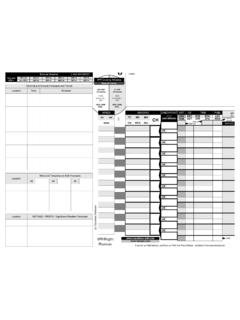
VFR Flight Planner 22B - Dauntless Soft
www.dauntless-soft.comif you like our flight planner, you'll love our FAA Test Prep Software - download it from www.faatest.com VFR Flight Planner notes (c) Dauntless Software

Made in the USA. OPERATIONS MANUAL - DPMS Firearms
www.dpmsinc.comwww.dpmsinc.com made in the usa. p anther lr-308 • 24” sst bull barrel • .308 win p anther lr-300 • 20” sst fluted bull barrel • .300 rem saum p anther lr-308b • 18” bull barrel • .308 win p anther lr-308t • 16” heavy barrel • .308 win 6.8mm ap4 panther carbine • 16” ap4 barrel • 6.8 x 43mm spc p panther .22lr • 16” bull barrel • .22lr rem.

Holey Megaminx Solution - 12 colour - Meffert's
www.mefferts.comHoley Megaminx Solution - 12 colour By Jaap Scherphuis 1. Top layer corners Solve five corners in the top face. You can insert a corner using the move

TDC1000-C2000EVM User s Guide - TI.com
www.ti.comBill of Materials www.ti.com 9 Bill of Materials Table 1. TDC1000-C2000EVM Bill of Materials PACKAGE PART DESIGNATOR QTY. VALUE DESCRIPTION REFERENCE NUMBER EVM 1 TDC1000_C2000EVM …
Flip Chip Ball Grid Array Package Reference Guide (Rev. A)
www.ti.comFlip Chip Ball Grid Array Package Reference Guide Literature Number: SPRU811A May 2005
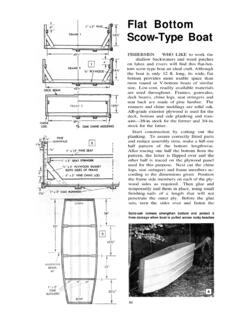
Flat Bottom Scow-Type Boat - Vintage Projects
www.vintageprojects.comFlat Bottom Scow-Type Boat FISHERMEN WHO LIKE to work the shallow backwaters and weed patches on lakes and rivers will find this flat-bot-tom scow-type boat an ideal craft.