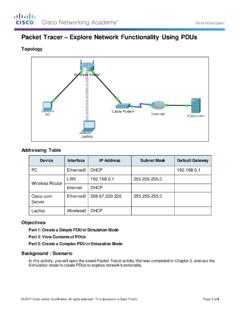
Packet Tracer Explore Network Functionality Using PDUs
Packet Tracer – Explore Network Functionality Using PDUs Topology Addressing Table Device Interface IP Address Subnet Mask Default Gateway PC Ethernet0 DHCP 192.168.0.1 Wireless Router LAN 192.168.0.1 255.255.255.0 Internet DHCP Cisco.com Server Ethernet0 208.67.220.220 255.255.255.0 Laptop Wireless0 DHCP Objectives
Download Packet Tracer Explore Network Functionality Using PDUs

Information
Domain:
Source:
Link to this page:
Documents from same domain

Packet Tracer - Logical and Physical Mode Exploration
contenthub.netacad.comencounter in Cisco Networking Academy courses will use Logical mode. You can switch between these You can switch between these modes at any time to compare the differences by clicking the Logical (Shift+L) and Physical (Shift+P)

Packet Tracer Configure End Devices
contenthub.netacad.comPacket Tracer – Configure End Devices Objectives Configure various end devices in Packet tracer. Background / Scenario In this activity you will construct a simple Packet Tracer network and complete basic configuration of end devices. Step 1: Launch Packet Tracer. a. Launch Packet Tracer on your PC or laptop computer

Packet Tracer Modify Your Thing
contenthub.netacad.comIn the Server-Devices Window click on the Security Camera to expand the device information. Notice the Security Camera is On but not activated. Step 2: Activate the Security Camera. Move the Tablet configuration window out of the way but still visible so that the Packet Tracer workspace is visible.
Introducción a la ciberseguridad Actividades y recursos ...
contenthub.netacad.comCisco y/o sus filiales. Todos los derechos reservados. Información confidencial de CiscoPágina 1 de 5 www.netacad.com Introducción a la ciberseguridad . Actividades y recursos adicionales
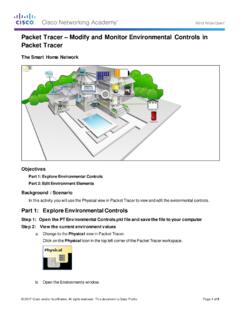
Packet Tracer Modify and Monitor Environmental Controls in ...
contenthub.netacad.comPacket Tracer – Modify and Monitor Environmental Controls in Packet Tracer The Smart Home Network Objectives Part 1: Explore Environmental Controls Part 2: Edit Environment Elements Background / Scenario In this activity you will use the Physical view in Packet Tracer to view and edit the evironmental controls.

Packet Tracer Create a Simple Network Using Packet Tracer
contenthub.netacad.comPart 1: Build a Simple Network in the Logical Topology Workspace Step 1: Launch Packet Tracer. a. Launch Packet Tracer on your PC or laptop computer Double click on the Packet Tracer icon on your desktop or navigate to the directory that contains the Packet Tracer executable file and launch Packet Tracer.

Lab Create a Process Flowchart
contenthub.netacad.comLab – Create a Process Flowchart Objectives Part 1: Recognize Symbols Used in a Flowchart and List Logical Process to Solve a Problem Part 2: Draw the Flowchart to Illustrate the Problem Solving Process Background Flowcharts are diagrams used to represent processes or workflows. Using different shapes, boxes, and

Video Introduction to Packet Tracer
contenthub.netacad.comserver labs, we can see security with AAA, DNS, file servers, secure web browsing, email servers, and even go into IoT registration servers for our IoT devices. For now, we're going to head over to the PC directory, and then the VPN folder. In the VPN folder, there's a VPN Easy file that we can open up.

Lab - Mapping the Internet
contenthub.netacad.comLab - Mapping the Internet © 2018 Cisco and/or its affiliates. All rights reserved. This document is Cisco Public. Page 6 of 12 path, and the return time is measured ...

Packet Tracer Adding IoT Devices to a Smart Home
contenthub.netacad.comof the IoT device window, click the Advanced button. Notice more tabs become visible at the top of the window. Click the I/O Config tab. Change the Network Adapter drop down list to PT-IOT-NM-1W, which is a wireless adapter. f. Configure the Wind Detector for the wireless network.
Related documents

Packet Tracer Create a Simple Network Using Packet Tracer
community.cisco.comPacket Tracer Activity File (.pkt). Part 1: Build a Simple Network in the Logical Topology Workspace Step 1: Launch Packet Tracer. a. Launch Packet Tracer on your PC or laptop computer Double click on the Packet Tracer icon on your desktop or navigate to the directory that contains the Packet Tracer executable file and launch Packet Tracer.
Packet Tracer Create a Simple Network Using Packet Tracer
contenthub.netacad.comPacket Tracer executable file and launch Packet Tracer. Packet Tracer should open with a blank default Logical topology workspace as shown in the figure. Step 2: Build the topology a. Add network devices to the workspace. Using the device selection box, add the network devices to the workspace as shown in the topology diagram.
Packet Analysis Using Wireshark - GitHub Pages
mchow01.github.ioPacket Analysis Using Wireshark Ming Chow (ming@wallofsheep.com) Wall of Sheep and the Packet Hacking Village Twitter: @wallofsheep, @0xmchow. About the Wall of Sheep and the Packet Hacking Village •Our mission: security awareness •How we accomplish our mission: interactive demonstrations,