
RVLock Keypad/Remote Programming and Syncing …
-If remote programming did not work or if you have additional remotes to program, repeat steps 1 and 2. -Holding down the LEARN button for 10 seconds will remove all previously synced remotes from the handles memory. - You can have up to 10 remotes operating the same RVLock handle. Remote FOB’s have the ability to control multiple RVLock handles.
Download RVLock Keypad/Remote Programming and Syncing …

Information
Domain:
Source:
Link to this page:
Documents from same domain
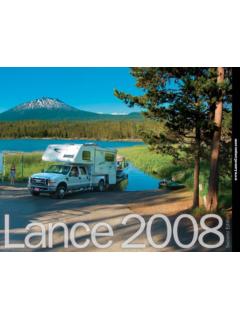
2008-brochure - Lance Camper
www.lancecamper.comLance If you need the extra room for sleeping up to seven, the 11'6" Lance 1131 is a great family camper. With a dry bath, roadside slideout, side entry and rear

2002-brochure - Lance Camper
www.lancecamper.comThe Lance Slideout 811, with its L -shaped dinette, adds an entirely new dimension to this compact model. The unique dinette quickly converts into an extra bed.
Lance Camper | Truck Campers and Travel Trailers
www.lancecamper.comGenerator Ready (exe 810, 910) Generator — Generac 315 LPG (exc. 810, 910) Solar Panel — 50 Watts, 12V Solar Panel Wring Fluorescent Light 30 NIP Serv'icv Cord/Lccking Companment 11th' Convenience Outlets I patio Outlet Pre-Wired for: Roof Air Conditioner, Fantastic Vent/Cooler, Electric Jacks, TV Antenna/Satellite Dish, Steœo and 4 Speake:s
Lance Camper | Truck Campers and Travel Trailers
www.lancecamper.comre-engineered from top to bottom. You'll love the way they look, and perform... better than ever. ... has extensions for added seating and easily converts into a large bed. The table slides to various positions ... Automatic Changeover LPG Regulator _(§tandard 915, 1025) (N/A 815)

2005-brochure - Lance Camper
www.lancecamper.comholding tanks and additional storage. LanceLoclC- our proprietary precision structure and assembly process used in Lance Max models - incorporates a welded aluminum frame and interlocking aluminum assembly extrusions to ensure each unit provides its owners with a camper that's the ultimate in strength and reliability.

Lance Camper Brochure - Truck Campers and Travel Trailers
www.lancecamper.comcompatällty guide Theseareaneralguidelines.to-useyhennatchingalancvcamper-toyour-truckandassumes standard equipment on both the truck and camper. Whether any camper can be used with your truck is dependent on yout truck configuration (2WD vs. 4WD, standard cab vs, extended cab. etc.) and its capacities for carrying and/or towing -

Lance Camper | Truck Campers and Travel Trailers
www.lancecamper.com15" LCD Flat Screen TV and 4 Speakers on Slide (replaces standard TV slideout shel AWFM/CD Player with 4 Speakers Stereo Ready FRESH AND WASTE WATER SYSTEMS Insulated Fresh-Water Tank Lockinywater Tank fill Door Shurflou Water Pump with In-Line Filter 6-Gallon Hot Water Heater 6-Gallon Auto-Relight Hot Water Heater Fully-Automatic Hot Water Heater
Trailer Owners Manual - Lance Camper
www.lancecamper.comLance warrants to the original end user purchaser (“Owner”) of this Trailer (“Trailer”) to be free of defects in materi- als and workmanship and for structural integrity, under normal use, with reasonable care and maintenance, for one

Lance Camper | Truck Campers and Travel Trailers
www.lancecamper.comLPG Gas Detector Carbon Monoxide Detector Smoke Detector Zecess Mounted Fire Extinguisher Cabover Skylight/Escape Hatch Keyed Deadbolt Entry Lock Porch Light/ Assist Handle Locking Wheel Well Access Doors Saf-T-Vue© Rear View Bolt Through Tie Down Brackets Back-Up Lights Safety Glass Windows G.F.I, llOv Receptacles

TABLE OF CONTENTS - Lance Camper
www.lancecamper.comDUAL PROPANE TANKS 56 PROPANE AT LOW TEMPERATURE 57 COMBO CARBON MONOXIDE & PROPANE ... PORTABLE BBQ 61 FRESH WATER SYSTEM 63 WATER PUMP 63 WATER TANK FILL 63 CITY WATER CONNECTION 64 ... For identification purposes it is recommended that you write the camper serial number inside your camper. Pick a
Related documents
Get to know your Optional Advanced Auto-Program remote ...
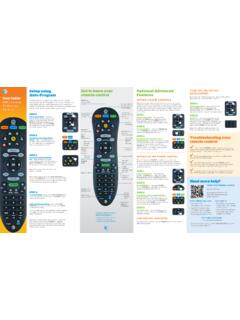
www.att.comAudio device programming: Let go of the FASt ForWArD key when the device mutes. Press mute to unmute the device. Use the volume keys to verify that the remote control is controlling the volume. If it does not work properly, repeat this process. note: If TV programming is interrupted or inactive for more than 10 seconds, the PoWer key will flash
PowerView Remote Control Guide - Hunter Douglas
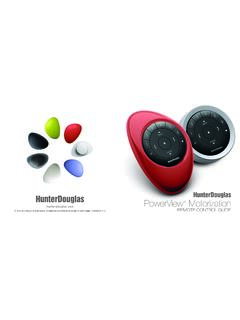
cdn.hunterdouglas.comReplacing batteries in the remote Replacing the batteries in the remote module will not cause the loss of any window covering programming, including GROUPS and FAVORITE. The remote uses two CR 2032 batteries. ™1. For the Pebble Remote, slide your thumb in the indentation, gently lift and remove the remote module from the Pebble.

CLICKER - Lowe's
pdf.lowes.comIf programming fails reverse DIP switches (OFF to ON and ON to OFF). ** 3 Position DIP Switch: For Chamberlain remotes DO NOT use the “0” position, use “+” or “-”. If you already have a 3-button remote, DIP switch #1 must be set to “-” if the large button is to open the door. It may be necessary to reprogram original remote ...

PowerView Remote Control Guide - Hunter Douglas
cdn2.hunterdouglas.comInserting the remote module into the PowerView ® Pebble (hand-held): 1. Center the Hunter Douglas logo on the remote module above the indentation on the bottom rim of the Pebble. 2. Align the ribs on the remote module with the grooves on the Pebble. 3. Gently push the remote module into the Pebble until it is snug. Ribs on remote to be aligned ...
Programming your remote - Telus
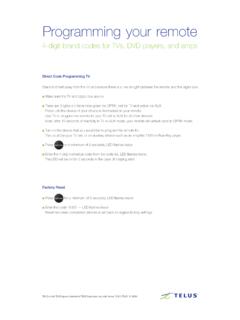
static.telus.comProgramming your remote 4-digit brand codes for TVs, DVD players, and amps Direct Code Programming TV Stand 6-8 feet away from the TV and ensure there is a line of sight between the remote and the digital box. Make sure the TV and digital box are on. There are 3 lights on the remote green for OPTIK, red for TV and yellow for AUX.
Universal Remote Control Programming Guide
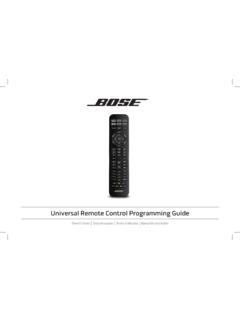
assets.bose.comProgramming your remote to control your source 1. Power on your source. 2. save your settings.Locate the code for your source’s brand in the Universal Remote Device Codes book (provided). 3. On the remote control, press and hold the appropriate source button until all six source buttons glow, then release.
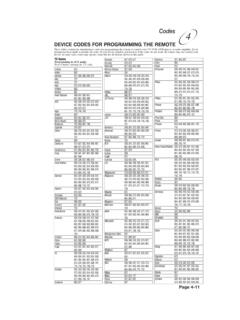
Remote Codes - Device codes for programming the Bell …
support.bell.caDEVICE CODES FOR PROGRAMMING THE REMOTE These tables contain the manufacturer codes for programming the remote to control your TV, VCR, DVD player, or audio amplifier. Every attempt has been made to include all codes. If your device brand is not listed or if the codes do not work, the remote may not control your device.

Clicker Remote Programming Instructions
www.gsoverheadsystems.comIf programming fails reverse DIP switches (OFF to ON and ON to OFF). **3 Position DIP Switch: For Chamberlain remotes DO NOT use the “0” position, use “+” or “-”. If you already have a 3-button remote, DIP switch #1 must be set to “-” if the large button is to open the door. It may be necessary to reprogram original remote ...