
SAP Reports – Purchase Orders
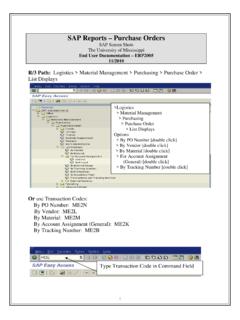
Jan 02, 2019 · Check – The “Check” icon provides a check of your data entry by counting the number of entries you have made. The count appears on the top left of the tab. Copy – When complete, select the “Copy” icon to paste your entries to the prior screen. Use this tab to enter a list of cost center ranges. 1 Use this tab to enter a list of non ...
Download SAP Reports – Purchase Orders

Information
Domain:
Source:
Link to this page:
Documents from same domain

Display Variants (Layout) - SAP Support
sap.olemiss.eduDisplay Variants (Layout) SAP Screen Shots The University of Mississippi End User Documentation – 4.6C ... 662.915.5222 Email: sap@olemiss.edu A display variant is a way to save a layout of a report so that they may be used for future reports. Display (Layout) Variant Icons: …

SAP Reports - Work Orders
sap.olemiss.eduSAP Reports - Work Orders Reviewing PM (work orders) charges to your Cost Object SAP Screen Shots The University of Mississippi End User Documentation – Enterprise 2005 09/2007 SAP Support: 662.915.5556 SAP Web Site
Asset Management/Fixed Assets - SAP Support
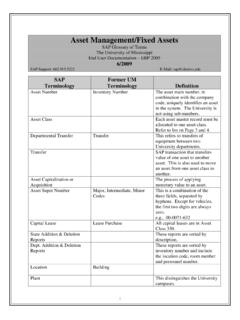
sap.olemiss.eduAsset Management/Fixed Assets SAP Glossary of Terms The University of Mississippi End User Documentation – ERP 2005 ... Codes This is a combination of the three fields, separated by hyphens. Except for vehicles, ... R/3 Path > Accounting > Financial Accounting > Fixed Assets > Asset > Display > Asset [double-click] Transaction Code
SAP Reports – Purchase Orders
sap.olemiss.edu7 Example: By Account Assignment (General) (ME2K) Cost Center: Enter your cost center. Range of Cost Centers - You may select to search for a range of cost centers by using the Cost center _____ to _____. Multiple Selection icon - If you wish to look for a non-sequential list, group of ranges or a combination use the “multiple selection” arrow.

Running jobs (Execute) in the Background - SAP Support
sap.olemiss.eduSAP Support: 662.915.5222 E-Mail: sap@olemiss.edu When running reports that take longer than 30 minutes to execute, users should set them up to run in background. Execute in the background: To execute in the background, instead of left-
How Do You Reset Your SAP Password?
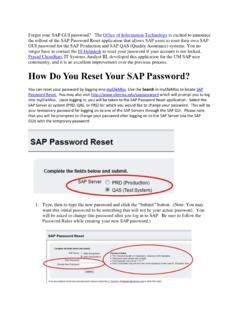
sap.olemiss.edulonger have to contact the IT Helpdesk to reset your password if your account is not locked. Prasad Choudhari, IT Systems Analyst III, developed this application for the UM SAP user community, and it is an excellent improvement over the previous process.
Related documents
![Writing Your QAPI Plan [Read-Only] - LeadingAge NY](/cache/preview/b/9/9/8/2/3/f/a/thumb-b99823fa2ae9636b8ed3230c56f78051.jpg)
Writing Your QAPI Plan [Read-Only] - LeadingAge NY
www.leadingageny.orgIdentify your vision statement, mission statement, purpose, guiding principles and scope for QAPI priorto writing your plan Attach these as a “preamble” to the QAPI plan 7 The plan should…. • Identify, Implement, and Sustain continuous improvements in all departments 8

Annual Reports: Presenting Your Successes
www.nonprofitmaine.orgAnnual Reports: Presenting Your Successes C O M M U N I C AT I O N S A Detailed Guide To Creating Professional Annual Reports. Launched in 1982 by Jim and Patty Ro u s e , The Enterprise Foundation is a national, nonprofit housing and community d e ve l o p -

2019 ANNUAL REPORT
corporate.mcdonalds.comThank you to our shareholders for your continued investment in McDonald’s, to our customers for your continued support and enjoyment, and to the entire system for all you do every day to serve customers and communities around the world. I am honored as ever to serve as your CEO. Be well, Chris Kempczinski President and CEO McDonald’s ...
OHIO IT 3
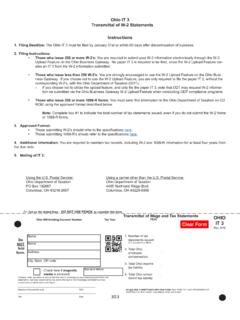
tax.ohio.govYou are required to submit your W-2 information electronically through the W-2 Upload Feature on the Ohio Business Gateway. No paper IT 3 is required to be filed, since the W-2 Upload Feature cre-ates an IT 3 from the W-2 information submitted. • Those …
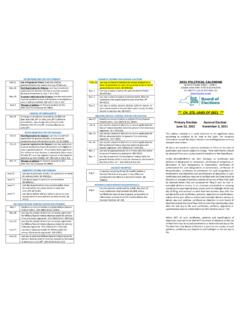
2021 Political Calendar - New York State Board of Elections
www.elections.ny.govJune 22 Last day to deliver primary ballot in person to your county board or your poll site, by close of polls. §8-412(1) MILITARY/SPECIAL FEDERAL VOTERS FOR PRIMARY : May 7 Deadline to transmit ballots to eligible Military/Special Federal Voters. §10-108(1) & §11-204(4)

Data Brokers: A Call For Transparency and Accountability ...
www.ftc.govof data broker practices. It issued identical Orders to File Special Reports (“Orders”) under section 6(b) of the Federal Trade Commission Act5 to nine data brokers seeking information about their data collection and use practices, as well as any tools provided to consumers to control these practices. Appendix A is a copy of

Information Provided Concerning the Disclosure and ...
www.irs.govof the Treasury, including your employment as an IRS contractor. One or more reports about you may be obtained for employment purposes, including evaluating your suitability for employment, promotion or reassignment which results in a change to your position risk level, or access to classified information. I,