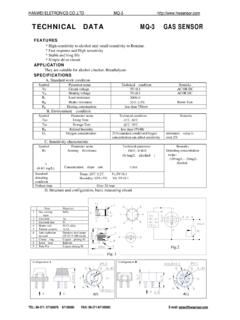
TECHNICAL DATA MQ-3 GAS SENSOR
TEL: 86-371- 67169070 67169080 FAX: 86-371-67169090 E-mail: sales@hwsensor.com Structure and configuration of MQ-3 gas sensor is shown as Fig. 1 (Configuration A or B), sensor composed by micro AL2O3 ceramic tube, Tin Dioxide (SnO2) sensitive layer, measuring electrode and heater are fixed into a
Download TECHNICAL DATA MQ-3 GAS SENSOR

Information
Domain:
Source:
Link to this page:
Documents from same domain

AT Commands Reference Guide - SparkFun …
www.sparkfun.comAT Commands Reference Guide 80000ST10025a Rev. 0 - 04/08/06 Reproduction forbidden without Telit Communications S.p.A. written authorization - All …
DS1307 64 x 8 Serial Real-Time Clock
www.sparkfun.com1 of 12 100101 FEATURES Real-time clock (RTC) counts seconds, minutes, hours, date of the month, month, day of the week, and year with …

Advanced User Manual - SparkFun Electronics
www.sparkfun.comusage information and a summary of common commands refer to the Install Guide for a given product. Version 4.77 August 27, 2009 Roving Networks reserves the right to make corrections, modifications, and changes to its products, documentation and services ... Advanced User Manual.

Preliminary Product Specification v1 - SparkFun Electronics
www.sparkfun.comRevision 1.0 Page 3 of 75 nRF24L01+ Preliminary Product Specification Writing Conventions This product specification follows a set of typographic rules that make s the document consistent and easy

Single chip 2.4 GHz Transceiver nRF24L01
www.sparkfun.comPRELIMINARY PRODUCT SPECIFICATION nRF24L01 Single Chip 2.4 GHz Radio Transceiver Nordic Semiconductor ASA - Vestre Rosten 81, N-7075 Tiller, Norway - Phone +4772898900 - …
XBee /XBee-PRO RF Modules - SparkFun Electronics
www.sparkfun.comThe XBee®/XBee-PRO® RF Module was designed to mount into a receptacle (socket) and there-fore does not require any soldering when mounting it to a board. The XBee Development Kits con-tain RS-232 and USB interface boards which use two 20-pin receptacles to receive modules.

GSM/GPRS Module - SparkFun Electronics
www.sparkfun.comThis document gives an overview of the LinkSprite GSM/GPRS module: a miniature, single-side board, quad-band GSM 850/EGSM 900/DCS 1800/PCS 1900 module, ready for integration in various kinds of Fix wireless phones and other wireless devices.

16-Channel Constant-Current LED Driver
www.sparkfun.comA6282 Description The A6282 device is designed for LED display applications. This CMOS device includes an input shift register, accompanying data latches, and 16 MOS constant current sink drivers.

+3.3V Low Power Half-Duplex RS-485 Transceivers with ...
www.sparkfun.com10/15/02 SP3481/3485 Low Power Half-Duplex RS485 Transceivers © Copyright 2000 Sipex Corporation 2 SPECIFICATIONS T AMB = T MIN to T MAX and V CC = +3.3V ± 5% ...
XBee /XBee-PRO RF Modules - SparkFun Electronics
www.sparkfun.comDigi International Inc. 11001 Bren Road East Minnetonka, MN 55343 877 912-3444 or 952 912-3444 http://www.digi.com XBee®/XBee-PRO® RF Modules XBee®/XBee-PRO® RF ...
Related documents
Configuration steps for installing Kavach 1. that requires ...
email.gov.in1. The ID of a user needs to be activated for Kavach in the mail server prior to activation by the users. Hence , this procedure needs to be followed by ONLY those users who receive a mail from mailservices@nic.in. This mail is sent after the id has been enabled for Kavach. If a user receives a mail forwarded by a

Common Event Format Configuration Guide
kc.mcafee.comJul 22, 2010 · with the event's destination. E-mail addresses are also mapped into the UserName fields. The recipient is a candidate to put into destinationUserName. end endTime Time Stamp The time at which the activity related to the event ended. The format is MMM dd yyyy HH:mm:ss or milliseconds since epoch (Jan 1st 1970). An example would be

Withdrawn NIST Technical Series Publication
nvlpubs.nist.govJan 20, 2022 · logical access (e.g., with or without PIN, over contact, contactless, or virtual contact interface). Federal departments and agencies must use accredited issuers to issue identity credentials for Federal employees and contractors. For this purpose, NIST provided guidelines for the accreditation of PIV Card issuers in [SP 800-79].

Guide for Security-Focused Configuration Management of ...
nvlpubs.nist.govan integral part of an organization’s overall configuration management. The focus of this document is on implementation of the information system security aspects of configuration management, and as such the term security-focused configuration management (SecCM) is used to emphasize the concentration on information security.

Fisher FIELDVUE DLC3010 Digital Level Controller
www.emerson.comto an electrical signal and digitized. The digital signal is compensated and processed per user configuration requirements, and converted back to a 4‐20 mA analog electrical signal. The resulting current output signal is sent to an indicating or final control element. Figure 1‐1. FIELDVUE DLC3010 Digital Level Controller W7977-2
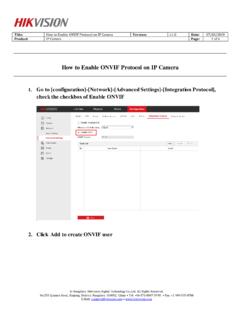
How to Enable ONVIF Protocol on IP Camera
www.hikvision.comE-Mail: support@hikvision.com • www.hikvision.com How to Enable ONVIF Protocol on IP Camera 1. Go to [configuration]-[Network]-[Advanced Settings]-[Integration Protocol], check the checkbox of Enable ONVIF 2. Click Add to create ONVIF user
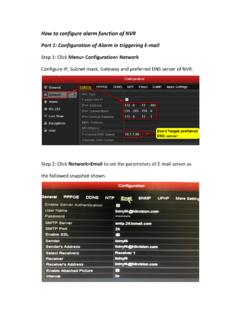
How to configure alarm function of NVR Part 1 ...
www.hikvision.comPart 1: Configuration of Alarm in triggering E-mail Step 1: Click Menu> Configuration> Network Configure IP, Subnet mask, Gateway and preferred DNS server of NVR. Step 2: Click Network>Email to set the parameters of E-mail server as the followed snapshot shown.

Setting Up Windows Mail Email Accounts - Spectrum Inc
www.spectruminc.com• Incoming mail (POP3 or IMAP) server—Enter pop.emailsrvr.com. • Outgoing e-mail server (SMTP) name—Enter smtp.emailsrvr.com. • Check the box labeled Outgoing server requires authentication. 1 Setting Up Windows Mail® Technical Manual: Configuration and Setup Document Updated: 2/07 5. In the next window, Internet Logon, enter your E-mail