
u-center User guide
• SQLITE database support ... installation from one location to another after the installation, make sure you copy the DLL files as well. After a successful installation, u-center can be started from the Start Menu (All Programs > u-blox > u-center > u-center) and will start up as shown in Figure 1.
Download u-center User guide

Information
Domain:
Source:
Link to this page:
Documents from same domain

SARA-S200 - U-blox
www.u-blox.comSARA-S200 - System Integration Manual UBX-17048649 - R01 Preface Page 3 of 61 Preface u-blox Technical Documentation As part of our commitment to customer support, u-blox maintains an extensive volume of technical

SARA-R4 series AT commands manual
www.u-blox.com- Profile: the command setting can be saved in a personal profile as specified in Chapter 1.4 - NVM: the command setting is saved in the non-volatile memory as specified in Chapter 1.4 - <command_name>: the parameter values set with the command are volatile, but the whole profile can be stored in NVM with <command_name> AT command.

NEO-M8U - U-blox
www.u-blox.comNEO-M8U - Data sheet . UBX-15015679 - R11 Functional description Page 7 of 27 C1-Public . 1.4 Block diagram . Figure 1: NEO-M8U block diagram. 1.5 Supported GNSS constellations . The NEOM8U GNSS module is a concurrent GNSS receiver which can receive and track multiple - GNSS systems: GPS, Galileo, GLONASS and BeiDou.
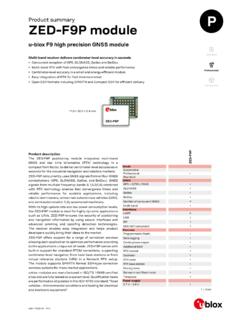
Product summary ZED-F9P module - U-blox
www.u-blox.comZED-F9P module Features Receiver type 184-channel u-blox F9 engine GPS L1C/A L2C, GLO L1OF L2OF, GAL E1B/C E5b, BDS B1I B2I, QZSS L1C/A L1S L2C, SBAS L1C/A Nav. update rate RTK up to 20 Hz1 Position accuracy2 RTK 0.01 m + 1 ppm CEP Convergence time2 RTK Storage temp.< 10 sec Acquisition Cold starts 24 s Aided starts 2 s Reacquisition 2 s

u-blox GNSS product overview
www.u-blox.comu-blox products come in various integration levels catering to all kinds of needs, from low volume, ease of use scenarios to scalable solutions for customized applications. The product offering includes modules, SiPs, smart antenna modules, and chips.

NEO-6 series - U-blox
www.u-blox.com• Based on GPS chips qualified according to AEC-Q100 • Manufactured in ISO/TS 16949 certified production sites • Qualified according to ISO 16750 NEO-6: 12.2 x 16.0 x 2.4 mm Product selector Model Type Supply Interfaces Features Standalone GPS Standalone GLONASS Timing & Raw Data Dead Reckoning 1.75 V – 2.0 V 2.7 V – 3.6 V UART USB ...
u-blox M8 concurrent GNSS modules
www.u-blox.comproviding reception of three GNSS systems. By default the M8 receivers are configured for concurrent GPS and GLONASS, including SBAS and QZSS reception. If power consumption is a key factor, the receiver should be conf igured for a single GNSS operation using GPS, Galileo, GLONASS or BeiDou and disabling QZSS and SBAS.

u-blox M8 concurrent GNSS modules
www.u-blox.comand GLONASS reception. If power consumption is a key factor, then the receiver should be configured for single GNSS operation using either GPS or GLONASS or BeiDou and disabling QZSS and SBAS. Galileo, QZSS and SBAS share the same frequency band as GPS and can always be processed in conjunction with GPS. 1.5.1 GPS
u-blox GNSS Sensor and VCP Device Driver
www.u-blox.comu-blox GNSS Sensor and VCP Device Driver - User Guide UBX-15022397 - R06 Production Information 1 Introduction Page 5 of 24 1.3 Sensor API The Sensor API enables developers to create sensor-based programs by using a set of COM interfaces.
ZED-F9P Integration manual
www.u-blox.comDec 20, 2018 · 2.1.1 Correction services u-blox ZED-F9P can use different types of correction services which broadly fall into two categories, based either on an Observation State Representation (OSR) or a State Space Representation
Related documents

Install Guide - OpenStack
docs.openstack.organd SQLite. Users can access OpenStack via the web-based user interface implemented by the Horizon Dashboard, via command-line clients and by issuing API requests through tools like browser plug-ins or curl. For applications, several SDKs are available. Ultimately, all these access methods issue REST API calls to the various OpenStack services.

Learn Flutter with Examples - Tutorial Kart
www.tutorialkart.comInstallation Flutter Installation in Linux (Ubuntu) Installation in Windows Installation in Mac Widgets Tutorials Flutter – Text Flutter – TextField ... Flutter SQLite Tutorial Example Login Screen with Flutter Flutter Official To visit official Flutter page, go to [https://flutter.dev/].

Sage Installation Guide - SageMath
doc.sagemath.org˓→sqlite sqlite-devel suitesparse suitesparse-devel symmetrica-devel sympow tachyon␣ ˓→tachyon-devel tar tox which xz xz xz-devel zeromq zeromq-devel zlib-devel zn_poly zn_ ˓→poly-devel OnArchLinux: 12 Chapter4. InstallfromSourceCode

RDKit Documentation - Read the Docs
buildmedia.readthedocs.org•SQLite- “The most used database engine in the world” •Lucene: Text-search engine 1 1.3Usage by other open-source projects This will, inevitably, be out of date. If you know of others, please let us know or submit a pull request! •stk(docs,paper) - a Python library for building, manipulating, analyzing and automatic design of molecules.

Chapter 02: Building Your Own Digital Marketing Plan
static.packt-cdn.comSelect an installation profile O Standard Install with commonly used features pre—configured. Minimal Build a custom site without pre—configured functionality. Suitable for advanced users. Demo: Umami Food Magazine (Experimental) Install an example site that shows Off some Of Drupal's capabilities. Save and continue Drupal 9.1.5 Choose language