
USER INSTRUCTIONS FOR PIV AUTHENTICATION …
Telework (VPN) User – Method 1 *PREFERRED METHOD – USE THIS FIRST* 1. Turn on the computer. 2. At the login screen press Ctrl+Alt+Delete to login to windows. 3. Select Cisco AnyConnect VPN Pre-Connect Icon in the lower right corner. 4. You will be presented the Cisco AnyConnect VPN Client with a drop down menu. Verify that you have two ...
Download USER INSTRUCTIONS FOR PIV AUTHENTICATION …

Information
Domain:
Source:
Link to this page:
Documents from same domain
Officer Separations - home.army.mil
home.army.milOfficer Separations Unqualified Resignation, Release from Active Duty or Resignation k- ; Army Instruction & HRC Separations Branch Web-site AR 600-8-24
THE NCO LEADERSHP CENTER OF EXCELLENCE (NCOL CoE)
home.army.milappeal the dismissal action. (Example C-5 IV) • Appeals will be forwarded to the school commandant or commander who will refer the proposed action and the appeal to the Office of the Staff Judge Advocate to determine legal sufficiency of the dismissal decision. All appellate actions will become part of the student’s case file. Commandants
Army Training Requirements and Resource System Brigade ...
home.army.mil•If you use an incorrect SSN to input a Reservation or Wait, don’tcancel it or try to reenter with the correct SSN. •Contact the ATRRS Help Desk. Do not include SSN in emails you send to ATRRS support staff. •Email the individual’s full name, military Email address and/or the parameters of the course in which they are
The Blue Book - United States Army
home.army.milDepartment of the Army, or contained in current authorization documents are worn by U.S. Army personnel. No item governed by the Regulation is altered in any way that changes the design or intent of the item. There is NO garrison or field standard, just the Army standard. 7. 3rd Infantry Division Mission and Vision. a. 3rd Infantry Division ...
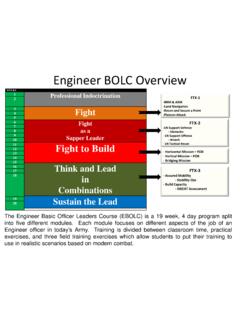
Engineer BOLC Overview - United States Army
home.army.mil-EN Tactical Recon FTX-3 -Assured Mobility -Stability Ops -Build Capacity -SWEAT Assessment -Horizontal Mission – FOB -Vertical Mission – FOB -Bridging Mission The Engineer Basic Officer Leaders Course (EBOLC) is a 19 week, 4 day program split into five different modules. Each module focuses on different aspects of the job of an
DEPARTMENT OF THE ARMY
home.army.milUR Reg 350-22 Maneuver and field Training Exercise Rights in the Federal Republic of Germany ... M9 and M11 FM 3-24.217 Explosives and Demolitions . FM 3-6 Urban Operations . Training Circulars (TC) ... TC 21-305-20 Manual for the Wheeled Vehicle Driver . TC 90-1 Training for Urban Operations . Technical Manuals (TM) ...
Chapter 6 Army Motor Vehicle/Privately Owned Vehicle ...
home.army.milAccident Avoidance Course or equivalent and have a refresher course every 4 years thereafter. Website for this training is found at appendix A, section III. AKO access is required. b. Motorcycle safety. All Service Members operating a motorcycle, moped, or scooter will
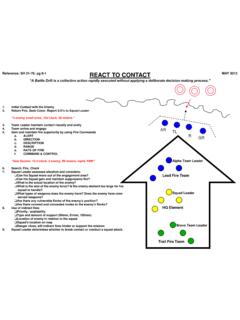
REACT TO CONTACT MAY 2012 - United States Army
home.army.milREACT TO A NEAR/FAR AMBUSH EXECUTE SQUAD ATTACK OR BREAK CONTACT SL “An Ambush is defined as a surprise attack by fire from a concealed position on a moving or temporarily halted target.” Reference: SH 21 -76; pg 8 9, 8 12 1. Plan to avoid possible ambush lines 2. Initial Contact with the Enemy, within hand grenade range (≤35 meters) 3.

Chapter 3 Composite Risk Management (CRM) 3-1. General
home.army.mil1 Chapter 3 Composite Risk Management (CRM) 3-1. General a. CRM is a leadership responsibility. Commanders/supervisors at every level will employ CRM to effectively control safety and occupational health risks to missions, personnel, equipment, and the environment. b. CRM is the best process for protecting the force.
Army Enterprise Service Desk (AESD) Skype for Business ...
home.army.milthe Skype for Business application is considered a government information system and as such, is subject to monitoring and recording per AR 25-2 and DoDI 8500.01. Back to Table of Contents
Related documents

AnyConnect Installation Guide - Cisco
devnetsandbox.cisco.comThe Cisco AnyConnect VPN Client provides a method for Sandbox users to create a secure VPN connection to a Sandbox Lab. This document will guide users through the installation process for the AnyConnect Client software on Windows, Mac OS and Linux. ... Read and Accept End-User License Agreement

How to use VPN
vpn.hyosung.comHow to use VPN 1) Connect VPN Login Page ① Connect to the URL, https://vpn.hyosung.com ② Input your VPN ID and password (Same with HOPE ID/Password) 2) When you connect VPN at the first time, you need to install VPN software. Click ‘Download’ button and start the installation.
How to Connect to VPN: Cisco AnyConnect Secure Mobility …
www.aims.wisc.edu2 – Connecting to the VPN 3 – Map Network Drives Each step will be discussed in more detail below. Connect to Wireless Internet When you are undocked and ready to connect to the VPN, turn on the wireless switch located on the side or front of the laptop. Note that if you can see orange, the switch is turned OFF. 1.

Contents
www.honeywell.comUser can start connecting to HRA / VPN. 4. In case of issues click here for troubleshooting instructions. Honeywell Remote Access Setup instructions (Windows Systems only) Non-Honeywell Laptops and Desktops: Following steps need to …
Weyerhaeuser VPN Tips and Tricks
www.ourwey.comUser is only a member of ONE VPN Ad group. This should be VPN – Employees for a standard WY employee. 2. TrendMicro virus scan is running 3. TrendMicro Virus Definitions are up to date within 7 days a. You can update your antivirus definitions even if you are not connected to the

PHONE-BASED VPN ACCESS: PERSONAL OR PHS REMOTE …
www.partners.org3. In the Partners Sign In window, enter your Partners user name and password. 4. Confirm your identity by entering a unique code sent to your pre-registered phone number. ACCESS PARTNERS APPLICATIONS, YOUR HOME DRIVE & SHARED FILE AREAS The Partners VPN portal page provides access to selected Partners Applications and maps your network drives.
Sophos VPN Clients
www.sophos.comSophos VPN Clients Sophos VPN Clients Securely connects mobile users to your headquarters Ì One-click VPN: Simply install individual VPN packages with a click of the mouse from the Sophos UTM UserPortal. Ì Automatic installation: The complete client installation is done within minutes—no configuration required by the user.

Trinity Connect Portal (VPN)
www.trinity-health.orgDec 21, 2020 · Trinity Connect Portal (VPN) Multi-Factor Authentication (MFA) Setup and Login ... On the User Setup screen on the computer, click the Method drop-down and select Phone Call. 5. In the PRIMARY Phone section on the User Setup …