Search results with tag "Custom settings"

Maestro Dual Technology Sensor Switch SPEC (369773)
www.lutron.comMaestro Sensor Custom Settings Default settings shown in bold - Timeout • 30 min • 15 min • 5 min • 1 min Mode - Sensor Modes Lights automatically turn off in all sensor modes • Occ -Occupancy mode (No ALD)1,2,3 • Lrn - Occupancy with learning ALD mode • Fixd - Occupancy with fixed ALD mode • Vac - Vacancy mode (No ALD)2,3
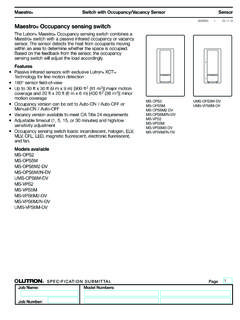
Maestro Occupancy sensing switch Spec 369666c
www.lutron.comMaestro ® Sensor 369666c 3 09.11.12 ® SPECIFICATION SUBMITTAL Page Job ame Job umber Model umbers Switch with Occupancy Vacancy Sensor Custom Settings Ambient Light Detection Lights turn on only if natural light in room is low.
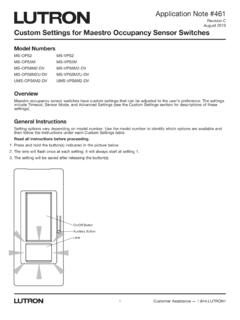
Custom Settings for Maestro Occupancy Sensing Switches …
www.lutron.comMaestro occupancy sensor switches have custom settings that can be adjusted to the user’s preference. The settings include Timeout, Sensor Mode, and Advanced Settings (see the Custom Settings section for descriptions of these settings). General Instructions Setting options vary depending on model number.