Example: confidence
機種変更をお考えのお客さまへ お客 ... - au
iTunesを起動し、パソコンにiPhoneに付属の電源ケーブルでパソコンに接続してください。 しばらくすると、iTunes画面の左のサイドバーのデバイス欄(下図の赤枠部)にあなたの iPhoneが表示されますので、iPhoneのアイコンをクリックしてください。
Tags:
Information
Domain:
Source:
Link to this page:
Documents from same domain
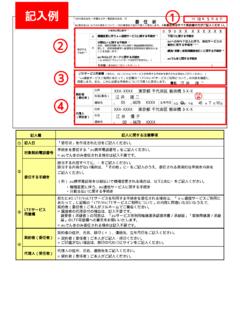
LTE 4G LTE/VoLTE au LTE/VoLTE 署名 - au.com
www.au.com契約者 (委任者) 住所 氏名(署名) 印 連絡先 ( ) - 生年月日 大正・昭和・平成 年 月 日 代理人 (受任者) 住所 ...

FAX専用お問い合わせ用紙 - au.com
www.au.com送り先 kddiお客さまセンター FAX番号 186-0120-944-019(無料) (1)お客様情報-記入欄 氏名 (フリガナ) ( )
KYF34 - au.com
www.au.com操作説明について 『取扱説明書』『設定ガイド』 主な機能の主な操作のみ説明しています。 さまざまな機能のより詳しい説明については、auホームページより『取

はじめてガイド - au
www.au.comはじめてガイド ごあいさつ このたびは、Speed Wi-Fi NEXT W01(以下、「本製品」と表記します)をお買い上げいただき、誠にありがとう
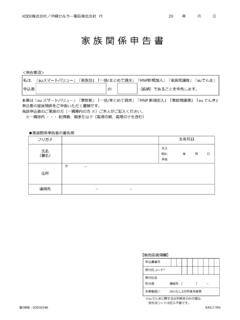
家族関係申告書 - au.com
www.au.comKDDI株式会社/沖縄セルラー電話株式会社⾏ 20 年 ⽉ ⽇ KASJ1709 家族関係申告書 私は、「auスマートバリュー」「家族割」「⼀括/まとめて請求」「MNP新規加⼊」「家族間譲渡 …
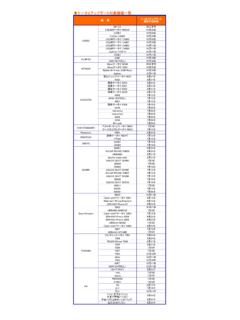
ケータイアップデート対象機種一覧 - au.com
www.au.comケータイアップデート対象機種一覧 機 種 casio w61ca 対応不可 ca001 ca007 fujitsu e09f hitachi 対応不可 kyocera k002 k006
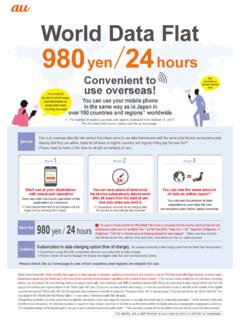
World Data Flat 980yen 24 - au.com
www.au.comIt is a relief to be able to check maps and information on restaurants when traveling overseas! Also convenient on overseas business trips! 【Data transmission】★1: If the monthly data capacity or data capacity is exceeded, maximum transmission and reception is set at 128 Kbps (best effort type service).

SHV41 - au.com
www.au.comごあいさつ このたびは、「AQUOS R compact SHV41」(以下、「SHV41」または「本製 品」と表記します)をお買い上げいただき、誠にありがとうございます。
Android 設定ガイドブック
www.au.com「Galaxy」は、Samsung Electronics Co.,Ltd.の商標または登録商標です。 「microSDTM」は、SD Card Associationの商標または登録商標です。 「FeliCa」は、ソニー 株式会社の商標または登録商標です。 「FeliCa」は、ソニー株式会社が開発した非接触ICカードの技術方式です。。 「QRコード®」は、株式会社 ...
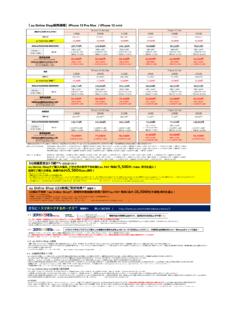
5,500 10,000
www.au.com③「故障紛失サポートwith AppleCare Services(有料)」に新たにご加入、または継続してご加入 詳しくはこちら( ) 【条件】以下①②両方を満たすこと ①期間中、au Online Shopで新規契約(UQ mobile、povo1.0、povo2.0、および他社からお乗りかえは除く)で対象機種を購入完了
Related documents
iPod Classic User Guide - B&H Photo
www.bhphotovideo.comPlaying iTunes U Content 39 Listening to Audiobooks 39 Listening to FM Radio Chapter 4 40 Watching Videos 40 Watching Videos on iPod classic. Contents 3 41 Watching Videos on a TV Connected to iPod classic Chapter 5 43 Adding and Viewing Photos 43 Importing Photos 44
RSA SecurID New User Quick Start Guide - J.P. Morgan
www.jpmorgan.comJul 23, 2019 · To install the app with iTunes: 1. Connect your device to a USB port on your computer, and then launch the App store in iTunes. 2. In the Search field, enter RSA SecurID Token, and then download the app to your computer. 3. If prompted, authenticate with your Apple ID or iTunes account credentials. 4. Instruct iTunes to sync the app onto your ...
How do I sign up to sell my content on the iTunes Store ...
www.apple.comdata for all audio delivered to iTunes. Do I need a U.S. Tax ID? Yes, we require a U.S. Tax ID as part of the iTunes Connect signup and authentication process. This requirement also applies to music providers not based in the U.S. To request a U.S. Tax ID from the IRS, go here.

Volume Purchase Program Guide - Apple
images.apple.comvpp.itunes.apple.com. Step 1. Search for an app or a book. Select media type iOS apps, Mac apps, or Books to narrow your search options. You can also type the name of the content or paste an iTunes link into the Search field to find specific content. Click the Category pull-down menu to find apps and books by category. Universal
Quick Start Guide - Honeywell Store
www.honeywellstore.comiTunes Total Connect Comfort free app is available for Apple ® iPhone , iPad® and iPod touch® devices at iTunes® or at Google Play® for all Android™ devices. This thermostat works with common 24 volt systems such as forced air, hydronic, heat pump, oil, gas, and electric. It will not work with millivolt systems, such as a
Epic Remote Access for Windows - UF Health Jacksonville
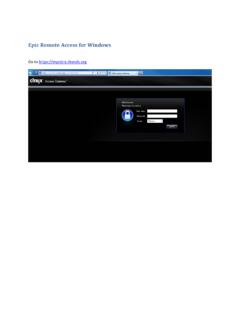
ufhealthjax.orgFirst you have to install the Citrix Receiver for iPad/iPhone via iTunes store. It is for free! Go to the APP Store on the iPad/iPhone and search for Citrix Receiver.

Overview of Managed Apple IDs for Business
www.apple.comthe U.S. and other countries. App Store, iCloud, and iCloud Drive are service marks of Apple Inc., registered in the U.S. and other countries. Other product and company names