Example: bankruptcy
Basic Set up Quick Start Guide - manuals.harborfreight.com
SURVEILLANCE DVR with 4 HD Cameras With Mobile Monitoring Capabilities. 1 Connect DVR to Router "!Connect one end of Ethernet Cable to LAN port on DVR "!Connect other end to open LAN port on Router 2 Go to Parameter > Network "!Make sure DHCP is selected, then click Save
Tags:
Information
Domain:
Source:
Link to this page:
Documents from same domain

Harbor Freight Tools Special Order Replacement Parts
manuals.harborfreight.comFeb 26, 2020 · Harbor Freight Tools How to Obtain Special Order Replacement Parts Find Your Item Call to Order Special Order Replacement Parts Identify the brand name and item number of your product. If the item appears in the list, parts for this item are available for special order. Call a Harbor Freight Parts Specialist at 1-800-444-3353 to place your ...

Harbor Freight Tools In-Stock Replacement Parts Listing
manuals.harborfreight.comHarbor Freight sells many tools and products that look similar, but are different. To ensure you are purchasing the correct parts or part kits, you will need to identify the product's unique Item Number. Products with different Item Numbers do not have interchangeable parts.

Owner’s Manual & Safety Instructions
manuals.harborfreight.comVoltage Range 115 ±10VAC Frequency 60 ±2Hz Ground Wire Gauge 8 AWG No Load Current (Switch on) 1.2 A Maximum efficiency 90% Full load efficiency >80% Over voltage Shutdown 15.75 ±0.75 V Low voltage alarm 10.5 ±0.5 V Low voltage shutdown 10 ±0.5 V Thermal Shutdown 149 ±9 °F Note: Battery charge level, wire length and

Owner’s Manual & Safety Instructions
manuals.harborfreight.comThis is the safety alert symbol. It is used to alert you to potential personal injury hazards. Obey all safety messages that follow this symbol to avoid possible injury or death. Indicates a hazardous situation which, if not avoided, will result in death or serious injury. Indicates a hazardous situation which, if not avoided,

Owner’s Manual & Safety Instructions
manuals.harborfreight.comOperating Instructions, for an explanation of ... 1 Anyone using vibrating tools regularly or for an extended period should first be examined by a doctor and then have regular medical check-ups to ensure medical problems are not being caused or worsened from use Pregnant women or

Owner’s Manual & Safety Instructions
manuals.harborfreight.comOwner’s Manual & Safety Instructions Save This Manual Keep this manual for the safety warnings and precautions, assembly, operating, inspection, maintenance and cleaning procedures. Write the product’s serial number in the back of the manual near the assembly diagram (or month and year of purchase if product has no number).

Owner’s Manual & Safety Instructions
manuals.harborfreight.comOwner’s Manual & Safety Instructions Save This Manual Keep this manual for the safety warnings and precautions, assembly, operating, inspection, maintenance and cleaning procedures. Write the product’s serial number in the back of the manual near the assembly diagram (or month and year of purchase if product has no number).

Table of Contents
manuals.harborfreight.comdiagnostic testing, and no DTCs are present). 11. YELLOW LED - Indicates there is a possible problem. A “Pending” DTC is present and/or some of the vehicle’s emission monitors have not run their diagnostic testing. 12. RED LED - Indicates there is a problem in one or more of the vehicle’s systems. The red LED is also used to show that ...

8750 WATT INVERTER GENERATOR
manuals.harborfreight.com25. The Generator engine can produce high noise levels. Prolonged exposure to noise levels above 85 dBA is hazardous to hearing. Always wear ear protection when operating or working around the gas engine while it is operating. 26. Wear ANSI-approved safety glasses, hearing protection, and NIOSH-approved dust mask/respirator during use. 27.

Owner’s Manual & Safety Instructions
manuals.harborfreight.comOwner’s Manual & Safety Instructions Save This Manual Keep this manual for the safety warnings and precautions, assembly, operating, inspection, maintenance and cleaning procedures. Write the product’s serial number in the back of the manual near the assembly diagram (or month and year of purchase if product has no number).
Related documents
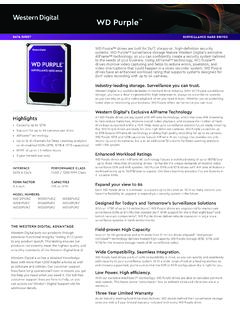
DATA SHEET SURVEILLANCE HARD DRIVES
documents.westerndigital.comsurveillance DVR and NVR systems. WD Purple 10TB and 12TB drives with AllFrame AI feature a workload rating up to 360TB/year to support the Deep Learning analytics that are features in AI capable NVRs. Expand your view to 64 Each WD Purple drive is optimized to support up to 64 cameras. With so many options, you
§542.43 What are the minimum internal control standards ...
www.nigc.govSurveillance operation room means the area of the surveillance department where surveillance is taking place and/or where the surveillance equipment is located. Revision based on December comment: (a) The surveillance system shall be maintained and operated from a staffed surveillance operation room and shall provide surveillance over gaming areas.

DVR User Manual - Provision-ISR
provision-isr.comLIVE SURVEILLANCE Support HDMI/VGA output (Some models also supports CVBS) Support channel security by hiding live display Display the local record state and basic information Support USB mouse to make full control RECORD MEDIA Support one SATA HDD to record for a longer time without any limitation BACKUP

LUM-510 Series Surveillance Recorders
www.control4.comDVR-4CH 1TB 0 Additional 6TB / bay 6TB DVR-8CH 1TB 3 Additional 6TB / bay 24TB DVR-16CH 2TB 3 Additional 6TB / bay 24TB NVR-4CH 1TB 1 Additional 6TB / bay 12TB NVR-8CH 1TB 3 Additional 6TB / bay 24TB NVR-16CH 2TB 3 Additional 6TB / bay 24TB 8-channel and 16-channel recorders also have an eSATA port on the back that can attach an additional hard ...
H.264 HD DVR User’s Manual
www.holund.noLIVE SURVEILLANCE Support VGA /CVBS/HDMI output Support 4/ 8/ 16 channel SDI video input Support channel security by hiding live display Display the local record state and basic information Support USB to make full control RECORD MEDIA 4 channel HD DVR support 2 SATA HDD or 1 SATA HDD if a DVD-RW writer is installed inside
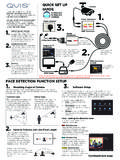
BEFORE INSTALLING ANYTHING WE STRONGLY …
www.free-instruction-manuals.comDVR to a TV or monitor. You can connect your system to a HD TV using a HDMI cable, you can also use the RCA (Video Out) socket or the VGA socket on the back of the DVR. Further, more detailed instructions on how to operate your DVR are included in the main manual which is on the set up disc included.
DVR User Manual
www.secutech.com.auAHD DVR User Manual 1 1 Introduction 1.1 DVR Introduction This model is standard 4/8 CH real time 720P high resolution AHD DVR(Analog High Definition Digital Video Recorder), which adopts high performance video processing chips and embedded Linux system. Meanwhile, it utilizes many most advanced technologies, such
Speed Dome Camera Installation Guide
www.surveillance-download.comBNC cable Connect to an HD CCTV DVR with a coaxial cable (Used as an HD CCTV camera). Terminal block 1. ALARM IN Alarm input for an alarm device like magnetic contacts. 2. ALARM OUT Alarm output for an alarm device like a siren. 3. GND Ground wire 4. RS485A Used for PTZ camera or other device connection. 5.