Transcription of Easy Setup Method AT&T SMART WI-FI EXTENDER Smart …
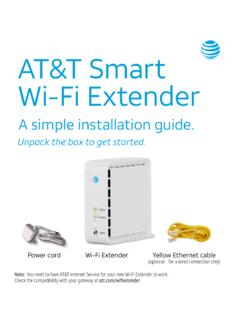
1 AT&T SMART WI-FI EXTENDERA SIMPLE Setup GUIDEUNPACK YOUR KITR emove protective film if present WI-FI ExtenderPower cordEthernet cable (for optional installation process)You need to have AT&T Internet service for your new WI-FI EXTENDER to work. Check the compatibility with your Gateway at Easy Setup MethodUse AT&T SMART Home ManagerSmart Home Manager is a free app that provides an easy way to view and manage your home network from your smartphone, tablet, or computer. You can personalize and monitor devices, as well as troubleshoot. Plus, it helps with installation, identifying where WI-FI coverage is weaker so you can make Download the SMART Home Manager app to your smartphone through your device s app charges may apply for app download and usage. Coverage and service not available Set up in minutes with your User ID or AT&T Email and Password. 3. Select Tools. 4. Select Install SMART WI-FI Extenders. Note: AT&T SMART Home Manager is available to AT&T Internet service customers with a compatible AT&T WI-FI Gateway.
2 Limited to home WI-FI network. Features may depend upon Gateway Setup MethodPower UpPlug inthe power cord to your WI-FI EXTENDER and then plug it into a power outlet close to your WI-FI Power button on the back of the WI-FI for the light to blink :For a successful Setup , make sure: Both the and 5 GHz radio bands are enabled. For help, use the SMART Home Manager app or go to If you have dual SSIDs make sure they have the same name and passwordPairPressand release the WPS button on your WI-FI Gateway. Pressand release the WPS button on your WI-FI 3 minutes for the devices to automatically pair. The blinking light will turn solid GREEN when : If it does not light up solid GREEN within 5 minutes, repeat the pairing process or refer to the Troubleshooting section. Tip:Once the WI-FI EXTENDER is successfully paired and placed in the home, the EXTENDER provides two optional wired Ethernet connections for devices, such as game consoles, connected TVs, WI-FI EXTENDER from the power WI-FI EXTENDER to its new location between your WI-FI Gateway and the area where you want a stronger : Max distance between nearest Gateway or EXTENDER is 40 ft, two walls, or one floor away.
3 Extenders work best when placed up off the floor and on open surfaces away from large obstructions and things that can cause interference ( , microwaves, wireless devices, etc.).Plugyour WI-FI EXTENDER into a power outlet and wait a few minutes for the connection to re-establish and the light to turn re done!TroubleshootingIf you see a flashing red light, move the WI-FI EXTENDER closer to the WI-FI Gateway or another connected you see a solid red light, try to pair with WPS or use the included Ethernet cable to connect your EXTENDER to your Gateway and pair them red lightOut of rangeSolid red lightPairing errorIf you still have an issue, check your AT&T Internet service or WI-FI your all cables and cords to ensure they are connected properly and down, power the power cord from the back of your WI-FI Gateway. Leave it unplugged for 15 seconds and plug it back in. Then unplug the power cord from the back of your EXTENDER . Leave it unplugged for 15 seconds and plug it back may need to wait up to 10 minutes for your Gateway or EXTENDER to completely reboot.
4 Go to for additional EXTENDER support and a list of compatible Gateways. Is my EXTENDER working?Your WI-FI Network name and password do not change so it won t appear as a new network. To check if it s working:1. Your EXTENDER is paired and functioning when the light is solid green. OR2. Use the AT&T SMART Home Manager app to check if the EXTENDER is on your network. (It will appear in the Devices section when it s connected.) Get SMART Home Manager at SMART Home Manager gives you easy access to your home network information in one convenient spot and can also be used to:View and customize your WI-FI name and who s on your WI-FI your device names, like Matt s smartphone, or Monica s laptop. Choose when and how your family uses your network with parental more coverage?It s easy! Go to to purchase additional AT&T SMART WI-FI Extenders and improve WI-FI coverage in your home. Additional InformationManage your accountAvailable 24/7, download the myATT app at from your mobile device.
5 Accessibility support Alternate format guides: - Braille or large print: call - Accessible-tagged PDF: visit Telephone equipment for visual and/or hearing impaired: - Phone: -TTY: 800-651-5111 Hablas espa ol? Visita y haz clic en Ver en espa ol al final de la p gina. Tambi n puedes consultar la gu a del extensor de se al SMART WI-FI de AT&T para ver m s more help?Go to 2019 AT&T Intellectual Property. All rights reserved. AT&T, the AT&T logo and all other marks contained herein are trademarks of AT&T Intellectual Property and/or AT&T affiliated companies. All other marks are the property of their respective owners.