Example: barber
FRO Online Guide
Using Internet Explorer with JAWS When using Internet Explorer and the JAWS screen reader to access FRO Online, there are a few different key combinations to use when navigating with a keyboard. For navigation between the screen tabs and view tabs, you need to first press JAWS Key +Alt + M followed by JAWS Key + Alt + Arrow Keys ( or →).
Tags:
Information
Domain:
Source:
Link to this page:
Related documents
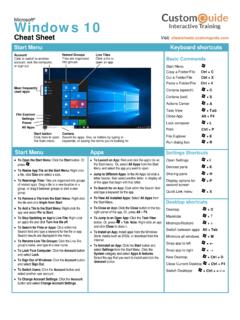
Start Menu Keyboard shortcuts - University of Florida
it.ufsa.ufl.eduFile Explorer + E . Run dialog box + R . Settings Shortcuts . Open Settings + I . Devices pane + K . Sharing pane • + H . Display options for• + P. second screenof related apps. Drag a tile to a new location in a . Quick Link menu + X . Desktop shortcuts . Desktop + D. Maximize + ↑ Minimize/Restore + ↓ Switch between apps . Alt + Tab

VA Once Quick Reference User Guide
www.benefits.va.govInternet Explorer (IE) in order to access VA-ONCE. Other browsers ... next to the search bar and looks like a piece of paper torn in half horizontally. In IE 11, click the cog icon. It is ... the screen when the Help Tab is selected is also a link for Keyboard shortcuts, if you prefer using the keyboard to the mouse.
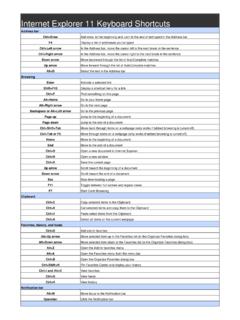
Internet Explorer 11 Keyboard Shortcuts
shortcutmania.comInternet Explorer 11 Keyboard Shortcuts Address bar Ctrl+Enter Add www. to the beginning and .com to the end of text typed in the Address bar F4 Display a list of addresses you've typed Ctrl+Left arrow In the Address bar, move the cursor left to the next break in the sentence

INTERNET SHORTCUTS AND PINNED SITE SHORTCUTS IN …
www.aztcs.org"INTERNET EXPLORER 9" AND "INTERNET EXPLORER 10" IN "WINDOWS.." High-level Executive Summary: In "Internet Explorer 9" and "Internet Explorer 10", you now can make both a .WEBSITE "Pinned Site Shortcuts" and .URL "Internet Shortcuts". By default, when you drag a Favicon, a hyperlink, or a tab from "Internet Explorer 9", you

Epic Keyboard Shortcuts - University of Virginia
hit.healthsystem.virginia.eduEpic Keyboard Shortcuts Use these keyboard shortcuts to navigate through Epic to complete daily documentation and chart review. Any time you see a word with a letter underlined you can use the ALT+ the underlined letter to select that button or open an activity. For example, from the Patient Lists workspace, when a My List folder is selected,

X56 HOTAS - Logitech
www.logitech.com7 English Windows® 7 1. Click on the ‘Windows’ icon from the system tray. Hover over the All Programs menu. Click the ‘Games’ folder and then the ‘Games Explorer’ icon 2. Click the ‘Tools’ option (with downward facing arrow) from the list across the top of the window. From the dropdown list, click ‘Input Devices’ 3. From the Game Controllers window, you should see the …

X56 HOTAS - Logitech
www.logitech.comEnglish 7 Windows® 7 1. Click on the ‘Windows’ icon from the system tray. Hover over the All Programs menu. Click the ‘Games’ folder and then the ‘Games Explorer’ icon 2. Click the ‘Tools’ option (with downward facing arrow) from the list across the top of the window. From the dropdown list, click ‘Input Devices’ 3. From the Game Controllers window, you should see the …

UG038 PCS New user guide - NHS Greater Glasgow and Clyde
www.nhsggc.org.uk4.1 EMIS PCS main menu The EMIS PCS main menu is the first screen displayed when you log on to EMIS PCS. When you are logged on, click the Modules button or press F3 at any time to access the main menu. Note: The main menu for your EMIS PCS system may vary slightly from the one shown below: you may have access to more or fewer system modules.

EchoLink User’s Guide
secure.echolink.orgEchoLink User's Guide settings. Unless you have a specific reason to begin with different settings, choose the "Import these settings" option.
Related search queries
Menu Keyboard shortcuts, Explorer, Shortcuts, Menu, VA Once Quick Reference User Guide, Internet Explorer, Keyboard shortcuts, Keyboard, Internet Explorer 11 Keyboard Shortcuts, INTERNET SHORTCUTS AND PINNED SITE SHORTCUTS, Internet Shortcuts, X56 HOTAS, Logitech, UG038 PCS New user guide, EchoLink User’s Guide, EchoLink User's Guide