Transcription of Installation / Setup Guide - ThunderMax
1 Video Instructions Available on You Tube Part # 309-380 2012-15 Softail / Dyna 309-382 2014-15 XL Sportster Serial # TMCM Step 1 (All Models) Insert the included Tmax Tuner CD into your computer. Tmax Tuner will automatically open the InstallShield W izard when the computer fi nds the CD- Rom. Follo w the instructions and install the software on yo ur computer. St ep 2 - Module Installation - Softail Models (Skip to page 3 for Dyna models, page 4 for XL models) FX/FLST-A: Remove the s eat to access the factory Electronic Control Module (E CM). Slide the fuse box to the left to release it from the plastic bracket. Open the fuse box and remove the main : Remove the battery cables (negative first) and remove the battery fr om the motorcycle.
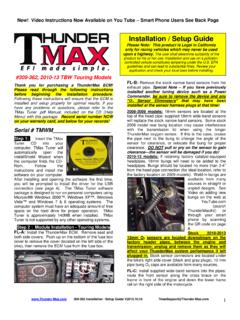
2 Remove any previousl y installed ancil lary tuning device in cludin g oxygen sensor eli minators that may be pl ugged int o the factory oxygen sensor harness. Installation / Setup Guide Please N ot e: This product is Legal in California only for racing vehicles which may never be used upon a highway. The user shall determine suitabili ty of the product for his or her use. Installation and use on a pollution- controlled vehicle constitutes tampering under the EPA guidelines and can l ead to substantial fines. Revie w your application and check your local laws before installing. FX/FLST-C: Spread the plastic latches holding the factory ECM i n place and lift t he E CM from the mounting bracket. Depress the latch on the main connectors and remove the ECM from the wiring harness.
3 FX/FLST-D: Unplug the tail lig ht harness connector plug. Remove the (2) bolts holding the s teel fuse box mounting bracket. FX/FLST-E: Clip the ri ght re ar wire tie holding the harness tr ough to t he frame as s hown. FX/FLST-F: Lif t the steel fuse box mounting bracket to e xpose rear of t he plastic battery tray / wiring c addy. Firmly push the caddy forward to create s pace needed to f eed the Front ThunderMax oxygen sensor harness (shown in yellow) 309-380 / 309-382 Installation / Setup Guide 1 Thank you for purchasing a ThunderMax ECM! Please read through the following instructions before beginning the Installation procedure. Following these instructions will ensure that the ECM is installed and Setup properly for optimal results.
4 If you have any problems or questions, please refer to the TMax Tuner .pdf Manual, included on the CD (Help Menu) with this package. Record serial number NOW on your warranty card, and below for your records! connector through the openin g between the frame and the caddy, exiting behind the right wing of the oil tank. FX/FLST-G: A packet of dielectric grease is included with your ThunderMax . W h en installing the ECM, apply the provided dielectric grease to the inside lip of the ThunderMax ECM to ensure the rubber w eather s eal does n ot bind upon Installation , and a cros s t he pin casing on both 18 pin ECM connectors . Spread the gr ease across all of the female terminal o penings, making sure the grease penetrates openings.
5 This grease will help to maintain vital conductivity between the ThunderMax and the 18 pin connectors. added to the headers in a similar location as 07- 11 models (3-4 from the cylinder head at the top of t he pipe). W eld-in bungs are available in straight or angled style from many industry sources as well as plugs for the stock 12mm sensors (video Installation link on page 8). On '07-'11, if you wish to cap off the bike side of the harness connector, protective caps are provided. See Tips and General Information section on page 8 for further : Once your wide-band sensors are installed, route rear sensor harness under oil tank, feeding connector plug up though opening i n the ri ght fr ont bottom o f the battery cavity in the oil tank.
6 FX/FLST-H: Apply dielectric gr ease to the ThunderMax oxygen harness connector female terminals to hepl maintain vital conductivity, and to the outer housing to prevent binding upon Installation to the ECM. FX/FLST-I: Install the ThunderMax ECM onto the ECM caddy; insert t he oxygen harness c onnector into t he ECM with the imprinted T hunderMax logo facing up. Ti ghten the (2) Phillips connector screws. Lift ECM and install the two 18-pin connectors , ensuring they are fully seated and latched. Replace ECM i nto t he caddy. FX/FLST-L: Position rear oxygen sensor harness connector on top of oil tank, just forward of the battery under battery gr ound cable as s hown. FX/FLST-M: Route fr ont oxygen sensor harness behi nd and under transmission with c onnector plug just under the engine/transmission mounting boss; connect to front oxygen sensor.
7 FX/FLST-J: Unplug and remove factory oxygen s ensors from the exhaust pipes (rear s ensor plug located under oil tank). If using an exhaust system equipped with 18mm sensor bungs ( 07- 11 style), install the supplied sensors into the exhaust pipes a nd tighten. If r etaining factory exhaust headpipes, 18mm bungs will need to be 309-380 / 309-382 Installation / Setup Guide 2 FX/FLST-N: Securely ti e all harnesses t o the frame and/or other harnesses. Avoid routing harnesses where engine movement, sharp edges, exhaust systems or hot engine components can contact and cut into the harnesses or connector plugs. Be aware that swingarm movement at full suspension compression reduces t he cl earance opening at t he rear of the oil tank where the fr ont oxygen sensor harness is routed (tie harness inboard of swingarm).
8 FX/FLST-O: Install steel fuse box mounting bracket. Plug in the tail light harness plu g, re- install the battery (positive cable first) . Re-install the main fuse. Replace the fuse box cap and attach the fuse box to t he p lastic fuse box bracket. St ep 2 - Module Installation - Dyna Models FXD-A: Remove seat. Di sconnect fuel lin e from f uel tank by carefully pushing up the quick disconnect ri ng on the tank fi tti ng while g entl y pullin g the fuel line down. L oosen front fuel tank mounting bolt; remove rear mountin g bolt, prop up tank rear 4-5 with a wood block. FXD-B: Remove left side cover to expose electrical caddy. Remove fuse box cover and remove Maxi-fuse. FXD-C: Remove factory ECM from caddy by pushing up ECM from bottom and sliding it out towards you.
9 Depress locking tab on connectors and remove the ECM from the wire harnesses. FXD-D: Remove the three caddy mounting bolts (do not remove caddy fr om bike) to allow caddy to drop down slightly towards primary cover. Pull caddy slightly towards y ou to allo w room f or oxygen sensor harness routing. FXD-E: Starti ng at the rear cy linder head, route the oxygen sensor harness behind the coil and ECM caddy up through the frame opening as shown, then back down through the frame opening, through the back of the ECM opening of the ECM caddy . Pull the harness through far enough to a llo w i t to be a ttached to the ThunderMax ECM. Apply di- electric grease (see page 2, G&H) and attach the harness to the ECM using screws provided; plug black and gray harness pl ugs i nto ThunderMax ECM.
10 W ith ECM still out of i ts home position as s hown, reinstall (3) c addy mounting screws. Verify that oxygen sensor harness moves fr eely (not pinched by caddy reattachment). Enough slack must be left in harness to a llo w ECM to be pulled out f ar enough for temporary attachment o f the ECM communication cable for map programming and adjustments. FXD-F: Unplug and remove factory oxygen sensors from the exhaust pipes. Remove any previously installed ancil lary tuning device including oxygen sensor eli minators that may be plugged i nto the factory oxygen sensor harness. If using an exhaust system equipped with 18mm sensor bungs ( 06- 11 style), install the supplied sensors into the exhaust pipes and tighten.