Transcription of Instructions For Use AED Trainer - Cardiac Science
1 Page 170-00036-01 CInstructions For UseAED TrainerPART NUMBER 70-00036-01 CCopyright 2007 Cardiac Science Corporation. All rights Automated External Defibrillator (AED) Trainer is a device for teaching basic AED rescue skills and correct defibrillation s in these Instructions Safety 2 Supported Models 2 Intended Use 2 Learning Objectives 3 AED Trainer Overview 3 Language Setup 7 Modes and Mode Selection 7 Rescue Scenarios 7 Maintenance 10 Specifications 10 FCC Notice to United States Users 11 Contact Information 11 Page 270-00036-01 CSafetyBefore using the Trainer , be aware of the following:!WARNING! Patient injury or AED Trainer is not a rescue device and cannot deliver defibrillation shocktherapy. The AED Trainer is for training or demonstration avoid confusion, do not store the AED Trainer or AED Training Pads in the same area with other AED avoid confusion when referring to the AED Trainer and other devices in this manual, the following terms are used: Rescue any device or accessory intended to deliver a therapeutic shock includes the word rescue (for example, the Powerheart 9300A is a rescue AED) Training any device or accessory used to demonstrate AED functionality includes the words training or Trainer (for example, AED Training Pads cannot deliver a therapeutic shock)Supported ModelsThis Trainer approximates the function of the following Cardiac Science Corporation AED models.
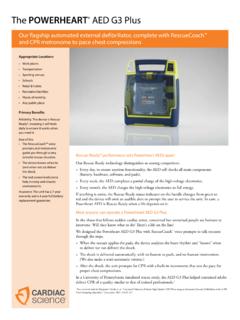
2 Powerheart 9300A (G3 Automatic) Powerheart 9300E (G3 Semi-Automatic) FirstSave 9300C (G3 Semi-Automatic) FirstSave 9300D (G3 Semi-Automatic)Additionally, the Trainer supports branded and other models that have the same functionality as the listed UseThe AED Trainer and this manual are intended for use by qualified instructors with the following competencies and experience: American Heart Association or European Resuscitation Council (or their equivalents) cardio-pulmonary resuscitation (CPR) certification and first responder defibrillation trainingPage 370-00036-01 C A thorough understanding of operation and use of supported rescue AED models and accessoriesFor detailed operation Instructions for a specific rescue AED model, refer to the Operation and Service manual for that ObjectivesAfter training, students should have the minimum competencies: Successfully simulate a patient rescue using the AED Trainer Understand differences between the AED Trainer and rescue AEDs Understand the operation of rescue AEDsAED Trainer OverviewThe AED Trainer is a simulated AED for teaching basic rescue skills and correct defibrillation procedure to first responders who use Cardiac Science AED Trainer can: Simulate each rescue stage Change rescue scenarios Create simulated Cardiac rhythms, both shockable and non-shockableInstructors operate the AED Trainer by remote 470-00036-01 CAED Trainer PartsThe AED Trainer has the same general external features as a rescue :The AED Trainer uses special training pads used only to demonstrate proper pad placement.
3 Training pads cannot deliver a shock or provide 1:AED Trainer and RemoteThe AED Trainer may be configured for semi-automatic or automatic to the appropriate rescue AED Operator and Service manual for detailed descriptions of parts of a rescue 570-00036-01 CAED Trainer RemoteThe remote control has the following functions:Table 1: AED Trainer Remote Buttons ButtonUse1, Shock CancelledScenario 1 Language ConfirmationPress while charging to prompt, Rhythm changed. Shock cancelled. Press during Place Pads prompts to forward to the Analysis prompts. The next sequence (Shock or CPR) is determined by the selected during a CPR sequence to forward to the Analysis prompts, followed by another CPR # then 1 to start Scenario to confirm language selection (see Language Setupon page 7).2, Shock AdvisedScenario 2 Press during Place Pads prompts to forward to the Analysis prompts.
4 The next sequence (Shock or CPR) is determined by the selected during a CPR sequence to forward to the Analysis prompts followed by a Shock # then 2 to start scenario 2. 3, Check PadsScenario 3 Press during analysis to prompt, Check Pads. Press again to continue the # then 3 to start Scenario , Place PadsScenario 4 After the prompt, Tear open package and remove pads, press to prompt: Peel one pad from plastic liner Place one pad on bare upper chest Peel second pad and place on bare lower chest as shown Note:Use if necessary to advance through the prompts more again to indicate pad # then 4 to start Scenario 4. 5, Analysis InterruptedPress during Analysis prompts to prompt, Analysis interrupted. Stop patient motion. Press again to 670-00036-01 C6, Low BatteryPress during a rescue scenario to prompt, Battery low (the battery LEDs will also show low battery).
5 Press again to turn off the low battery LED and turn on two green battery LEDs (50% battery level).7, Service RequiredDecrease VolumePress to prompt, Service Required. Press again to # then 7 to decrease speaker , PauseIncrease VolumePress at any time to Pause (the AED Trainer beeps while paused). Press again to # then 8 to increase speaker , Change ScenarioChange VolumePress # then 1, 2, 3, or 4 to change the shock # then 7 or 8 to decrease or increase the speaker 1: AED Trainer Remote Buttons (continued)ButtonUsePage 770-00036-01 CLanguage SetupTo change the voice prompt language:1 Open the Trainer lid and immediately press and hold the Shock button for 5 seconds. The Shock button stays lit and the current language is displayed on the and hold the Shock button to advance through the available the desired language is displayed, release the Shock button and press the 1 button on the remote to confirm the and Mode SelectionThe Trainer has four modes to simulate the following types of rescue AEDs: Mode 1: FirstSave or Powerheart Semi-Automatic with CPR Metronome Mode 2: FirstSave or Powerheart Semi-Automatic without CPR Metronome Mode 3: Powerheart Automatic with CPR Metronome Mode 4: Powerheart Automatic without CPR MetronomeTo set the mode:1 Select the language (see Language Setupon page 7) and then press the 1 button.
6 The Operation Mode number flashes. 2 Press and hold the Shock button to advance through the available the desired mode is displayed, release the Shock button and press the 1 button on the remote to confirm the selection. The Trainer reboots and begins the voice ScenariosThis section describes a typical rescue scenario and then lists the four pre-set rescue scenarios. To change scenarios, refer to the button functions in theAED Trainer Remote 870-00036-01 CNote:Unlike a rescue AED, the AED Trainer does not store rescue Rescue ScenarioThe following steps demonstrate a typical rescue scenario. Once the AED Trainer is set and the lid is opened, the AED Trainer advances through the complete scenario. The instructor may speed up the scenario if the lid of the AED Trainer . The AED Trainer prompts, Tear open package and remove pads. 2 Press 4 on the remote to continue the Pads prompts: Peel one pad from plastic liner.
7 Place one pad on bare upper chest. Peel second pad and place on bare lower chest as shown. 3 Press 4 again to indicate pad AED Trainer advances to the analysis stage of the rescue sequence and prompts, Do not touch patient. Analyzing rhythm. 5If a shockable rhythm is selected, the AED Trainer prompts, Shock Advised. Charging. The next steps depend on the simulation a semi-automatic simulation:aThe AED Trainer prompts Stand clear. Push flashing button to deliver shock. bThe student presses the Shock button to deliver the first simulated the Shock button is not pressed after 30 seconds, the AED Trainer enters CPR an automatic simulation:aThe AED Trainer prompts Stand clear. Shock will be delivered in Shock delivered. bThe AED Trainer enters CPR the scenario defines a non-shockable rhythm, the AED Trainer prompts, Start CPR. Give 30 compressions then give 2 breaths.
8 Page 970-00036-01 CRecommended Rescue ScenariosThe following table lists the four rescue scenarios recommended by the : If simulating an automatic AED, instead of prompting for shock, the AED Trainer counts down and then automatically delivers a 2: Recommended AHA ScenariosStep Scenario 1 Scenario 2 Scenario 3 Scenario 41 Opens AED Trainer lid2 Places pads on manikin3 AED Trainer performs analysis4No shock advisedShock advised52 minutes of CPRC harge and prompt to shock6 Second analysis2 minutes of CPR7No shock advisedSecond analysis82 minutes of CPRS hock AdvisedNo Shock Advised9 Third AnalysisCharge and prompt to shock2 minutes of CPR10 Shock Advised2 minutes of CPR11 Charge and prompt to shockThird Analysis12 Shock Advised13 Charge and prompt to shock142 minutes of CPRPage 1070-00036-01 CMaintenanceThe AED Trainer has no user serviceable parts. The only maintenance required is to: Clean external surfaces with a damp cloth Replace batteries in the AED Trainer or Remote as needed.
9 The AED Trainer requires two D-cell alkaline batteries The remote control requires two AAA alkaline batteriesWhen replacing batteries, ensure that the polarity is correct. For any other maintenance or repair problem, call Cardiac Science Technical Support or International Operations outside the United States (seeContact Informationon page 11).SpecificationsThe following table lists AED Trainer specifications:Table 3: SpecificationsParameterDetailDimensionsH eight: 8 cm ( in)Width: 27 cm ( in)Depth: 31 cm ( in)Operating and Standby ConditionsTemperature: 0 C to +50 C (32 F to +122 F)Humidity: 5% to 95% (non-condensing)Shipment Conditions (Up to one week)Temperature: -40 C to +65 C (-40 F to +149 F)Humidity: 5% to 95% (non-condensing)BatteryAED Trainer : Two D-cell alkaline batteries Remote Control: Two AAA alkaline batteriesEmissionsRadiated E-M: EN 55011, Group 1, Category BImmunityRadiated E-M: EN 61000-4-3 Radiated M: EN 61000-4-8 ESD: EN 61000-4-2 Page 1170-00036-01 CFCC Notice to United States UsersThis device complies with part 15 of the FCC rules.
10 Operation is subject to the following two conditions: (1)This device may not cause harmful interference, and (2) This device must accept any interference received,including interference that may cause undesired operation. See 47 CFR Sec. (3).Contact InformationThe AED Trainer kit (Model 180-5020) is manufactured for Cardiac Science the United States, contact International Operations or your local ServiceTechnical Support 1-800-991-5465 (US) 1-425-402-2690 (US and Canada) 1-888-466-8686 (US) 1-425-402-2691 (US and Canada) OperationsKirke Vaerloesevej 14 Vaerloese, Denmark Science Corporation3303 Monte Villa Parkway Bothell, WA 98021, USAToll Free: + : + : C