Example: bankruptcy
Interactive Display
Samsung Flip 3 is a powerful education solution that delivers interactive learning experiences. Developed specifically for the education market, Flip 3 provides educators with boundless resources and flexibility to create engaging lessons for a new
Information
Domain:
Source:
Link to this page:
Documents from same domain

Easy Setting Box - Samsung Display Solutions
displaysolutions.samsung.comEasy Setting Box Install/Uninstall 07 6 Click Install. 7 Click Finish to complete the installation. 8 The executable Easy Setting Box icon is created on the desktop when installation is complete. To start the program, double-click the icon.

Samsung Flip 2
displaysolutions.samsung.comSamsung Flip is an intuitive and easy-to-use digital flipchart for any meeting environment, offering enhanced collaboration ... The 55-inch model offers increased workspace in front of the display, a hinge assembly structure and wheels for an efficient, moveable solution. The 65-inch model provides a larger screen which can be used as the main ...
User Manual - Samsung Display Solutions
displaysolutions.samsung.com• When installing the product on a cabinet or shelf, make sure that the bottom edge of the front of the product is not protruding. ... ‒ Contact Samsung Customer Service Center for repairs. • To move the product, first disconnect all the cables from it, including the power cable.
User Manual - Samsung Display Solutions
displaysolutions.samsung.comApr 29, 2019 · User Manual The color and the appearance may differ depending on the product, and the specifications are subject to change without prior notice to improve the performance. Recommended hours of use per day for the DBJ, QBH, QBH-N, QHH models is less than 16 hours. If the product is used for longer than 16 hours a day, the warranty may be void.

MagicInfo Player I - Samsung Display Solutions
displaysolutions.samsung.comcustomized. In formal mode, devices can be arranged based on a predefined matrix such as 2x2 and 4x4. - Matrix Switcher Matrix Switcher refers to a device that converts and sends signals from a variety of external input sources, such as HDMI, DVI and videos, to display devices. - Stream Repeater Stream Repeater refers to a program that sends

INSTALL GUIDE - Samsung Display Solutions
displaysolutions.samsung.comThis TV B2B (Business to Business) model is designed for hotels or the other hospitality businesses, supports a variety of special functions, and lets you limit some user (guest) controls. Figures and illustrations in this Install Guide are provided for reference only and may differ from the actual product appearance.

Monitor User Manual - Samsung Display Solutions
displaysolutions.samsung.comMonitor User Manual The color and the appearance may differ depending on the product, and the specifications are subject to change without ... If a gas leakage is found, do not touch the product or power plug. Also, ventilate the area immediately. • Sparks can cause an explosion or fire.

Samsung SMART Signage
displaysolutions.samsung.comThe Samsung SMART Signage Platform (SSSP) is an open-source, all-in-one solution embedded in Samsung SMART signage that simplifi es installation and maintenance. With SSSP, there is no need for any external devices to communicate with the server or play digital media enjoying easy development, reinforced capability with
Curved Monitor - displaysolutions.samsung.com
displaysolutions.samsung.com‒ Dust accumulation combined with heat can cause a fire, electric shock or electric leakage. • Use the product at the recommended resolution and frequency. ‒ Your eyesight may deteriorate. • Do not put AC/DC adapters together. • Remove the plastic …

User Manual - Main | Samsung Display Solutions
displaysolutions.samsung.comAug 16, 2018 · Leaving the screen fixed on a stationary image for an extended period of time may cause ... " If dust or dirt from the supplied pen remains on the protective glass, clean it referring to the instructions below. Cleaning the exterior and display Wipe the surface with a slightly wet, soft cloth, and then wipe with a dry cloth. ...
Related documents
The World Bank Logframe Handbook, A Logical Framework ...
www.afdb.org(PEAP 1) Stable economic foundation established (PEAP 1) Financial sector regulated and stabilized Financial sector regulated and stabilized Agricultural growth mechanisms implemented Agricultural growth mechanisms implemented Accessible quality health services delivered Accessible quality health services delivered Accessible quality education
Intel WiFi Link 5100 Series
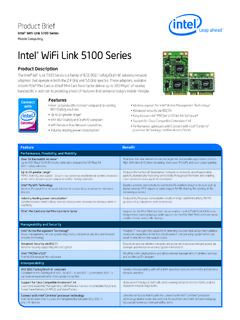
www.intel.comAuthentication WPA7 and WPA27, 802.1X, LEAP, EAP-TLS, PEAP-TLS, and PEAP-MSCHAPv2* Protocols Encryption CKIP, TKIP, 64-bit and 128-bit WEP (for 802.11a/b/g), AES-CCMP (for 802.11a/b/g/Draft-N) Product Safety UL, C-UL, CB (IEC 60950) Products Available Model Code Version Intel® Wireless WiFi Link 5100 512AN_MMW 512AG_MMW 512AN_HMW 512AG_HMW
Spot Vision Screener-Quick Reference Guide
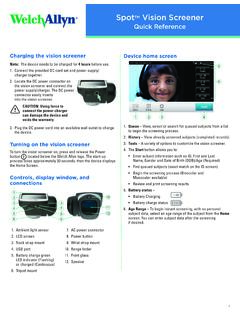
www.welchallyn.comWPA/2 EAP-PEAP The WPA/2 EAP-PEAP username and the password must be between 1 and 64 characters. To connect to a wireless network 1. Touch Tools, and then touch Network . 2. To connect a device to the network, add the network name (SSID), security type, and passphrase or password. 3. Touch OK to save your changes and return to the previous screen.

SMART CONFERENCE TRIO C60 PHONE FOR ANY Bring …
www.poly.com802.1X (EAP-TLS, PEAP-MSCHAPv2) • QoS- IEEE 802.1p/Q tagging (VLAN), layer 3 TOS, and DSCP • WMM (Wi-Fi multimedia)1 POWER • LAN IN: Built-in auto-sensing IEEE 802.3at. PoE Device (Class 4) (requires full Class 4 power input on LAN IN for operation Class 0 if no PSE). Backward compatibility with IEEE 802.3af

Law Enforcement Mental Health and Wellness Programs ...
cops.usdoj.govThis project was supported, in whole or in part, by cooperative agreement number 2016-CK-WX-K007 awarded to 21CP . Solutions, LLC (an independent organization not affiliated with the Task Force on 21st Century Policing established in

Information for Traffic Court Closure - Alberta Courts
www.albertacourts.caGRPP@csadm.just.gov.ab.ca 780 538 5454 780 538 5360 High Prairie, Red Earth Creek, Slave Lake, Wabasca -Desmarais

WAX620 Insight Managed WiFi 6 AX3600 Wireless Access Points
www.downloads.netgear.comPAGE 5 of 7 Insight Managed WiFi 6 AX3600 Wireless Access Points Data Sheet WAX620 Product Comparison WAC505 WAC510 WAX610 WAX620 WiFi Standards 5.0GHz: 802.11a/n/ac

Configuring 802.1X Authentication Client for Windows 10
www.nyp.edu.sg1.8 In the Protected EAP Properties page: • Uncheck “Verify the server’s identity by validating the certificate”. • Check “Enable Fast Reconnect”. • Select “ Secured password (EAP-MSCHAP v2) ” for authentication method. • Click on the “ Configure… ” button. •