Transcription of Programming Remote Control Brand Codes Satellite Receivers
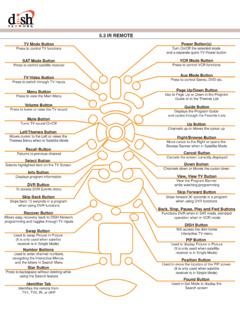
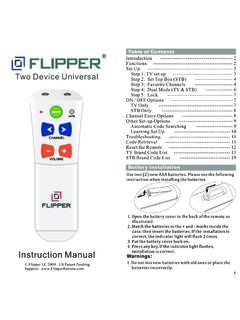
1 Your Remote Control can handle several devices. However, first you have to set up your Remote Control for your equipment. You can do it in one of the following ways: Brand SetupFirst, find the manufacturer of your equipment on the Brand Codes list. If the manufacturer s Brand is not listed, go to Automatic Search below. To set up your Remote Control follow these steps:Turn the device on. Press / / / X / depending on what mode you want to handle and then hold RCU SETUP until the device key blinks twice. Enter one of the Codes from the list. If the code was correct the mode key blinks twice. If not, the key emits one long blink. Then, you will have to repeat steps 2 and 3 until entering the correct.
2 If the device has turned off, you have chosen the right code . If none of the Codes work, try Automatic SearchAutomatic Search should only be undertaken if none of the Brand Codes works or your Brand name is not listed. Use the Automatic Search on your device. Then press appropriate mode key, for example if you want to set up a and hold RCU SETUP until the mode key blinks . The mode key blinks twice. Aim the Remote at the device and press . Press / repeatedly until the device is switched off. Press to turn the TV , press RCU SETUP to store the code for your device. The mode key blinks twice. Your Remote Control is now programmed to operate your TV search Codes for other devices repeat steps 1 through 7, but substitute the key with the appropriate one for the mode you are searching Your CodeIf you want to know what code operates your device, you can obtain it with the Device code option.
3 To find out the code , follow these instructions:Switch on your device. Then press appropriate mode key, for example if you want to set up a and hold RCU SETUP until the mode key blinks . The mode key blinks twice. For the first digit of your code , press and count the number of times the key blinks ( 2 blinks = 2). If the light does not blink, the digit is 0. For the second digit press and count the number of blinks. Do the same for the remaining check for other device Codes , repeat the above steps, but substitute the key with the appropriate one for the device you are LearningYour Remote Control includes a learning feature. It means you can transfer some unique functions from the Remote Control of other device to this Remote Control .
4 Press RCU SETUP until the last selected mode key blinks twice. Then press . Press the mode key. For example to transfer a function from DVD Remote Control press .Press the key on which the function will be your Remote Control and the device Remote Control ( your DVD Remote Control ) head-to-head, about 5 centimeters / 2 inches apart. 2"5 cm2 inOn the device Remote , press and hold the key to be learned. The target Remote Control will blink rapidly and turn off. Keep holding the key on the device Remote Control until the device key on the target Remote blinks the learning failed, the device key emits one long blink. You will have to repeat step 5.
5 Deleting a Single Learning KeyOnce you used a particular key to store a new function on it, you may restore the original function of the RCU SETUP until the last selected mode key blinks twice. Then press . Press the mode key (for example ). The mode key blinks the key containing the learned function. The mode key blinks and hold RCU SETUP to exit All Learned KeysPress RCU SETUP until the last selected mode key blinks twice. Then press .Press the mode key twice (for example ). All the learned keys for this mode will be cleared. The mode key blinks and hold RCU SETUP to exit Remote ControlBrand CodesThe following Codes are used when configuring the Remote Control .
6 First find the manufacturer of your equipment and then try the Codes one by AmplifiersAdcom0577, 1100 Bose0674 Durabrand1561 Elan0647GE0078 Harman/Kardon0892 JVC0331 Left Coast0892 Lenoxx1561 Luxman0165 Marantz0892, 0321 McIntosh0251 Nakamichi0321 NEC0264 Optimus0395, 0823 Parasound0246 Philips0892 Pioneer0823 Polk Audio0892 RCA0823 Realistic0395 Sansui0321 Shure0264 Sony0689, 0815, 1126 Soundesign0078, 0211 Victor0331 Wards0078, 0211 Yamaha0354, 0133 Pioneer1023, 0014, 0080, 0150, 0244, 0531, 0630, 1384 Polaroid1508 Polk Audio0189, 1289, 1414 Proscan1254 RCA1023, 1609, 1254, 0080, 0531, 1074, 1390, 1511 Rio1869 Samsung1295, 1500 Sansui0189 Sanyo1251, 1469, 1801 Sharp0186, 1286 Sharper Image1556 Sherwood1077, 1517, 1653 Sirius1627, 1811, 1987 Sonic Blue1532, 1869 Sony1058, 1441, 1258, 1759, 1622, 0474, 1349, 1406, 1442, 1558, 1658, 1758, 1858 Soundesign0670 Stereo-phonics1023 Sunfire1313 Teac1074, 1390, 1528 Technics1308, 1518, 0309 Thorens1189 Toshiba1788 Venturer1390 Wards0189, 0014, 0080XM1406, 1414 Yamaha0176, 0186, 1176, 1276, 1331, 1375 Zenith0857, 1293 Audio AccessoriesAccurian1106 Altec Lansing0607, 1056, 1485 Apple1115, 1644 Cambridge Soundworks1530 Creative0872D-Link1522 DLO1155 Integra1789iPort1917 Marantz1491 Motorola1464 NaviPod1644 Netgear1785 Omnifi1605 Onkyo1789 Roku1828 Sonance1917 SSI1522 Yamaha1809, 1810 Audio ReceiversADC0531 Aiwa1405.
7 0189, 0121, 0405, 1243, 1388, 1641 Akai1512 Alco1390 Amphion Media Works1563, 1615 AMW1563, 1615 Anam1609, 1074 Apex Digital1257, 1430, 1774 Arcam1120 Audiotronic1189 Audiovox1390, 1627B & K0701, 0820, 0840BK0702 Bose1229, 1629, 1841, 1933 Cambridge Soundworks1370 Capetronic0531 Carver1189, 0189 Classic1352 Coby1389 Curtis Mathes0080 Daewoo1250 Delphi1414 Denon1360, 0004, 1142 Fisher1801 Gateway1517Go Video1532 Harman/Kardon0110, 0189, 0891, 1304,1306 Hitachi1801 Integra0135, 1298, 1320 JBL0110, 1306 JVC1374, 1495, 1811, 1871 Kenwood1313, 1570, 1569, 0186 KLH1390, 1412, 1428 Koss1366, 1497 Lasonic1798LG1293 Linn0189 Liquid Video1497 Magnavox1189, 1269, 0189, 0391, 0531, 1514 Marantz1189, 1269, 0189, 1289 Mitsubishi1393 Norcent1389 Nova1389 Onkyo0135, 0842, 1298, 1320, 1531 Optimus1023, 0080, 0186, 0531, 0670, 1074 Oritron1366, 1497 Panasonic1308, 1518, 0309, 0367, 1288, 1316, 1548, 1633, 1763, 1764 Philips1189, 1269, 0189, 0391, 1120, 1266 Cable Boxes/ConvertersABC0003, 0008, 0014, 0017 Americast0899 Amino1602, 1822 Bell & Howell0014 Bell South0899 Clearmaster0883 ClearMax0883 Coolmax0883 Digeo1187 Digi0637 Director0476 Dumont0637 General Instrument0476, 0810, 0276, 0003 GoldStar0144 Hamlin0009, 0273i3 Micro1602 Jerrold0476, 0810, 0276, 0003, 0012, 0014 Memorex0000 Motorola1376, 0476, 0810, 0276, 1187, 1254, 1106, 1540 Multitech0883 Myrio1602, 1822 Pace1376, 1877, 0237.
8 0008 Panasonic1376, 1877, 0000, 0107 Panther0637 Paragon0000 Philips1305, 0317 Pioneer1877, 0877, 0144, 0533 Pulsar0000 Quasar0000 RadioShack0883 RCA1256 Regal0279, 0273 Runco0000 Samsung1376, 1877, 0144 Sasktel1737 Scientific Atlanta1877, 0877, 0477, 0008, 0017 Sejin1602 Sony1006 Starcom0003 Supercable0276 Supermax0883 Thomson1256 Tocom0012 Torx0003 Toshiba0000 Tristar0883V20883 Viewmaster0883 Vision0883 Vortex View0883 Zenith0000, 0525, 0899 Cable/DVR/PVR CombosAmericast0899 Amino1822 Digeo1187 General Instrument0476, 0810 Jerrold0476, 0810 Motorola1376, 0810, 1187, 1106, 1540, 0476 Myrio1822 Pace1376,1877, 0237 Panasonic1376, 1877 Pioneer1877, 0877 RCA1256 Sasktel1737 Samsung1376, 1877 Scientific Atlanta1877, 0877 Sony1006 Supercable0276 Thomson1256 Zenith0899 Daewoo0784, 0705, 0833, 0869, 1169, 1172, 1234, 1242, 1441, 1443 Denon0490, 0634 Desay1407, 1455 Diamond Vision1316, 1609, 1610 Disney0675, 1270 Dual1068, 1085 Durabrand1127 DVD20000521 Emerson0591, 0675, 0821, 1268 Enterprise0591 ESA0821, 1268, 1443 Fisher0670, 1919 Funai0675, 1268, 1334 Gateway1073, 1077, 1158GE0522, 0815, 0717Go Video0744, 0715, 0741, 0783, 0833, 0869, 1044, 1075, 1099, 1144, 1158, 1304, 1443, 1730Go Vision1071, 1072 GoldStar0741 GPX0699, 0769 Greenhill0717 Harman/Kardon0582, 0702 Hitachi0573, 0664, 1247, 1919 Hiteker0672iLo1348, 1472 Initial0717.
9 1472 Innovative Technology1542 Insignia1268 Integra0627 Jaton1078 JBL0702 Jensen1016 JSI1423 JVC0558, 0623, 0867, 1164, 1275, 1602, 1863jWin1049, 1051 Kawasaki0790 Kenwood0490, 0534, 0682, 0737 KLH0717, 0790, 1020, 1149, 1261 Konka0711, 0719, 0720, 0721 Koss0651, 0896, 1423 Kreisen1421 Landel0826 Lasonic0798, 1173 Lenoxx1127LG0591, 0741, 0801, 0869, 1526 LiteOn1058, 1158, 1416, 1440 Loewe0511 Magnavox0503, 0539, 0646, 0675, 0821, 1268, 1506 Malata0782, 1159 Marantz0539 McIntosh1273 Memorex0695, 0831, 1270 Microsoft0522, 1708 Mintek0839, 0717, 1472 Mitsubishi1521, 0521 Momitsu1082 NAD0741 Nakamichi1222 NEC0785 Nesa0717, 1603 NeuNeo1454 Next Base0826 NexxTech1402 Norcent1003, 0872, 1107, 1265, 1457 Onkyo0503, 0627, 0792 Oppo1224, 1525 OptoMedia Electronics0896 Oritron0651 Panasonic0490, 0632, 0703, 1362, 1462, 1490, 1762 Philips0503, 0539, 0646, 0675, 0854, 1260, 1267, 1354 Pioneer0525, 0571, 0631, 0632 Polaroid1020, 1061, 1086, 1245, 1316, 1478, 1480, 1482 Polk Audio0539 Portland0770 Presidian0675, 1072 Prima1016 Primare1467 Princeton0674 DVD PlayersAccurian1072, 1416 Adcom1094 Advent1016 Aiwa0641 Akai0695, 0770, 0899, 1089 Alco0790 Allegro0869 Amphion Media Works0872, 1245 AMW0872, 1245 Apex Digital0672, 0717, 0755, 0794, 0796, 0797, 0830, 1004, 1020, 1056, 1061, 1100 Arrgo1023 Aspire Digital1168, 1407 Audiologic0736 Audiovox0790, 1041, 1071, 1072, 1121, 1122 Axion1071.
10 1072B & K0655, 0662 BBK1224 Bel Canto Design1571 Blaupunkt0717 Blue Parade0571 Broksonic0695, 0868, 1419 Buffalo1882 Cary Audio Design1477 CAVS1057 Centrios1577 Cinea0831 Cinego1399 CineVision0876, 0833, 0869 Citizen1277 Coby0778, 0852, 1086, 1107, 1165, 1177, 1351 Craig0831 Curtis Mathes1087 CyberHome0816, 0874, 1023, 1024, 1117, 1129, 1502, 1537D-Link1881 DVD CombosAkai0695 Audiovox1071, 1121, 1122iLo1472 Initial1472LG1526 Mintek1472 RCA1193 Using the Master Power KeyYour Remote has a feature that enables you to sequentially turn up to five devices on and off with a single key press. This functionality works only if the Remote Control is in STB RCU SETUP until the last selected mode key blinks.