Example: tourism industry
Quick Reference Guide - Iowa State University
Bruker Optik GmbH OPUS Quick Reference Guide 1 1 Starting OPUS 1. Insert the OPUS stick into the USB port of your PC. Normally, the installa-tion starts automatically. If the Windows Autostart option is disabled, you have to start the installation manually by running the Setup program from the stick.
Tags:
Information
Domain:
Source:
Link to this page:
Documents from same domain

Getting Started with VnmrJ Liquids NMR
www.cif.iastate.eduGetting Started with VnmrJ Liquids NMR Varian NMR Spectrometer Systems with VnmrJ Software Pub. No. 01-999150-00, Rev. C0503

QTOF Training Manual - Iowa State University
www.cif.iastate.eduQTOF Training Manual (11/1/2011 K.H.) Table of Contents . Important Notes p.3 . Overview of QTOF Hardware p.5 ... It is an excellent LC/MS interface that it’s easy to use . 8 and can accommodate high flow rates. Like ESI, APCI can be used in positive ion mode or negative ion mode.

LCMS 2020 Training Manual - Iowa State University
www.cif.iastate.eduLCMS 2020 Training Manual . Kamel Harrata (November 2014) Location: 1238 Hach Hall . ... not well versed in Chromatography and Mass Spectrometry, a 1 hour course/session is usually ... MS, and LC pumps. Wait for IG Vacuum to be about 6 10-4 Start LC pump by clicking on from

Surface Area and Porosity - Iowa State University
www.cif.iastate.eduSurface Area and Porosity Outline •Background Techniques •Surface area Total - physical adsorption External Porosity meso micro 1 2 Tuesday, December 4, 12

A basic guide to particle characterization
www.cif.iastate.edudistribution data are collected and analyzed. The three most commonly used for particle sizing are described below. 1. Number length mean D[1,0] or Xnl The number length mean, often referred to as the arithmetic mean, is most important where the number of particles is of interest e.g. in particle counting applications.
Agilent 5973 GCMS Training Manual - Iowa State University
www.cif.iastate.eduAutoscale Y-axis during zoom Set Anchor display Separate displays Overlaid displays Set number of displays Range select Peak select Manual integration ... view, use right-clk-drag to zoom, and then use left-clk-drag to highlight a region of scans to be averaged into one spectrum. A representative background spectrum is normally created first.
Related documents
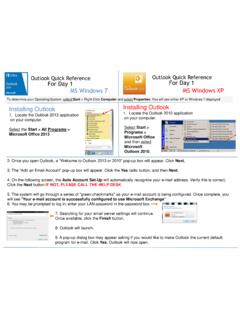
Outlook Quick Reference For Day 1 MS Windows 7 ... - …
w3.assurant.comOutlook Quick Reference For Day 1 Outlook Quick Reference For Day 1 MS Windows 7 MS Windows XP Installing Outlook 1. Locate the Outlook 2013 application on your computer. Select the Start > All Programs > Microsoft Office 2013 Installing Outlook 1. Locate the Outlook 2010 application on your computer. Select Start > Programs > Microsoft Office ...

Adobe Photoshop 7.0 Quick Reference Card for Windows
www.cheat-sheets.orgVersion 7 for Windows ® QUICK REFERENCE CARD Adobe Online Move (V) (M) Rectangular Marquee Magic wand (W) Slice (K) Brush (B) History brush (Y)* Gradient (G)*

MiCollab Client Quick Reference Guide Q - Mitel Edocs
edocs.mitel.comMiCollab Client Quick Reference GuideQ About MiCollab Client MiCollab Client is a software comm unications product integrated with advanced call management features. The following clients are available: • MiCollab for PC Client (Windows 10 only) • MiCollab MAC Desktop Client • MiCollab Web Client

Windows 7 Quick Reference - SharePoint Training
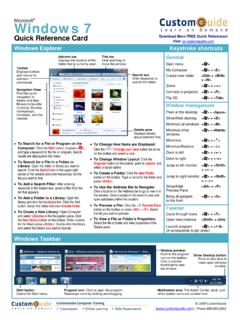
www.customguide.comWindows 7 Quick Reference Card Windows Explorer Keyboard shortcuts General Start menu My Computer + E Create new folder Ctrl + Shift + N Zoom + + Connect to projector + P Flip 3D + Tabnavigation to Window management Peek at the desktop + Space Show/Hide desktop + D Minimize all windows + M Minimize other + Home windows

Windows 7 Quick Reference Guide - Hobbs Municipal Schools
hobbsschools.netWindows 7 Quick Reference Guide Updated: April 2010 Windows Explorer Keyboard Shortcuts • To Search for a File or Program: Click the Start button and type a keyword for the file or program. Results are displayed immediately in the menu. • To Search for a …

Windows 7 Quick Reference Guide - Lehman College
wp.lehman.eduWindows 7 – Quick Reference Guide Windows Explorer Desktop shortcuts Gadgets Start menu Start menu search box T Start button Active program buttons ndows Explorer icon askbar T askbar Notific tion area Show Desktop button Starting Programs and Opening Files To open the Start menu: 1.
Detailed Guide to Office 2010 - Word - Renfro Corporation
www.renfro.comBy design, this guide can be used as a replacement for the Windows 7 and Microsoft Office 2010 Quick Start Guide section for “Microsoft Word 2010” and the Word-related pieces of “Microsoft Office 2010 – Common Features” .
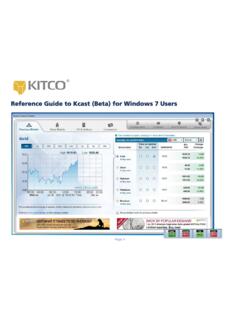
Reference Guide to Kcast (Beta) for Windows 7 Users
www.kitco.comRecommended Windows 7 Settings for Kcast Users To get the most out of your Kcast application, Kitco strongly recommends the following default settings for your Windows 7 operating system: Note: The Kcast for Windows 7 Taskbar always appears on your Application Tray (bottom left of your window). Taskbar Settings 1. Right-click the Windows taskbar 2.
Windows 7 QR - CustomGuide
www.customguide.com• Jump Lists are quick shortcuts to files and commands that a program uses program selected. For example, Internet Explorer displays frequently visited pages, Microsoft Word displays frequently opened documents. • To View a Jump List: Right-click an icon on the Windows 7 taskbar. Or,
Windows 7 - University of Wolverhampton
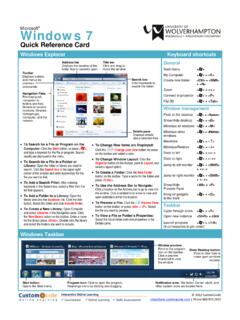
www2.wlv.ac.ukTo Flip through Windows with Flip 3D: Press < > + <Tab>; continue to hold down the < > key while pressing <Tab> to scroll through the open windows. Personalization To Personalize Windows 7 Appearance and Sounds: Right-click the desktop and select Personalize. The …
Related search queries
Outlook Quick Reference For Day, Windows 7, Windows, Quick Reference Card for Windows, QUICK REFERENCE, MiCollab Client Quick Reference, Windows 7 Quick Reference, Windows 7 Quick Reference Guide, Windows 7 – Quick Reference Guide Windows, Detailed Guide to Office 2010 - Word, Quick, Reference Guide to Kcast (Beta) for Windows 7, Kitco