Transcription of Service Quick Guide - Indesit Company
1 WASHINGS ervice Quick GuideService Quick GuideIndesit Company , Service DepartmentSQG_WM_33/1_GB1/2 Indesit Basic Range LED Interface washing machine1523764 Arcadia washing machine: , , Models Covered:Interface:Demo Mode:Function Buttons1 ON/OFF button2 PROGRAM knob3 WASH OPTION buttons and LEDs 4 START/PAUSE button and LEDs 5 WASH PHASE LEDs 6 SPIN knob7 TEMPERATURE knobNot present in this modelAutotest function:Start with the appliance off and the program knob set to the top position (at 12 o clock). 1. Switch on the appliance and turn the knob clockwise by one position. Switch off the appliance and turn the knob to the original position2.
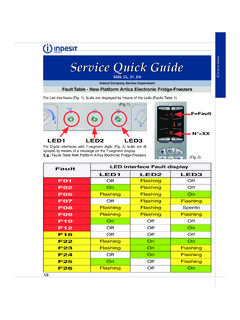
2 Switch on the appliance and turn the knob clockwise by two positions. Switch off the appliance and turn the knob to the original position3. Switch on the appliance and turn the program knob counter-clockwise by one position then press the Start button. Indesit Basic Range LED Interface washing machine2/22/2 Appliance response in the event of a fault:Fault messages:In case of a fault the appliance will fi ll with water and drain continuously to prevent damage to the heating element and possible fl faults are the same as those of the Arcadia platform (see fi le Arcadia Platform Fault Table ) . The LEDs signalling the fault are steadily illuminated while the option LEDs fl ash Table reference.
3 See SQG WM24 (Full) / SQG WM23 (Basic)FAULT LED COMBINATION LED 5 LED 4 LED 3 LED 2 LED 1 F01 Off Off Off Off On F02 Off Off Off On Off F03 Off Off Off On On F05 Off Off On Off On F06 Off Off On On Off F07 Off
4 Off On On On F08 Off On Off Off Off F09 Off On Off Off On F11 Off On Off On On F12 Off On On Off Off F13 Off On On Off On F14 Off On On On Off F15 Off On On On On F16 On Off Off Off Off F17 On Off Off Off On F18 On Off Off On OffLED 5 : 16 LED 4 : 8 LED 3 : 4 LED 2 : 2 LED 1 : 1