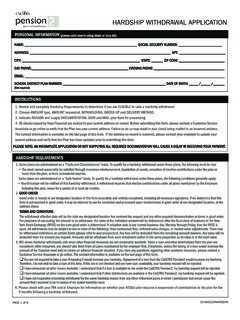
Transcription of Service Retirement Application Change Request …
1 Service Retirement Application Change Request Information and Instructions GENERAL INFORMATION: This form is for the purpose of changing any elections made at Retirement on the Service Retirement Application (SR 0059) only. All changes must be received by CalSTRS no later than 30 days after your first payment was issued by CalSTRS. Complete Section 1 and Section 6. Complete only the sections that apply to the Change you wish to make. Refer to all 12 pages of your previously submitted Service Retirement Application when completing this form. See Your Retirement Guide for detailed instructions and more information. SECTION 1: MEMBER INFORMATION Include your home and alternate telephone numbers and your e-mail address so we can contact you if we have any questions. Be sure your name on your form matches your name as it appears on your Social Security card. If you know it, include your Client ID instead of your Social Security number. You can find your Client ID on your Retirement Progress Report.
2 Service Retirement Application Change Request INSTRUCTIONS REV 12/11 PAGE 1 OF 2 SECTION 2: Retirement Change OR CANCELLATION Check the appropriate box to: Change the Retirement date requested on your Retirement Application . Your new Retirement date must be: On or after January 1, 2012. After your last date of paid employment. Change your last day of paid employment listed on your Retirement Application . Cancel your Retirement Application . This will terminate your Retirement benefits and reinstate your account to active member status. Before making this important decision, talk to a CalSTRS benefits counselor. Change the Retirement alternative you indicated on your Retirement Application . Continue reading for Retirement alternative descriptions. Retirement Alternative Descriptions: Normal Retirement You are eligible for normal Retirement if you are age 60 or older and have at least 5 years of credited Service . Your benefit will be calculated at the rate of two percent of final compensation for each year of credited Service .
3 The 2% factor will be increased by for each quarter year of age up to a maximum of at age 63. Reduced Benefit Election (Early Retirement Limited-Term Reduction Program): If you are at least age 55, but are under age 60 and have at least 5 years of credited Service , you qualify to apply for Retirement under this alternative. You will receive one-half the monthly benefit amount calculated as if you were age 60. The reduced benefit will continue for the same number of months after age 60 that you received benefits before age 60. After that, the normal Service Retirement benefit will be paid. SECTION 3: OPTION CANCELLATION OR Change Check the appropriate box to: Change the option and/or option beneficiary elected at Retirement on your Service Retirement Application . Cancel the option indicated on your Service Retirement Application . IMPORTANT: If you previously filed a preretirement election of option and wish to Change the option or option beneficiary you elected on that form, you must submit your Change on the Preretirement Election of an Option form (SR 0307).
4 CalSTRS must receive the Preretirement Election of an Option form no later than 30 days after your first payment is issued by CalSTRS. SECTION 4: DEFINED BENEFIT SUPPLEMENT ELECTION Change Check the appropriate box to Change your DBS election. From: Enter the DBS Election you made on your Service Retirement Application To: Check the box next to your new DBS Election Be sure your new DBS election is acceptable with your Defined Benefit Election. SECTION 5: DEFINED BENEFIT SUPPLEMENT PAYMENT INSTRUCTIONS Lifetime Monthly Annuity or Period-Certain Annuity of 10 Years Complete this portion of Section 5 if you elected a lifetime annuity or a period-certain annuity of 10 years for your Defined Benefit Supplement funds. You will need to specify your tax withholding preferences. If you do not want tax withholding, mark the Do Not Withhold boxes. If you want tax withholding, mark the appropriate boxes and specify the number of allowances, or you may elect a flat amount to withhold for California state tax only.
5 Service Retirement Application Change Request Information and Instructions Service Retirement Application Change Request INSTRUCTIONS REV 12/11 PAGE 2 OF 2 SUBMITTING YOUR Service Retirement Application Change Request Lump Sum or Period-Certain Annuity of 3 to 9 Years Complete this section if your chose a lump sum or period-certain annuity of 3 to 9 years for your Defined Mailing Address Benefit Supplement funds. You may elect to have your funds paid directly to you or rolled over; mark the appropriate box. If you chose an annuity other than a lump sum or period-certain annuity of 3 to 9 years, you do not need to complete this portion of Section 5. CalSTRS Box 15275, MS 65 Sacramento, CA 95851-0275 Hand Delivery Hand deliver your form to any CalSTRS benefits IMPORTANT: If you are doing a rollover, read Special Tax Notice: Your Rollover Options in the Service Retirement Application . counseling office. For a current listing, go to Overnight Delivery If you are using a special mailing Service such as UPS or FedEx, send your form to: SECTION 6: REQUIRED SIGNATURES Check all boxes that apply, then sign and date your Service Retirement Application Change Request form.
6 If you are married or registered as a domestic partner, your spouse or partner must also sign and date your Application . Your signature date is the date you signed your Application . CalSTRS Member services 100 Waterfront Place West Sacramento, CA 95605 Fax Delivery If your spouse or registered domestic partner does not sign your Application , you must include a completed and signed Justification for Non-Signature of Spouse or Registered Domestic Partner form with your Application . 916-414-5964 or 916-414-5965 QUESTIONS? E-mail questions using your myCalSTRS account or at , or call 800-228-5453. If you divorced or terminated a registered domestic partnership and a portion of your CalSTRS benefits was awarded to a former spouse or partner, check that box. You may need to refer to your settlement agreement to make this determination. In addition, if your court documents have not been reviewed by CalSTRS, you may be asked to provide them later. Keep a copy of your completed form for your records.
7 If you fax your Application , keep a copy of the confirmation page. We are unable to call and confirm receipt of your faxed forms. Service Retirement Application Change Request REV 12/11 PAGE 1 of 5 Service Retirement Application Change Request SR 1328 (Rev. 12/11) California State Teachers Retirement System Box 15275, MS 65 Sacramento, CA 95851-0275 800-228-5453 Please read the instructions before completing this form. This form is for the purpose of changing any elections made at Retirement on the Service Retirement Application (SR 0059) only. All changes must be received by CalSTRS no later than 30 days after your first payment is issued by CalSTRS. Section 1: Member Information NAME (LAST, FIRST, INITIAL) CLIENT ID OR SOCIAL SECURITY NUMBER MAILING ADDRESS DATE OF BIRTH (MM/DD/YYYY) ( ) CITY STATE ZIP CODE HOME TELEPHONE ( ) E-MAIL ADDRESS ALTERNATE PHONE Section 2.
8 Retirement Change or Cancellation Check the appropriate box. I previously submitted my Service Retirement Application and I now Request to: Change my Retirement date from _____/_____/_____ to _____/_____/_____. Change my last date of paid employment from _____/_____/_____ to _____/_____/_____. Cancel my Retirement Application . Change my Retirement alternative from my current choice to: Normal Retirement Reduced Benefit Election (Limited-Term Reduction Program) Section 3: Option Cancellation or Change I am cancelling my Modified Benefit and electing a Member-Only Benefit I am cancelling my Member-Only Benefit and electing a Modified Benefit with an option. (Choose one and complete the beneficiary information in Section 3.) 100% Beneficiary Option 75% Beneficiary Option 50% Beneficiary Option Compound Option (If you choose Compound Option you must also complete and attach the Compound Option Election form (SR 0363).)
9 Change my option from _____ to (choose one): (previous option election) 100% Beneficiary Option 75% Beneficiary Option 50% Beneficiary Option Compound Option (If you choose Compound Option you must also complete and attach the Compound Option Election form (SR 0363). Service Retirement Application Change Request continued Section 3: Option Cancellation or Change continued Change my option beneficiary. For 100% Beneficiary, 75% Beneficiary or 50% Beneficiary Option, complete the information below. To Change a Compound Option beneficiary skip this section and complete the remainder of this form. You must also complete and attach the Compound Option Election form (SR 0363). THE NEW BENEFICIARY I AM ELECTING AT Retirement IS: BENEFICIARY S NAME (LAST, FIRST, INITIAL) CLIENT ID OR SOCIAL SECURITY NUMBER ( ) ( ) MAILING ADDRESS HOME TELEPHONE ALTERNATIVE TELEPHONE CITY STATE ZIP CODE DATE OF BIRTH (MM/DD/YYYY) CalSTRS MEMBER?)
10 YES NO Birth Date Verification enclosed RELATIONSHIP SPOUSE REGISTERED DOMESTIC PARTNER OTHER GENDER MALE FEMALE Section 4: Defined Benefit Supplement Election Change Change my DBS election from _____ to: (Choose only one and complete the applicable portion of Section 5.) (previous DBS election) New DBS Election (If your DBS account balance is less than $3,500, you must take a lump-sum payment): 1. Lump-Sum Payment 2. Annuity Payment (Select one) Period-Certain Monthly Annuity of 3 to 10 years* Number of years (circle one) 3 4 5 6 7 8 9 10 OR Lifetime Monthly Annuity If you elected the Member-Only Benefit, you will receive the Member-Only Annuity. If you elected the Modified Benefit, you have three choices. Select one: 100% Beneficiary Annuity 75% Beneficiary Annuity 50% Beneficiary Annuity 3.