Transcription of Setting up Firefox (32 or 64 bit computers) or …
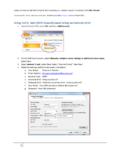
1 Setting up Firefox (32 or 64 bit computers ) or Waterfox ( 64 bit computers ) to use your CAC on a Windows computerThese tweaks are required to utilize your CAC If you don t follow these instructions, Firefox (FF) (or Waterfox(WF)) will not know the CAC reader exists enabling you to access CAC secured guide requires you to install ActivClient (FF / WF will not work with the built in Windows 7, 8 / , or 10 smart card software)ActivClient download locations: Revision / review: 29 December 2016 Presented by: Michael J. DanberryThe most up to date version of this presentation can be found at: Firefox (or Waterfox) Firefox is used on 32 bit Windows Computers is used on 64 bit Windows Firefox (or Waterfox) click the 3 parallel lines, then Options3 Select Advanced, Certificates(tab), SecurityDevices (button)4 Click the Load(button)Type: CAC Reader in Module Name:5 Click thennavigate to locations listed below the image, then click OK- 32 bit Windows computer with ActivClient (32bit) navigate to: C:\Program Files\ActivIdentity\ActivClient\ can also try the file- ActivClient & (64bit) computers, navigate to C:\Program Files(x86)\ActivIdentity\ActivClient\ ActivClient (64 bit) computers, navigate to: C:\Program Files (x86)\HID Global\ActivClient\ OpenSC (32 bit) computer will find the file located at: C.
2 \windows\system32\ Coolkey computer will find the file located at: C:\Program Files(x86)\Mozilla Firefox \NOTE (ActivClient users): Some people / computers may receive: Unable to add module. Some ideas that helped others:1. Navigate to the .dlllocation, then remove everything BEFORE (basically leaving it by itself). 2. Run Firefox as an Administrator. If these tips don t work for you, go back to using Internet Explorer for anything CAC related, you will save yourself a LOT of time and instructions6 Click then navigate to locations listed below the image, then click OK- 64 bit Windows computer with ActivClient (64bit) navigate to: C:\Program Files\ActivIdentity\ActivClient\ ActivClient (64 bit) computers, navigate to: C: \Program Files\HID Global\ActivClient\ (ActivClient users): Some people / computers will receive Unable to add module.
3 Some ideas that helped others:1. Navigate to the .dlllocation, then remove everything BEFORE (basically leaving it by itself). 2. Run Waterfox as an Administrator. If these tips don t work for you, go back to using Internet Explorer for anything CAC related, you will save yourself a LOT of time and instructions7 You should now see CAC Reader in the left column. Select OKto close this windowNOTE: Some Air Force users have had to select Enable FIPS (button) to access the Air Force Portal8 Select the View Certificates (button) you will be prompted for a Master Password (this is the Firefox & Waterfox term for your 6-8 digit CAC PIN).9 When Certificate Manager opens, you should see three certificates under the Your Certificates(tab). Four will show for dual persona personnel who have their PIV activated successfully access DoD websites, you MUST installthe Department of Defense (DoD) certificatesDownload links for the InstallRoot file(s) can be found on: will not harm your computer to run this file more than onceIf after installation of DoD certs you see There is a problem with this website s security certificate or see red certificate errors, follow this guide: Guidance(Visual guide on next page) Close Firefox / Waterfox and restart it.
4 Verify functionality by accessing a CAC restricted website like ( ) and selecting the CAC option for logging in. You will be prompted with a message the Connection is Untrustedthe first time you go to a new DoD website Examples are found on the next slide. Firefox / Waterfox will ask you each and every time you go to visit a new or different DoD website to Confirm the Security Exception (aka, the certificate).12 Once confirmed you should see the website you are trying to :If you have problems accessing (or want the ability to digitally encrypt emails), follow the next few slides15IE Tab V2 extension information / configuration which gives you Internet Explorer type flexibility in your FF/WF web browser (example S/MIME options) The IE Tab V2 (Enhanced IE Tab) plugin gives you the functionality of Internet Explorer without opening Internet Explorer.
5 Download: tab additional configurationOpen Firefox (or Waterfox), Select the 3 parallel lines, followed by Add-ons17 Select Extensions, IE Tab 2 (FF +), users, type https://*. * (without the quotes) in the URL (box), select Add, thenOKhttps://*. *Examples show for Navy personnel. Other military branches may need to add their OWA URLs. Recommend adding /* at the end of the URL19 Attempt to access your CAC enabled email you are in, try to send a digitally encrypted created and maintained by:Michael J. you still have questions, visit.