Example: marketing
Single Power Reclining Button w/USB
2 Button Controller w/USB Extension Cable. How to Connect the Cables 2 Pin Connector 8 Pin Connector 5 Pin Connector. 3 Motor: Power Reclining, Head Tilt, Lumbar w/USB Top Button : Opens and Closes Head Tilt Middle Button : Opens and Closes Lumbar Bottom Button: Smooth side will open the Ottoman
Tags:
Information
Domain:
Source:
Link to this page:
Documents from same domain

<5A3A5CB4FDB0ECCAC2CFEE5C43463730303220D7AABDC7B2A3C1A7B5E ...
www.ashleydirect.comTitle: 5A3A5CB4FDB0ECCAC2CFEE5C43463730303220D7AABDC7B2A3C1A7B5E7C4D4D7C05CB5E7C4D4D7C0204D6F64656C20283129> …

REPLACEMENT PART DESCRIPTION FORM MODEL …
www.ashleydirect.comPACKP/M 1 Side Rail (L=2146mm)床侧 B662-96/97 R47431 Wood+Fabric
ASSEMBLY INSTRUCTIONS - AshleyDirect
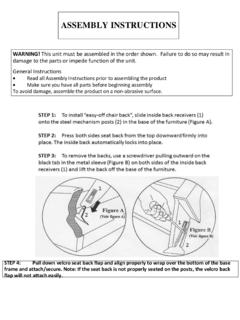
www.ashleydirect.comASSEMBLY INSTRUCTIONS WARNING! This unit must be assembled in the order shown. Failure to do so may result in damage to the parts or impede function of the unit.

GREEN YELLOW CUSHION CHAISE POLY 5250156
www.ashleydirect.com36" Unit 16 LAF Corner Chaise Unit 34 Armless Loveseat Unit 77 Wedge 101" Unit 56 RAF Love Sectional 525 Configuration 2 Space Between Units = 3/4" for Connecting Brackets

Stationary shipping cleat removal - AshleyDirect
www.ashleydirect.comStationary shipping cleat removal Step 1: Rest unit on its back. Step 2: Remove Philips head screws and remove cleat. Note: some styles have multiple cleats.
Fireplace User Guide - AshleyDirect
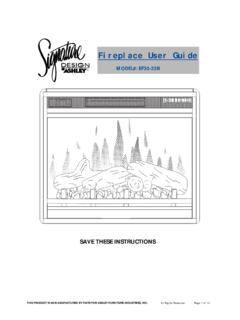
www.ashleydirect.com6. This fireplace is not intended for, and must not be used in bathrooms, laundry areas or any other location in, around, or near water or that may become wet. Never locate fireplace where it may fall into a bathtub or other water source. Failure to follow this instruction may result in electrical shock, fire, and serious bodily injury, death

IMPORTANT INSTRUCTIONS - AshleyDirect
www.ashleydirect.com6. AVERTISSEMENT : N'utilisez le fauteuil que pour l'usage auquel il est destiné et conformément aux instructions en matière de sécurité et à toute autre instruction reliée au produit. Le fait de ne pas suivre ces instructions pourrait entraîner d’importantes blessures, la mort ou des dommages matériels. 7.
ASSEMBLY INSTRUCTIONS - AshleyDirect
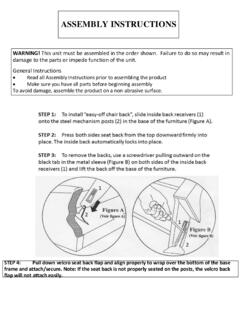
www.ashleydirect.comASSEMBLY INSTRUCTIONS WARNING! This unit must be assembled in the order shown. Failure to do so may result in damage to the parts or impede function of the unit.
Related documents
Data Sheet C7000 AC1900 WiFi Cable Modem Router
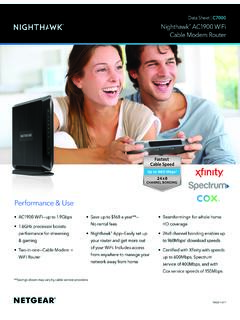
www.netgear.comThe more channels your cable modem router has, the more you avoid peak congestion, maintain fast download speeds and get the most reliable Internet connection. The Nighthawk WiFi Cable Modem Router supports industry-leading 24 downstream channels and the fastest cable Internet speed tiers. FASTER INTERNET DURING PEAK HOURS 8x4 Channel Bonding 24x8

How do I configure the wireless printer using a USB or ...
www.brother-usa.com25. (For USB cable users) Disconnect the USB cable between the computer and the machine. 26. (For LAN cable users) Disconnect the network cable between your access point and the machine, and click Next. Wireless setup is now complete. STEP III: Install The Printer Driver 1. Click Next to install the printer drivers.

C232HM USB 2.0 Hi-Speed to MPSSE Cable Datasheet
www.ftdichip.comThe USB 2.0 Hi-Speed to MPSSE cable contains a small internal electronic circuit board, utilising the FTDI FT232H, which is encapsulated into the USB connector end of the cable, this handles all the USB signalling and protocols. The cable provides a fast, simple way to connect devices with 3.3 Volt digital interfaces to USB.
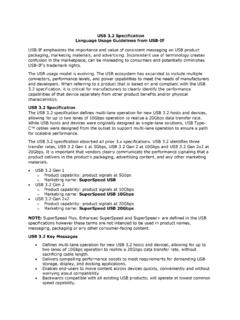
USB 3.2 Specification Language Usage Guidelines from USB-IF
www.usb.org- USB 3.2 only defines the transfer rate of a product. o USB 3.2 is not USB Type-C™, USB Standard-A, Micro-USB, or any other USB cable or connector. o USB 3.2 is not USB Power Delivery or USB Battery Charging. There are separate Language and Packaging Usage Guidelines for the USB Type-C™ Cable and Connector Specification, found here:
USB Cable Installation Guide (UG344) - Xilinx
www.xilinx.comUG344 (v2.2) July 28, 2016 www.xilinx.com USB Cable Installation Guide 01/20/2014 2.1 The Windows 7 Professional 32- and 64-bit operating system was added to Table 1, page 8 and to “For Windows 7, Windows XP, or Wi ndows 2000 Professional Operating

N150 Wireless USB Adapter WNA1100
www.downloads.netgear.comUSB cable N150 Wireless Adapter Resource CD cradle with built-in USB cable. Or your package contents could look like this: Your package contents could look like this: Figure 1. What is in the package depends on where the product is sold. Set up Your Wireless Adapter 6

8-Bit USB Debug Adapter IT USB DEBUG ADAPTER USER S …
www.silabs.com2. Connect one end of a standard USB cable to the USB connector on the USB Debug Adapter. 3. Connect the other end of the USB cable to a USB Port on the PC. 4. Power the target board. Notes: Reset eh t•Ues button in the IDE to reset the target when connected using a …

Setup Guide Logitech® USB Headset H540
www.logitech.comLogitech USB Headset H540 Logitech USB Headset H540 4 English English 5 Troubleshooting Headset not working • Adjust headset volume. • Make sure the microphone is not on mute. The microphone mute LED turns red when mute has been activated. • Check the USB cable connection to your computer. Try a different USB port on your computer.