Transcription of SOLAR PANELS SYSTEM MANUAL - Tesla
1 SOLAR PANELSSYSTEM MANUAL2 YOURSOLAR PANELS SYSTEMC ongratulations on your new SOLAR PANELS SYSTEM . Welcome to the Tesla family and the energy revolution. Your beautiful and durable SOLAR SYSTEM will produce clean, renewable energy for years to come. This MANUAL walks you through each step of activating, monitoring, and maintaining your SOLAR SYSTEM . If you have any questions about this MANUAL or other functions of your SOLAR SYSTEM , please contact Tesla Customer 3 SOLAR SYSTEM Activation 4 Inverter Startup 5 Home Energy Monitoring 6 SOLAR SYSTEM Performance 8 SOLAR PANELS Maintenance 9 Warranty and Service 10 Related Products: Powerwall 11 Frequently Asked Questions 12 Contact Tesla Anytime 143 SAFETYYour safety is Tesla s top priority.
2 Follow these precautions around your SOLAR SYSTEM and related electrical you believe your SOLAR PANELS SYSTEM requires repair, or your inverter displays an error message, please contact Tesla Customer Care for : Your SOLAR SYSTEM generates electrical current. Contact with electrically active parts of a photovoltaic (PV) SYSTEM and related equipment can result in burns, sparks, and lethal shock. DO NOT service the SYSTEM , disconnect wires, open electrical PANELS , or damage any portion of your equipment in any :Opening or altering electrical equipment by anyone other than a Tesla approved technician may void your warranty. DANGER: Do not walk on the roof without being trained and using required safety equipment. Walking on a roof is a fall hazard and can result in serious injury or SYSTEM ACTIVATIONT esla Customer Care notifies you when your utility company approves the operation of your SOLAR SYSTEM .
3 If your SYSTEM is approved and not yet turned on, you can activate your SOLAR SYSTEM with guidance from Tesla Customer is important to follow disconnect procedures in this exact order: 1. Turn on the breakers in your main electrical to your main electrical panel. Most electric PANELS are mounted on an outside wall, or mounted in a garage, basement, or closet. Find the breakers labeled SOLAR SYSTEM , PV, Photovoltaic Backfeed, or these may have an additional sub-panel. If you do, check to see if there are additional SOLAR breakers in the sub-panel and switch them Switch on the external AC and DC your SOLAR PANELS have one or both of these, switch these to know:BreakersSwitches inside electrical PANELS that protect your home from harmful power switch, operated by a large handle, that disconnects or interrupts the electrical central component that converts SOLAR -generated power from Direct Current (DC) voltage to Alternating Current (AC) voltage for your home s STARTUPI nverters commonly installed along with Tesla SOLAR PANELS are shown below.
4 If yours is not shown, or if you need assistance activating your inverter, please contact Tesla Customer Care. Once you complete these steps, it may take about 5 minutes for the inverter to start producing Turn the DC disconnect dial If you have a SolarEdge inverter, turn the power switch InvertersIf you have multiple inverters, you can turn them On in any Disconnect Dial12On ( I ) Off (O) SwitchSolarEdgeABBD elta6 HOME ENERGY MONITORINGT esla Mobile AppUse the Tesla mobile app to monitor your SOLAR PANELS as well as products like Powerwall or your Tesla vehicle. The app gives you visibility into your SOLAR PANELS power generation and home energy use. The app also sends alerts from Tesla Customer Care if Tesla detects issues with your SOLAR PANELS .
5 Most issues can be resolved remotely by Tesla Customer Care. If not, Tesla sends a technician directly to your GATEWAYUTILITY METERMAIN PANELSOLAR INVERTERB ackup Gateway or Neo GatewayFor homes with Powerwall, a Backup Gateway is installed for SYSTEM monitoring and accessing Powerwall energy in case of a power outage. For homes without Powerwall, a Neo Gateway is installed for SYSTEM both instances, you need an always-on Internet connection, a router with an open Ethernet port, an AC power outlet, and the to Your Backup GatewayIf your home has a Powerwall installed, the Backup Gateway is already installed and set up. Use the Tesla mobile app to follow your energy production in real can also find more information in the Powerwall Owner s MANUAL at: homes without Powerwall, connect the Neo Gateway to monitor energy production from your SOLAR Download the Tesla mobile app on your Log into the Tesla Connect the Neo Gateway to your the included Ethernet cable to connect the Neo Gateway to your Turn on the Neo your Neo Gateway into a power strip near your router using the included power supply.
6 The power light on top glows Watch for a Neo Gateway should be connected. If you see a WEAK SIGNAL notification, move the Neo Gateway closer to the inverter until the notification disappears. For any other error messages, please contact Tesla Customer Use the Tesla mobile app to monitor energy production in real you have trouble setting up or troubleshooting your Neo Gateway, please contact Tesla Customer to Your Neo Gateway8 SOLAR SYSTEM PERFORMANCEYour SOLAR SYSTEM performance is measured by how much energy is generated over time. Energy production can vary from month to month based on seasonal weather conditions. Other factors that can hinder production include: Unexpected shading due to new tree growth Debris or dirt on the PANELS Long periods of rainy or snowy weatherYou can find expected performance information on your SOLAR PANELS layout document.
7 You can also use the Tesla mobile app to follow your energy production in real PANELS MAINTENANCE SOLAR PANELS require routine maintenance. Minor care on your part can ensure better SYSTEM ManagementShade on your SOLAR PANELS can hinder electricity production. Keep trees or other tall plants trimmed to prevent shade on your SOLAR PANELS Cleaning Cleaning your PANELS occasionally to remove accumulated dust, pollen, and leaves maintains SYSTEM performance. How often you clean depends on where you live. Ordinarily, you can rinse off PANELS with a water hose from ground level to remove accumulations. Rinse only the glass cover of the PANELS ; do not rinse wiring or areas underneath PANELS . For safety and performance reasons, rinse PANELS only when the sky is overcast, or when the sun is low in the sky, as PANELS can become hot under intense sunshine .
8 If you have excessive soiling, such as bird droppings, you may wish to hire a local SOLAR panel cleaning Service and ReplacementIf your inverter is still under its 10-year warranty and you experience an issue with the inverter, please contact Tesla Customer Care to make a warranty claim against the manufacturer and receive inverter service, repair, or your inverter is no longer under warranty and you experience an issue with the inverter, please contact Tesla Customer Care as the SYSTEM warranty may cover service, repair, or replacement of the or IceDo not shovel snow off your SOLAR PANELS . While accumulated snowfall can cover PANELS and temporarily reduce production, this is not a cause for concern. Your SYSTEM is designed with annual energy production in mind, and occasional inclement weather is AND SERVICES olar PANELS WarrantyReview your Warranty Agreement for detailed information about the coverage of your SYSTEM over to Get Warranty ServiceIn the rare case that your SOLAR SYSTEM is not operating properly, please contact Tesla Customer Care.
9 If Tesla determines that a problem cannot be diagnosed or resolved remotely, Tesla Customer Care will arrange for service. If the issue is covered by warranty, your SOLAR PANELS will be repaired at no cost to you. If the issue is not covered by your warranty, Tesla Customer Care will assist you in resolving the issue and any service charges that may WarrantyReview your inverter Warranty Agreement for detailed information about the inverter coverage over time, typically 10 years. If you experience any issues with your inverter during the warranty period, please contact Tesla Customer Care to make a warranty claim against the manufacturer and receive inverter you experience any issues with your inverter after the inverter warranty period, contact Tesla Customer Care.
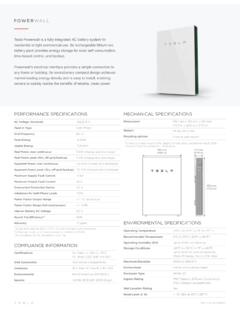
10 In some systems, Tesla warrants that, after the end of the manufacturer s inverter warranty period, and under normal use and service conditions, your SYSTEM inverter will be free from defects in workmanship, or from defects in or a breakdown of materials or components, for the remainder of the SOLAR PANELS SYSTEM warranty, typically a period of 20 years. Powerwall WarrantyPowerwall is a maintenance-free product with a 10-year warranty. Please visit Tesla s support page for the Powerwall Owner s MANUAL at PRODUCTS: POWERWALLIf you have a Powerwall, you are successfully storing excess SOLAR energy from SOLAR PANELS and powering your home even when the sun isn t out. You also have the advantage of automatically backing up your home during a utility power outage.