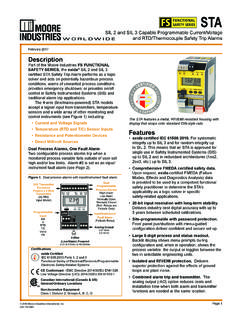
Transcription of STA
1 225-748-01 LFebruary 2017 User s ManualDemand Moore TAHLPRG Programmable Current/Voltage safety Trip AlarmProgrammable Current/VoltageSafety Trip Industries-International, 2 - User s Manual225-748-01L February 2017 Programmable Current/Voltage safety Trip AlarmS TAHLPRGL ocationsCustomer SupportMoore Industries is recognized as the industry leader in delivering top quality to its customers in products and services. We perform a sequence of stringent quality assurance checks on every unit we ship. If any Moore Industries product fails to perform up to rated specifications, call us for help. Our highly skilled staff of trained technicians and engineers pride themselves on their ability to provide timely, accurate, and practical answers to your process instrumentation questions. Our headquarters and other facilities phone numbers are listed below. There are several pieces of information that can be gathered before you call the factory that will help our staff get the answers you need in the shortest time possible.
2 For fastest service, gather the complete model and serial number(s) of the problem unit(s) and the job number of the original Headquarters 16650 Schoenborn StreetNorth Hills, California91343-6196, : (818) 894-7111 Fax: (818) 891-2816E-mail: FREE: China Room 806, Block 2,Lotus International PlazaNo. 7866 Hu Min Road, Min Hang District,Shanghai, 201102, P. R. ChinaTel: 86-21 62491499 Fax: 86-21 62490635E-mail: 1 Lloyds Court, Manor Royal, CrawleyW. Sussex RH10-9 QUUnited KingdomTel: 01293 514488 Fax: 01293 536852 FREE PHONE: 0800 Guido Gezellestraat 106B-2630 AartselaarBelgiumTel: 03 : : Burg Meslaan 984003 CD TielThe NetherlandsTel: (0)344-617971 Fax: Sydney, NSW3/1 Resolution DriveCaringbah, New South Wales 2229 AustraliaTel: (02) 8536-7200 Fax: (02) Perth, WA6/46 Angove StreetNorth Perth, Western Australia 6006 AustraliaTel: (08) 9228-4435 Fax: (08) Moore Industries-International, 3 - User s Manual225-748-01 LFebruary 2017 safety Messages Please read this manual in its entirety.
3 It should answer most of your questions. For personal and system safety , and for optimum product performance, make sure you thoroughly understand the contents before installing, using, or maintaining this product. Should you still have questions please visit our web site at or contact any of our sales/support offices nearest you. Your safety and the safety of others is very important. We have provided many important safety messages in this manual. Please read these messages carefully. These safety messages alert you to potential hazards that could hurt you or others or render damage to units. All Moore Industries instrumentation should only be used for the purpose and in the manner described in this manual. If you use this product in a manner other than that for which it was intended, unpredictable behavior could ensue with possible hazardous consequences. Each safety message is associated with a safety alert symbol.
4 These symbols are found in the throughout the manual. The definition of these symbols is described below: Pay particular attention wherever you see the following symbols:Note Information that is helpful for a procedure, condition or operation of the Hazardous procedure or condition that could damage or destroy the Hazardous procedure or condition that could injure the Personnel The Moore Industries product/systems described in this manual may be operated only by personnel qualified for the specific task in accordance with the relevant documentation, in particular its warning notices and safety instructions. Qualified personnel are those who, based on their training and experience, are capable of identifying risks and avoiding potential hazards when working with these Moore Industries use of Moore Industries products Moore Industries products may only be used for the applications described in the catalog and in the relevant technical documentation.
5 If products and components from other manufacturers are used, these must be recommended or approved by Moore Industries . Proper transport, storage, installation, assembly, commissioning, operation and maintenance are required to ensure that the products operate safely and without any problems. The permissible ambient conditions must be complied with. The information in the relevant documentation must be have reviewed the contents of this publication to ensure consistency with the hardware and/or software described. Since variance cannot be precluded entirely, we cannot guarantee full consistency. However, the information in this publication is reviewed regularly and any necessary corrections are included in subsequent editions. Specifications and information are subject to change without product and company names are trademarks or registered trademarks of their respective holders.
6 Use of them does not imply any affiliation with or endorsement by them unless otherwise Current/Voltage safety Trip AlarmS TAHLPRGA bout this Industries-International, 4 -User s Manual225-748-01L February 2017 Table of ContentsSTA (HLPRG) Quick Start Guide ..5 Default/Factory Configuration 6 Section 1 - Introduction ..7 Model Numbers and Options ..8 Alarm Terminology ..10 Section 2 - Calibration and Bench Check 12 Calibration ..12 Bench Check ..12 Section 3 - Installation and Wiring 15 Dimensions ..15 Conditions of Use ..16 Terminal Designations ..17 Security Settings ..21 Section 4 - STA Front Panel Configuration 22 Section 5 - STA PC Configuration 45 Section 6 - Operation and Maintenance 60 Operation ..60 STA Diagnostics & Fault Alarms ..60 STA Diagnostic Messages ..61 Maintenance ..62 Section 7 - STA in safety Instrumented Systems 63 Proof Tests ..67 Section 8 - Applications 69 High Integrity Alarm Trip.
7 69 High Availability Architecture ..691oo2 Redundant Architecture ..70 Analog Output in the safety Path ..71 High Integrity Analog Output ..71 Section 9 - Specifications 72 Section 10- Ordering Information 74 Warranty Disclaimer 76 Programmable Current/Voltage safety Trip AlarmS Industries-International, 5 - User s Manual225-748-01 LFebruary 2017 STA (HLPRG) Quick Start GuideUse the front pushbuttons to quickly and easily set-up the STA for your application. After programming your alarm using the diagram below, install the unit into your application using the connection diagrams and terminal designation table located in this STA configuration can be recorded using the worksheet found at the end of this manual. Please contact Moore Industries Sales for an interactive version of the PanelPushbuttonsUse the UP and DOWN pushbuttons to scroll through menus and sub-menus. Use the SELECT pushbutton to access menus and/ormake a im Analog Output:Connect the STA into a calibrationset-up as shown in the manual,trim the analog outputSet Tr im Zero, Full,Factory Tr im and Test.
8 (Requires -AO Option)Password:View or change Options:Display mode, decimal places,50/60Hz filter, startup delay, display test and factory Fault:Reset fault option, select Yes or No .CONFGPASWDExit Configuration Menu:Return to process Alarm:Settings for Alrm 1, Alrm 2, Input Fault*, and Manual Reset*.Set trip point, dead band, high/low trip, latching/non-latching,Enter Delay*, and Manual Reset Configuration*.DSCALEAOUTS cale Analog Output:Set the values for output atzero and full input(Requires -AO Option)DURESETFAULTDDUCONFGAOUTC onfigure Analog Output:Select volt or current damping valueand fail mode.(Requires -AO Option)TRIMINPUTTr im Input:Select Tr im Mode, User 1 PNT,User 2 PNT, or FCTRY TRIMDUUUDUUUDUENTERPASSSYSLOCKE nter the password code to enablesettings changes.(Default = 1)(If the incorrect password is entered, access to the configuration menus is denied.)Configure Input:Choose Input type,Input Zero, Input Full, Input OOR*,and BWIRE LevelSecurity Jumperinstalled in FullAccess Jumperinstalled in NoAccess Jumperinstalled in PasswordRequired Input:Set the Scale Mode On/Off, set EGU, set Zero values, and set Full values.
9 WARNING: This menu is intended to aid in the configuration of your instrument. However, proper use of the STA at its intended safety level cannot be achieved without thorough review of the STA in safety Instrumented Systems Section of this manual.* For STA units with firmware versions and earlier, these Settings are not Current/Voltage safety Trip AlarmS TAHLPRGSECTION Industries-International, 6 - User s Manual225-748-01L February 2017 Default/Factory Configuration The following are the default factory settings for your : 4-20mA *Lower Out of Range Value: mA (1% of Span)*Upper Out of Range Value: mA (1% of Span)*Startup Delay: 0 SecondsScale Mode: Off Trim Mode: Factory Trim Trip Alarms: Trip High at 12mA with Deadband set to 0 *Input Fault Alarm: Latching (On)*Manual Reset: Trip Alarms 1 & 2 OnlyOptional Analog Output (AO): Current, No Damping, Fail Low, Scaled to 4-20mA Display: Process Variable (PV), Auto Decimal Point, 60Hz Filter Broken Wire Detection: Level Set to 0 (disabled) Password.
10 1* For STA units with firmware versions and earlier, these Settings are not Current/Voltage safety Trip AlarmS TAHLPRGSECTION Industries-International, 7 - User s Manual225-748-01 LFebruary 2017 Programmable Current/Voltage safety Trip AlarmS TAHLPRGSECTION 1 Section 1 - IntroductionThis is the user s manual for Moore Industries STA (HLPRG): Programmable Current/Voltage safety Trip Alarm. The Moore Industries safety Trip Alarm (STA) is designed and manufactured to provide a high level of availability for safety critical applications and for use as a component part of a safety instrumented manual contains all of the information needed to configure, install, operate and maintain this product. When the STA is used in a SIL rated safety application (as defined by IEC 61508), the safety Instrumented Systems section of this manual must be read and followed in order for the STA to meet its IEC 61508 certification Industries STA (HLPRG) is a Programmable Current/Voltage safety Trip STA monitors a process variable and provides two fully user-configurable contact closure outputs that can be individually programmed to trip whenever the input falls outside a user-set, high or low trip point.