Example: stock market
Super Charger - storage-asset.msi.com
User Guide. 2 Super Charger er uie Super Charger Super Charger provides i-Pad, i-Phone and iPod charging function. The iPad with very special charging requirements as it requires 1.6A power supply rather than the 0.5A current available with conventional USB interfaces. That is
Tags:
Information
Domain:
Source:
Link to this page:
Documents from same domain

MSI SMART TOOL
storage-asset.msi.com2 MSI SMART TOOL User Guide MSI SMART TOOL MSI SMART TOOL is a convenient tool that can help you to create your Windows installation USB flash drive with USB 3.0 drivers, and it can also create a software RAID. Main menu After installing and activating MSI SMART TOOL, it will display a main menu for you to choose Win7 Smart Tool or Software ...

DRAGON CENTER User Guide - storage-asset.msi.com
storage-asset.msi.comfrom the root path of the MSI Driver Disc. 4. Click the Utilities tab. 5. Select the DRAGON CENTER. 6. Click the Install button in the lower-right corner of the window. 7. The installation will then be in progress, after it has finished it will prompt you to restart. 8. Click OK button to finish. 9. Restart your computer. Launching DRAGON CENTER
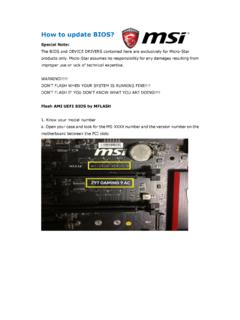
How to update BIOS? - storage-asset.msi.com
storage-asset.msi.com8. A warning message comes out “ Don`t remove USB drive or shutdown system” and then System will be reset to update BIOS after 5 seconds. 9.If your motherboard is equipped with …

BIOS Update Instruction By DOS Tool
storage-asset.msi.comAug 02, 2016 · Wait for a couple of seconds to complete the BIOS update procedure. * DO NOT power off the notebook while this BIOS is updating 9. Power off the notebook after the BIOS update procedure is completed. 8 MSI NB FAE Team Flash BIOS by DOS Tool 10. Then power on again and press “DEL” key to enter the BIOS screen.

EC Firmware Update Instruction Windows mode
storage-asset.msi.comMay 11, 2017 · B1. If there is a batch file “ECWIN.BAT” among the extracted file, please right click on the batch file to open the context window and select “Run as Administrator” and select “Yes” to accept the UAC window. B2. Please read the descriptions among DOS screen carefully. Making sure that

How to enable crosshair - storage-asset.msi.com
storage-asset.msi.comNov 02, 2017 · 1. Press “ < “ button front of monitor can enable crosshair function. 2. By press the button to switch different color and type of crosshair. How to enable crosshair G27C / …

BIOS Update Instruction UEFI BIOS Setup Utility
storage-asset.msi.comFlash BIOS by UEFI BIOS Setup Utility 1-13. After reboot, system will enter BIOS setup utility. Press “Enter” key on “Proceed with flash update”. 1-14. When you see the message as the screenshot below, please do reset EC firmware by following the instructions. (Please choose one of methods to operate the process.)

How to make a bootable flash disk and to flash BIOS
storage-asset.msi.com1. Extract the zip file containing the BIOS files and flash utility to a bootable USB flash drive (Pen drive). 2. Insert the USB flash drive (Pen drive) in the USB port. 3. Boot up the notebook and press F11 key to run Boot menu and then to select USB flash disk drive. Note1: For some models, you need to go into the bios and change boot priority.

How to redeem Game Pass free trial - storage-asset.msi.com
storage-asset.msi.comTo keep your account in good standing, we require your date of birth. Birthdate January Year Cancel Next msi . Store Pick a payment method Credit card or debit card PayPal Mobile phone A gift Cancel x Microsoft St PC 1 Month plus applicable month after that

FAQ No. 02155 How to use MSI Dragon center to adjust FAN …
storage-asset.msi.comYou can use the same way to setup GPU FAN RPM. Please click “Save” when you finish the setup. Note: 1. Not every model has individual CPU and GPU fans. Some models only has single FAN for CPU/GPU cooling, and Dragon Center will recognize it as CPU FAN. It is normal if you can’t adjust GPU RPM and see 0 FAN RPM of GPU on single FAN system. 2.
Related documents
MPLAB X IDE User’s Guide - Microchip Technology
ww1.microchip.comMPLAB X IDE User’s Guide MPLAB® X IDE User’s Guide Notice to Customers Important: All documentation becomes dated, and this manual is no exception. Microchip tools and documentation are constantly evolving to meet customer needs, so some actual dialogs and/or tool descriptions may differ from those in this document.

OpenFOAM User Guide, Version 9
foam.sourceforge.netOpenFOAM The OpenFOAM Foundation User Guide version 9 14th July 2021 https://openfoam.org
CAN BUS Analyzer User's Guide - Microchip Technology
ww1.microchip.comAug 02, 2011 · This user's guide describes how to use the CAN Bus Analyzer on a CAN network. The ... Integrated Development Environment for development systems tools. This list is focused on the MPLAB IDE, MPLAB SIM simulator, MPLAB IDE Project Manager and general editing and debugging features.

ATOMSTACK A5 Pro Laser Engraver Installation Manual
myosuploads3.banggood.comApr 11, 2021 · AtomStack is not liable for any and all losses arising from the user's failure to use the product in accordance wit h this manual. Atomstack has the ultimate right to interpret the document, subject to legal compliance. Atomstack reserves the rig ht to update, modify, or terminate the Terms without prior notice. ...
Using Microsoft Visual Studio to Create a Graphical User ...
www.egr.msu.eduGUI’s. This integrated development environment (IDE) is compatible with many different languages, but remains simple to maintain the functionality of the application. Visual Studio has a large assortment of options to create a GUI. As shown in Figure 1, depending on the

ESP32 Bluetooth Networking - Espressif
www.espressif.comFigure 1-1. EspBlufi User Interface • The Configure button will be shown in the interface and click this button. ! Figure 1-2. CONFIGURE Button • Configure the length of BLE mtu, BLE device filtering, and check the version of the app and Blufi repository. ! Figure 1-3. CONFIGURE Interface Espressif !2 /!13 2019.11!
User's Guide - epic-ide.org
www.epic-ide.orgEPIC - User’s Guide ii Contents 1 Plug-in Installation1 ... If you only want to use Eclipse as a Perl IDE, the Platform version is sufficient. If you are in for Perl and Java coding, use the SDK version. Eclipse does not include a Java Runtime Environment (JRE). You will need a …

USER’S GUIDE
www.spacex.comThe Falcon launch vehicle user’s guide is a planning document provided for customers of SpaceX (Space Exploration Technologies Corp.). This document is applicable to the Falcon vehicle configurations with a 5.2 m (17-ft) diameter fairing and the related launch service (Section .