Example: confidence
USER MANUAL - AKASO
Photo In Photo Mode, press the Shutter button to take photos. Self-Timer Self-Time Mode gives a delay between pressing the shutter release and the shutter's firing. Burst Photo In burst mode, several photographs are captured in quick succession, so it is perfect for capturing fast-moving activities. Time Lapse Photo
Tags:
Information
Domain:
Source:
Link to this page:
Documents from same domain

USER MANUAL - Affordable Action Camera | Best GoPro ...
www.akasotech.comA Self Timer gives a delay between pressing the shutter release and the shutter's firing. It is most commonly used to let photographers to take a photo of themselves (often with family). 13. Image Size: 20M / 16M / 12M / 10M / 8M / 5M / 3M / VGA 640x480 Default setting is 20M. 14. Burst: Off / Burst3 / Burst5 / Burst10 Default setting is off.

USER MANUAL - Best GoPro Alternative - AKASO
www.akasotech.comTu rn on camera, p ess and hold Down button for th ee seconds to tu n on Wi-Fi. To Turn Off Wi-Fi Press Down button to turn off Wi-Fi. There are 5 modes: Video, Photo, Burst Photo, Time Lapse Photo and Setting. OVERVIEW OF MODES VIDEO MODE Video Mode is the default mode when you turn on the camera.

USER MANUAL - akasotech.com
www.akasotech.comOverview of Basic Functions Welcome to use your AKASO Action Camera. To record or take pictures, Micro SD card (not included) is a must. Micro SD ca rd specifications: MicroSD/Micro SDHC/Micro SDXC Class 10 / UHS-I up to 64GB (compatible with 8GB, 16GB, 32GB, 64GB) Format the SD card first on this camera before using. Regularly formating the ...

USER MANUAL - Best GoPro Alternative - AKASO
www.akasotech.comA video codec is an electronic circuit or software that compresses or decompresses digital video. It converts uncompressed video to a compressed format or vice versa. According to multiple studies, HEVC, High Efficiency Video Coding (H.265) should deliver up to 50% better compression than H.264 in video on demand (VOD)

HEATED VEST User Manual
www.akasotech.comHEATING AREAS Heating Zones on left pocket, right pocket, mid-back and collar. CLEANING INSTRUCTIONS ① Remove the power bank from the vest pocket before washing, and put the USB plug back to the pocket and zip up. ② Gentle hand wash or machine wash in gentle cycle with a mild detergent and cold water.
Related documents
da9be3a68e8b72883d59 …
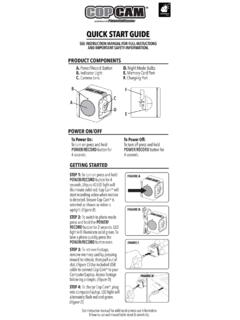
da9be3a68e8b72883d59-fb0b0f208275e2c0695c611c4ff18227.ssl.cf2.rackcdn.comSTEP 2: To switch to photo mode press and hold the POWER/ RECORD button for 2 seconds. LED light will illuminate solid green. To take a photo quickly press the POWER/RECORD button once. STEP 3: To retrieve footage, remove memory card by pressing inward to release, then pull out of slot. (Figure C) Use included USB cable to connect Cop Camw to your

HERO3 UM Silver ENG REVB WEB - GoPro
gopro.comTo capture a Photo Burst series, verify the camera is in Photo Burst mode. If the Photo Burst icon on your camera’s LCD screen is not showing, press repeatedly until it appears. to take a Photo Burst series: Press and release . The red status indicator Lights flash and the camera beeps multiple times. Pro tiP: Sometimes 30 photos/1 second is ...

USER MANUAL - GoPro
static.gopro.comTo capture a Photo Burst series, verify the camera is in Photo Burst mode. If the Photo Burst icon on your camera’s LCD screen is not showing, press repeatedly until it appears. to take a Photo Burst series: Press and release . The red status indicator Lights flash and the camera beeps multiple times. Pro tiP: Sometimes 30 photos/1 second is ...
USER MANUAL - Affordable Action Camera | Best GoPro ...
www.akasotech.comA Self Timer gives a delay between pressing the shutter release and the shutter's firing. It is most commonly used to let photographers to take a photo of themselves (often with family). 13. Image Size: 20M / 16M / 12M / 10M / 8M / 5M / 3M / VGA 640x480 Default setting is 20M. 14. Burst: Off / Burst3 / Burst5 / Burst10 Default setting is off.
PHOTO/VIDEO RELEASE FORM - English
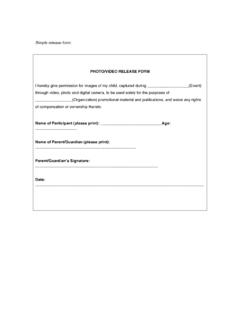
english.selu.eduSimple release form: PHOTO/VIDEO RELEASE FORM I hereby give permission for images of my child, captured during _____(Event) through video, photo and digital camera, to be used solely for the purposes of _____(Organization) promotional material and publications, and waive any rights of compensation or ownership thereto.

THE 2022 OLD FARMER’S ALMANAC CANADIAN EDITION …
www.almanac.com180 Photo: Denis Brodeur/ Getty Images 181 BEYOND THE BOARDS WHAT HAPPENED ON THE ICE WAS ONLY PART OF THE 1972 CANADA–SOVIET HOCKEY SUMMIT. BY PAT HICKEY PHIL ESPOSITO (7) OF TEAM CANADAfor 10 minutes in a boiling water bath. PLAYS AGAINST TEAM USSR DURING THE 1972 SUMMIT SERIES FOOD 68 Photo: …
Garmin Dash Cam™ 47/57/67W Owner’s Manual
www8.garmin.comTaking a Photo From the viewfinder, press . The device saves a photo and a video to the memory card. Travelapse The Travelapse feature captures a fast-motion video of your trip, which allows you to share a short video of all the places you traveled. Recording Travelapse does not stop dash cam recording.

USER MANUAL 1 - GoPro
gopro.com10 11 4. Hold down the Latch Release button on the side door, then slide the door open. 5. You can also update your camera manually using the microSD card and a Connect the camera to a computer or other USB charging adapter

Join the GoPro Movement
static.gopro.comfootage will tilt with it. You’ll capture every twist and turn. Landscape Lock This locks your camera into landscape orientation. Your on-screen camera menu won’t change if you rotate your camera to portrait orientation. 1. Swipe down to access the Dashboard. 2. Tap Preferences > Touch Screen > Landscape Lock.