Example: bankruptcy

Verify and Install the proper Tmax USBSER Driver.

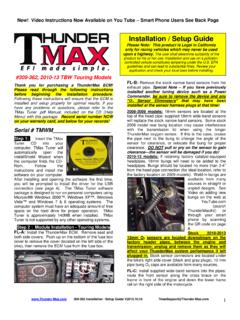
Verify and Install the proper tmax USBSER : If you are using Windows 10 all updates must be installed. (Windows 10 shown) Verify USBSER driver:To determine if the driver is loaded, connect to the module and THEN turn the KEY/KILL switches to , run the Open Device Manager / View Installed Adapters (SEE BELOW IMAGE)View the current driver details:DOUBLE-CLICK over tmax USBSER Driver (COM4)NOTE: Your COM number may be proper driver is marked/displayed you are having issues with tmax Windows 10 or ANY other Windows Operating the Install /Repair USBSER the following Install Wizard dialog opens select REMOVE then follow all re-run the above Install /Repair command again.

Verify and Install the proper Tmax USBSER Driver. IMPORTANT: If you are using Windows 10 all updates must be installed. (Windows 10 shown)

Tags:

  Install, Proper, Verify, Tmax, Usbser, Verify and install the proper tmax usbser

Information

Domain:

Source:

Link to this page:

Please notify us if you found a problem with this document:

Other abuse

Advertisement

Transcription of Verify and Install the proper Tmax USBSER Driver.

1 Verify and Install the proper tmax USBSER : If you are using Windows 10 all updates must be installed. (Windows 10 shown) Verify USBSER driver:To determine if the driver is loaded, connect to the module and THEN turn the KEY/KILL switches to , run the Open Device Manager / View Installed Adapters (SEE BELOW IMAGE)View the current driver details:DOUBLE-CLICK over tmax USBSER Driver (COM4)NOTE: Your COM number may be proper driver is marked/displayed you are having issues with tmax Windows 10 or ANY other Windows Operating the Install /Repair USBSER the following Install Wizard dialog opens select REMOVE then follow all re-run the above Install /Repair command again.


Related search queries