Transcription of Wireless Installing your switch quick-start guide 2 3 …
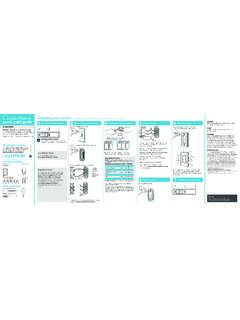
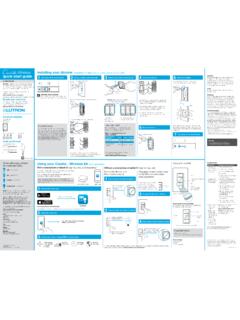
1 Wireless Installing your switch Installation for lights with one wall switch (single-pole). quick - start guide 1 Turn power off at circuit breaker! 2 Remove existing switch from wall 3 Remove side sections (if necessary) 4 Connect the switch 6 Attach the wallplate CAUTION. Use only with permanently installed lighting loads or with general purpose fan loads. In-wall switch Remove the wallplate from switch . Attach the adapter to the switch using the 3 screws provided and snap on the wallplate. Codes Welcome and thank you for purchasing a Cas taTM Install in accordance with all national and local Wireless in-wall switch . In order to control your lights electrical codes. from an app or remote, you'll need to replace an existing 2. 1 Bend back OFF. switch with a Cas taT Wireless in-wall switch . Grounding and forth. 1. We hope you enjoy the convenience of Cas taTM Wireless ! When no grounding means exist in wallbox, the 1.
2 Do not remove outside side sections on 4 National Electrical Code (NEC ) allows a control to WARNING: SHOCK HAZARD switches at the end of gang. Ground be installed as a replacement if 1) a nonmetallic, 2 noncombustible faceplate is used with nonmetallic May result in serious injury or death. Turn off power at circuit breaker or fuse before Installing . attachment screws or 2) the circuit is protected by a 1 Connect the bare copper (or green) ground wire ground fault circuit interrupter (GFCI). When Installing from the wallbox to the green wire on the switch Double your warranty Remove the switch and pull it away from the wall. using a wire connector. a control according to these methods, cap or remove P/N 0301740 REV A. 2 green wire before screwing control into wallbox. Love Cas taTM Wireless products? Have ideas for making them better? Tell us what you think 3. 2 Connect either of the remaining wires from the and we'll extend your warranty by 1 year.
3 FCC/IC Information wallbox to either of the black wires on the switch snap' This device complies with part 15 of the FCC Rules and Industry Canada 3 using a second wire connector. license-exempt RSS standard(s). Operation is subject to the following two Each switch has inside switch at middle has all conditions: (1) This device may not cause interference, and (2) this device side sections removed. side sections removed. must accept any interference, including interference that may cause undesired 3 Connect the remaining wire from the wall to operation. Modi cations not expressly approved by Lutron Electronics Co., Inc. could void the user's authority to operate this equipment. Important note: the other black wire on the switch using a third wire connector. Note: This equipment has been tested and found to comply with the limits for a Class B digital device, pursuant to part 15 of the FCC Rules.
4 These limits Removing side sections reduces the switch 's maximum are designed to provide reasonable protection against harmful interference wattage rating. See the chart below for maximum load in a residential installation. This equipment generates, uses and can radiate 4. Contents supplied information. 4 Cap off the blue wire on the switch using the small radio frequency energy and, if not installed and used in accordance with the instructions, may cause harmful interference to radio communications. Maximum load derating chart (120 V~ 50/60 Hz) wire connector. *. In-wall switch LUT-MLC* However, there is no guarantee that interference will not occur in a particular Disconnect all three wires* from the switch . Side sections removed None 1 side 2 sides installation. If this equipment does cause harmful interference to radio or (PD-5WS-DV) load adapter television reception, which can be determined by turning the equipment off LED, CFL, & Fluorescent 1 5A 4A 3A * Note: The blue wire is only used in 3-way and on, the user is encouraged to try to correct the interference by one or 5 or more of the following measures: installations.
5 See Reorient or relocate the receiving antenna. Important note: Incandescent, Halogen, & ELV 600 W 450 W 350 W for more information. (If you installed the switch next to other switches or Increase the separation between the equipment and receiver. Connect the equipment into an outlet on a circuit different from that to which 6 * Note: LUT-MLC may be required to ensure proper the receiver is connected. Some lights have one wall switch , while others or dimmers, you'll need to install a wallplate with the function with CFL, LED, ELV, and uorescent lighting. Consult the dealer or an experienced radio/TV technician for help. have two or more wall switches (such as stair 600 VA / 450 VA / 350 VA /. MLV 2 475 W 350 W 275 W Please visit for correct size/number of openings to accommodate all lights, which have a switch at both the top the devices.). or installation instructions.)
6 And bottom of the stairs). We've included Wire connectors (5) Screws (2) General Purpose Fan 3A 3A 3A. instructions for lights with one wall switch Ground (called a single pole). If your light has more than one switch (called a 3-way), please visit 7. Maximum load derating chart (277 V~ 50/60 Hz). Side sections removed None 1 side 2 sides 5 Mount the switch 7 Turn power on at circuit breaker for LED, CFL, & Fluorescent 1 5A 4A 3A. Use the screws provided. complete installation instructions and how-to or Tools you'll need videos. Incandescent, Halogen, & ELV 1350 W 1100 W 800 W. Flat-head screwdriver Pliers or 1350 VA / 1100 VA / 800 VA /. MLV 2. ON. 1075 W 875 W 625 W. 1. 1 The in-wall switch is ULR Listed for use with all magnetic and Phillips-head screwdriver Ground electronic uorescent ballasts. 2 The maximum lamp wattage is determined by the ef ciency of Warranty the transformer, with 70% 85% as typical.
7 For actual transformer For warranty information, please visit * Note: LUT-MLC is included to ensure proper function * If your switch has more than 3 wires attached, see ef ciency, contact either the xture or transformer manufacturer. with CFL, LED, ELV, and uorescent lighting. Please visit Installing Cas ta Wireless in a 3-way switch application The total VA rating of the transformer(s) shall not exceed the VA for installation instructions. video at rating of the in-wall switch . 2. Supported Loads (120 V~) Using your Cas taT Wireless kit (sold separately) Using your controls Troubleshooting Symptoms Probable cause and action LED up to 5 A With a smartphone or tablet (Smart BridgeTM required, sold separately) Without a smartphone or tablet Light does not turn on or in-wall Light bulb(s) burned out. Breaker is OFF or tripped. The Cas taT Wireless switch can be controlled from a smartphone (Smart BridgeTM not required) switch LED does CFL up to 5 A not light up.
8 Light not properly installed. when used with the LutronR Smart BridgeT. If you are using the switch and remote control with the LutronR Pairing the switch and On Wiring error. Smart BridgeT follow the instructions below. FASSTM on the switch is in the Incandescent / Halogen up to 600 W Lutron Pico remote control Off position. Note: If you are using the switch and remote control with Light does not The switch failed to pair with MLV up to 600 VA / 475 W. another manufacturer's bridge, please refer to that manufacturer's instructions for set-up. 1 Press and hold off button on the switch Off respond to Pico . remote control. Pico remote control; see Pairing the switch and Pico . LutronR Smart BridgeT LutronR app remote control. FASS The switch is already at the light ELV up to 600 W Hold for 6 seconds 1 Download the Lutron app Press and hold off button on dimmer until LED starts blinking Front Accessible Service switch level the Pico remote control is sending.
9 The Pico remote control is Fluorescent up to 5 A outside the 30 ft (9 m) operating In-wall switch range. Search for Lutron Caseta The Pico remote control battery General Purpose Fan up to 3 A is low. The Pico remote control battery is installed incorrectly. Replacing light bulbs using FASSTM. Light stays Proper bulb operation requires Lutron Pull the FASSTM out on the in-wall switch to remove power at the light socket. on when the a LUT-MLC (included in the Supported Loads (277 V~) Apple is a trademark of Apple Inc., registered in the and other countries. App Store is a service mark of Apple Inc. switch is turned package with the switch ). off. Please visit LED up to 5 A LED on 2 Launch the hold Press and Lutron app off button on remote 2 Press and hold off button on remote On in-wall switch is for installation instructions. ashing or solid CFL up to 5 A red color. Hold for 6 seconds Off Go to for Incandescent / Halogen up to 1350 W The Lutron app will walk you through until lights ash 3 times.
10 Additional troubleshooting suggestions. setting up your devices. x3. Lutron Pico remote control (sold separately). MLV up to 1350 VA / 1075 W. ELV up to 1350 W. Fluorescent up to 5 A. 3 Press Use theand hold app Lutron off tobutton ALL remaining steps on remote complete Repeat steps to pair other Pico remote controls. Important notes: 1. For indoor use only. Lutron, , and Pico are registered trademarks and FASS, Cas ta, and Smart Bridge are trademarks of Lutron Electronics Co., Inc. NEC is a 2. Operate between 32 F (0 C) and 104 F (40 C). Add devices Control Schedule Connect Device Ratings registered trademark of the National Fire Protection Association, Quincy, PicoR remote controls three ways your lights while away In-wall switch Massachusetts. Google and the Google logo are registered trademarks of Lutron Electronics Co., Inc. Dimmers Google Inc., used with permission.