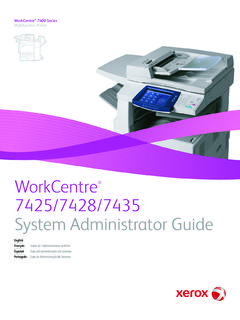
Transcription of Xerox WorkCentre 7120
1 Xerox WorkCentre 7120 User GuideGuide d'utilisationItaliano Guida per l utenteDeutsch BenutzerhandbuchEspa ol Gu a del usuarioPortugu s Guia do usu rioNederlands GebruikershandleidingSvenska Anv ndarhandbokDansk BetjeningsvejledningNorsk Brukerh ndbokSuomi K ytt opas e tina U ivatelsk p ru kaPolski Przewodnik u ytkownikaMagyar Felhaszn l i tmutat Русский Руководство пользователяT rk e Kullan c K lavuzu Rom n Ghid de utilizare Xerox WorkCentre 7120 Multifunction Printer 2010 Xerox Corporation. All Rights Reserved. Unpublished rights reserved under the copyright laws of the United States. Contents of this publication may not be reproduced in any form without permission of Xerox protection claimed includes all forms of matters of copyrightable materials and information now allowed by statutory or judicial law or hereinafter granted, including without limitation, material generated from the software programs which are displayed on the screen such as styles, templates, icons, screen displays, looks, and so , CentreWare , WorkCentre , PrintingScout , Walk-Up , FreeFlow , SMART send , Scan to PC Desktop , and the sphere of connectivity design are trademarks of Xerox Corporation in the United States and/or other countries.
2 Adobe Reader , Adobe Type Manager , ATM , Flash , Macromedia , Photoshop , and PostScript are trademarks of Adobe Systems Incorporated in the United States and/or other countries. Apple , AppleTalk , Bonjour , EtherTalk , Macintosh , Mac OS , and TrueType are trademarks of Apple Computer, Inc. in the United States and/or other , HP-UX , and PCL are trademarks of Hewlett-Packard Corporation in the United States and/or other countries. IBM and AIX are trademarks of International Business Machines Corporation in the United States and/or other , Windows Vista , Windows , and Windows Server are trademarks of Microsoft Corporation in the United States and/or other , NetWare , NDPS , NDS , Novell Directory Services , IPX , and Novell Distributed Print Services are trademarks of Novell, Incorporated in the United States and/or other countries.
3 SGI IRIX is a trademark of Silicon Graphics, , Sun Microsystems , and Solaris are trademarks of Sun Microsystems, Incorporated in the United States and/or other countries. UNIX is a trademark in the United States and other countries, licensed exclusively through X/ Open Company an ENERGY STAR partner, Xerox Corporation has determined that this product meets the ENERGY STAR guidelines for energy efficiency. The ENERGY STAR name and logo are registered version : May 2010 WorkCentre 7120 Multifunction PrinterUser Guide3 Contents1 SafetyElectrical Safety .. 12 Electrical Supply .. 12 Power Cord.. 12 Emergency Power Off .. 13 Telephone Line Cord .. 13 Maintenance Safety.
4 15 Printer Symbols .. 16 Product Safety Certification.. 17 Environmental Health and Safety Contacts .. 182 FeaturesBefore Using the Printer .. 20 Xerox Welcome Center.. 20 Parts of the Printer .. 21 Front-Left View .. 22 Right-Rear View .. 23 Telephone and Fax Connection Option .. 24 Document Feeder .. 25 Internal Components .. 26 Integrated Office Finisher Option.. 27 Office LX Finisher Option .. 28 Standard Features .. 29 Configurations .. 29 Printer Options .. 30 Energy Saver Mode .. 31 Control Panel .. 32 Control Panel Layout .. 32 Printer Information .. 33 Accounting.. 343 Installation and SetupInstallation and Setup Overview.. 38 Physical Connection.
5 38 Turning the Printer On .. 38 Turning the Printer Off .. 40 Assigning a Network Address .. 41 ContentsWorkCentre 7120 Multifunction PrinterUser Guide4 Installing the Software .. 42 Operating System Requirements .. 42 Installing Drivers and Utilities for Windows.. 42 Installing the Drivers and Utilities for Macintosh.. 43 Adding the Printer for OS X Version .. 45 UNIX and Linux Drivers .. 46 Using CentreWare Internet Services .. 47 Finding The Printer s IP Address .. 47 Accessing CentreWare IS.. 474 PrintingPrinting Overview .. 50 Supported Media.. 51 Recommended Media .. 51 General Media Loading Guidelines.. 51 Media That Can Damage Your Printer.
6 52 Paper Storage Guidelines .. 52 Loading Media .. 53 Loading Paper in Trays 1 through 4 .. 53 Loading Paper in Tray 5 (Bypass Tray) .. 55 Loading Envelopes in Tray 5 (Bypass Tray) .. 57 Configuring the Envelope Tray .. 57 Loading Envelopes in the Envelope Tray .. 58 Printing on Special Media .. 60 Printing on Envelopes .. 60 Printing on Labels .. 61 Printing on Glossy Paper .. 62 Selecting Printing Options .. 63 Printing Options for Windows .. 63 Printing Options for Macintosh .. 66 Printing on Both Sides of the Paper .. 68 Media Types for Automatic 2-Sided Printing .. 68 Printing a 2-Sided Document .. 692-Sided Page Layout Options .. 69 Selecting Paper.
7 70 Windows .. 70 Macintosh .. 70 Printing Multiple Pages to a Single Sheet (N-Up) .. 71 Windows .. 71 Macintosh .. 71 Printing Booklets .. 72 Selecting Booklet Printing Using a Booklet Maker .. 73 Selecting Booklet Printing Without Using a Booklet Maker .. 74 ContentsWorkCentre 7120 Multifunction PrinterUser Guide5 Using Color Corrections .. 75 Color Corrections for Windows.. 75 Color Corrections for Macintosh .. 76 Selecting Color Correction .. 76 Printing in Black and White .. 77 Windows .. 77 Macintosh .. 77 Printing Cover Pages.. 78 Windows .. 79 Macintosh .. 79 Printing Insert Pages .. 80 Windows .. 80 Macintosh .. 80 Printing Exception Pages.
8 81 Windows .. 81 Macintosh .. 81 Scaling .. 82 Windows .. 82 Macintosh .. 82 Printing Watermarks.. 83 Windows .. 83 Macintosh .. 84 Printing Mirror Images for Windows .. 85 Creating and Saving Custom Sizes.. 86 Windows .. 86 Macintosh .. 86 Job Completion Notification for Windows.. 87 Printing from USB Flash Drive .. 88 Printing from Media Card Reader.. 89 Printing Special Job Types .. 90 Printing and Deleting Secure Print Jobs .. 90 Printing a Sample Set .. 91 Delayed Printing.. 91 Charge Print.. 92 Saving a Print Job to the Printer .. 92 Sending a Print Job to a Fax Machine .. 935 CopyingBasic Copying .. 96 Document Glass .. 96 Document Feeder.
9 96 ContentsWorkCentre 7120 Multifunction PrinterUser Guide6 Adjusting Copy Options.. 98 Basic Settings .. 98 Image Quality Adjustments .. 102 Layout Adjustments .. 104 Output Format Adjustments .. 108 Advanced Copying .. 114 Building a Job .. 114 Printing a Sample Copy .. 116 Combining Original Sets .. 116 Delete Outside/Delete Inside .. 117 Saving Copy Settings .. 117 Retrieving Saved Copy Settings.. 1186 ScanningScanning Overview .. 120 Loading Original Documents .. 121 Using the Document Glass .. 121 Using the Document Feeder.. 121 Storing a Scan to a Folder.. 122 Scanning to a Folder .. 122 Printing Stored Files at the Printer .. 122 Using Job Flow Sheets .. 124 Printing Stored Files using CentreWare IS.
10 124 Retrieving Scanned Files to Your Computer Using CentreWare Internet Services .. 124 Creating a Folder .. 125 Deleting a Folder .. 126 Scanning to a Network File Repository .. 127 Scanning to an Email Address .. 128 Setting Email Options .. 128 Scanning to a Computer .. 130 Scanning to a Home Directory .. 131 Storing to a USB Flash Drive .. 132 Setting Scan Options .. 133 Scan Settings.. 133 Additional Scanning Options .. 134 Advanced Settings.. 134 Using the Xerox Scan Utility .. 137 Overview .. 137 Creating a Scan Template.. 138 Scanning to a Template.. 139 Accessing Xerox Scan Utility.. 139 Importing Scanned Files into an Application .. 1407 FaxingFax Overview.. 144 ContentsWorkCentre 7120 Multifunction PrinterUser Guide7 Loading Original Documents.