
Ashmore Hedwig User Guide v2
bound by the terms of the HP End User License Agreement (EULA). If you do not accept these license terms, your sole remedy is to return the entire unused product (hardware and software) within 14 days for a full refund subject to the ... Ashmore_Hedwig User Guide v2
Download Ashmore Hedwig User Guide v2

Information
Domain:
Source:
Link to this page:
Documents from same domain

HP Pavilion PC User™s Guide - HP® Official Site
h10032.www1.hp.com2 HP Pavilion PC User’s Guide Putting Your Computer Together For step-by-step instructions on putting your computer together, refer to the Welcome Poster that came in your computer box.

Quick Start Guide - HP
h10032.www1.hp.comHP Web Sites. Quick Start Guide Filename: ma2usqs.doc Title: HP-Print2k.dot Template: HP-Print2K.dot Author: jiml Last Saved By: WASSER, Inc. ® ® Start. ...

HP 9250C Digital Sender - HP® Official Site
h10032.www1.hp.comDevice information The HP 9250C Digital Sender connects directly to your network converts black-and-white and color documents, drawings, and photographs into an electronic form and then distributes them directly to

Technical Reference Guide HP Compaq dc7800 …
h10032.www1.hp.comTechnical Reference Guide HP Compaq dc7800 Series Business Desktop Computers ... deal with the system board and the power supply assembly.

Reference Guide - HP
h10032.www1.hp.comReference Guide A–1 A Troubleshooting This section provides three methods for resolving issues you may encounter when using your docking station. Use the methods

HP Pavilion 15 Notebook PC - HP® Official Site
h10032.www1.hp.com1 Product description Category Description Computer models equipped with an AMD processor Computer models equipped with an Intel processor Product Name HP Pavilion 15 Notebook PC √√

HP MINI User Guide
h10032.www1.hp.comSafety warning notice WARNING! To reduce the possibility of heat-related injuries or of overheating the device, do not place the device directly on …

User Guide - HP
h10032.www1.hp.comproprietor and used by Hewlett-Packard Company under license. Google, ... bound by the terms of the HP End User License ... see the printed Quick Start guide included ...

Manuel de l'utilisateur de l'ordinateur portable HP
h10032.www1.hp.comAvis d'avertissement sur la sécurité AVERTISSEMENT ! Pour éviter tout risque de blessure liée à la chaleur ou tout risque de surchauffe de l'ordinateur, ne le posez pas directement sur vos genoux et n'obstruez pas les ouvertures d'aération.

Manuel de l'utilisateur - HP® Official Site
h10032.www1.hp.comL'ordinateur et l'adaptateur secteur sont conformes aux limites de température de surface accessible à l'utilisateur, définies par la norme internationale sur la …
Related documents

PHANTOM 2 User Manual V1 - dl.djicdn.com
dl.djicdn.comThis manual is for Phantom 2 mode. Please refer to the Naza-M V2 Quick Start Manual for more information. 1.2 Connections with Other DJI Products PHANTOM 2 is compatible with other DJI products, including ZENMUSE H3-2D and H3-3D gimbal,iOSD mini, iOSD Mark II. Below are connections for these products and wireless video transmission module.

UM1727 User manual - STMicroelectronics
www.st.comBefore starting the user should: 1. Install the preferred Integrated Development Environment (IDE). 2. ST-LINK/V2-1 driver will be installed automatically. In case of problem, the user can proceed with manual installation of the driver, from toolchains install directory (further details are available in Section 3). 3.

The RISC-V Instruction Set Manual Volume I: User-Level ISA ...
riscv.orgVolume I: RISC-V User-Level ISA V2.2 iii convention. A revised proposal for the C compressed extension, version 1.9. Preface to Version 2.0 This is the second release of the user ISA speci cation, and we intend the speci cation of the base user ISA plus general extensions (i.e., IMAFD) to remain xed for future development. The
Manual - Fanatec
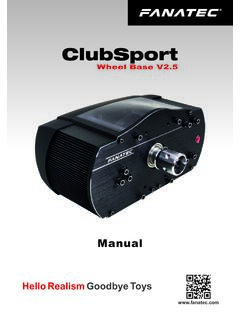
fanatec.com• This device contains components that cannot be repaired by the user, opening will void the warranty. WARNING! Electrical Safety The ClubSport Wheel Base V2.5 must be connected to an appropriate power source: • For the used ClubSport Wheel Base V2.5 use only the power supply and AC power cord that

STM32 Nucleo-64 boards (MB1360) - User manual
www.st.comUser manual STM32 Nucleo-64 boards (MB1360) Introduction ... ST-LINK/V2-1 debugger/programmer. The STM32 Nucleo-64 boards come with the comprehensive free STM32 software libraries and examples that are available with the STM32CubeG0 MCU Package. Figure 1. STM32 Nucleo-64 board top view.

MP Mini Delta V2 3D Printer
downloads.monoprice.comMP Mini Delta V2 3D Printer P/N 21666 User's Manual . 2 ... Please read this entire manual before using this device, paying extra attention to these safety warnings and guidelines. Please keep this manual in a safe place for future reference. ... Thank you for purchasing this MP Mini Delta V2 3D Printer from Monoprice™! This printer

PHD2 v2.6.10 User Guide - Open PHD Guiding
openphdguiding.org2 4 5 5 6 6 7 7 7 7 8 9 9 9 10 10 10 11 11 12 13 13 13 14 14 16 16 16 17 18 19 20 20 20 21 21 22 22 23 23 24 26 29 30 31 31 33 33 33 37 37 37 38 38 39 39 40 41 41 41 ...

FlameWheel 450 - dl.djicdn.com
dl.djicdn.comUser Manual V2.2. 2 ... accordance with the User Manual. SZ DJI Technology Co., Ltd. and its affiliated companies assume no liability for damage(s) or injuries incurred directly or indirectly from using, installing or refitting this product improperly, including but …
USER MANUAL - Hisense USA
assets.hisense-usa.comPlease refer to the User Manual that came with your device for step-by-step instructions. To connect an AV device with an HDMI cable (not provided): 1. Use an HDMI cable to connect the HDMI output port of the AV device to the HDMI port of the TV. 2. Plug the connected devices into the HDMI port on the TV before switching it on. 3.