
Atomix Atomic Clock 00562 Instructions
The tower icon and “OK” will appear on your display. 5. If the signal is not available when you are setting the clock functions, enter the present time and calendar by holding the CLK / CAL button for 3 seconds and then press and release the + or – buttons to select the correct values. 6. When the clock is searching for the signal and the ...
Download Atomix Atomic Clock 00562 Instructions

Information
Domain:
Source:
Link to this page:
Documents from same domain

Professional Weather Center - acurite.com
www.acurite.comweather reports for newspapers and websites. Its information comes from the National Weather Service, and over 250,000 personal weather stations. About Weather UndergroundTM Wi-Fi Setup for Weather UndergroundTM This weather station features wireless Internet connectivity in order to connect and send your data to Weather UndergroundTM. If you ...

SAVE THIS MANUAL FOR FUTURE REFERENCE. - AcuRite
www.acurite.comUsing the Weather Station Precision Weather Forecasting AcuRite’s Precision Forecasting provides your personal forecast of morning, noon & night (4 hour, 4 to 8 hour and 8 to 12 hour) weather conditions. The patent-pending technology combines regional weather patterns with data measured by a sensor in your yard. It generates a forecast with ...

Weather Thermometer …
www.acurite.compossible product performance, please read this manual in its entirety . and retain it for future reference. Unpacking Instructions . Remove the protective film that is applied to the LCD screen prior to using this product. Locate the tab and peel off to remove. Package Contents . 1. Display unit 2. Outdoor sensor 3. Instruction Manual. IMPORTANT
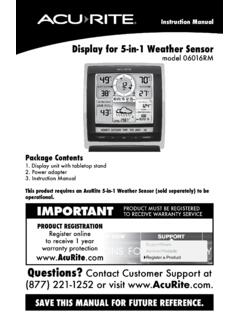
Display for 5-in-1 Weather Sensor model 06016RM Instructions
www.acurite.comInstruction Manual Display for 5-in-1 Weather Sensor model 06016RM Package Contents . 1. Display unit with tabletop stand Power adapter 3. Instruction Manual . This product requires an AcuRite 5-in-1 Weather Sensor (sold separately) to be operational. IMPORTANT. PRODUCT MUST BE REGISTERED TO RECEIVE WARRANTY SERVICE
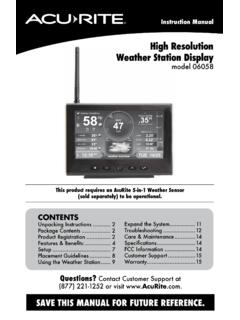
High Resolution Weather Station Display model 06058
www.acurite.comCongratulations on your new AcuRite product. To ensure the best possible product performance, please read this manual in its entirety and retain it for future reference.
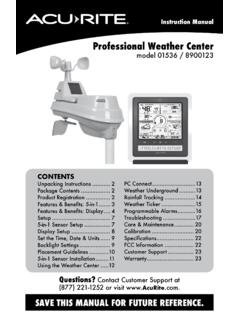
Professional Weather Center - AcuRite
www.acurite.comThis weather station’s color display features three different lighting settings: High (100%) brightness, Medium (60%) brightness and Low (15%) brightness. Using battery power alone, the backlight is available momentarily for 10 seconds by pressing the “
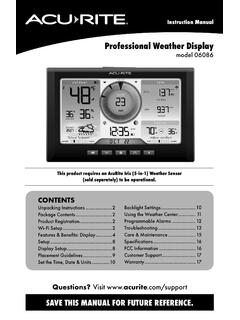
Professional Weather Display - AcuRite
www.acurite.com** This weather station display only supports 2.4 GHz wireless networks. About Weather Underground Weather Underground is a commercial weather service providing real-time weather information via the internet. Weather Underground provides weather reports for most major cities worldwide and local weather reports for newspapers and websites.

PCConnect for Windows Instruction Manual
www.acurite.compublication may be reproduced, stored in a retrieval system, or transmitted in any form or by any. means, electronic, mechanical or otherwise, for any purpose, without the prior written. permission of Chaney Instrument Co.. Chaney Instrument Co. 965 Wells Street. Lake Geneva WI 53147. Web: www.acurite.com. Phone: + 1 844 228 5465. Fax: +1 262 ...
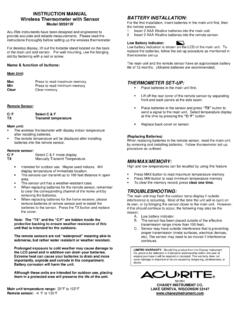
00591W Wireless Thermometer with Sensor
www.acurite.comThe remote temperature will be displayed after installing batteries into the remote sensor. Remote sensor: C/ F Select C & F mode display TX Manually Transmit Temperature. Intended for outdoor use. Maybe used indoors. Will display temperature of immediate location. The sensors can transmit up to 100 feet distance in open area.

AcuRite Iris (5-in-1) Weather Station with Color Display ...
www.acurite.com5. Backup Battery Compartment 6. A-B-C Switch ID code that must match AcuRite Iris sensor’s A-B-C switch to ensure units synchronize. 7. CLEAR RECORD / RESET Button Press and HOLD for 8 seconds to clear all records. Press and HOLD for 10 seconds for full reset to factory defaults. 8. Power Adapter 9. USB Cable for PC Connection 10.
Related documents

Large Print Colour Tube Map Dec 2020(e) - Transport for …
content.tfl.gov.ukTower Hill Westminster Piccadilly Circus Charing Cross Holborn Tower Gateway Monument Moorgate Leicester Square Hyde Park Corner Knightsbridge Angel Queensway Marble Arch South Kensington Sloane Square Covent Garden ... DLR, London Overground, TfL Rail, ( ) {( ) ...
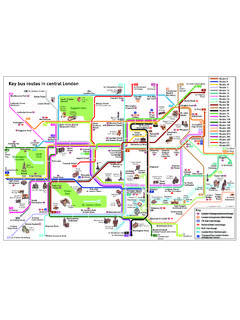
Key bus routes in central London - Transport for London
content.tfl.gov.ukTower London Bridge City Great Portland Marylebone to Deptford Tower Bridge Road Archway to Clapton Pond Embankment St. Pancras International (390 only) Old Street London Eye St. Katharine’s to Streatham Hill Albany Street for ZSL London Zoo to Parliament Hill Fields to Shepherd’s Bush/ White City (night journeys only) to Ilford
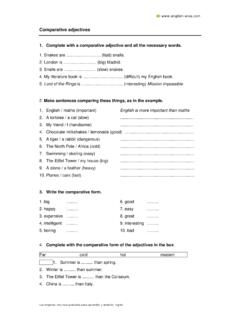
Hoja de ejerciciios 1 comparativos - English-area.com
english-area.comwww.english-area.com Los mejores recursos gratuitos para aprender y enseñar inglés Answers Exercise 1: 1. Snakes are faster than snails. 2. London is bigger than Madrid.

Welcome to London - Visitor guide
media.limkokwing.netTower of London More than 900 years of history and the Crown Jewels. 1Top10Attractions 2 visitlondon.com tfl.gov.uk 3 See visitlondon.com ets and for itineraries ondon British Museum Tate Modern Top10 Attractions Visitor Information Getting …

GRENFELL TOWER INQUIRY: PHASE 1 REPORT OVERVIEW
assets.grenfelltowerinquiry.org.ukthe MPS, the London Ambulance Service (LAS), RBKC and the TMO. Annex A to Part II contains a list of those who were present in the tower as at 00.54 and the times at which they left the building. 2 .11 The following key events form the backbone of the Narrative: 00.54 Behailu Kebede calls 999 to report a fire in Flat 16, floor 4 Grenfell Tower.

Health inequalities in London - GOV.UK
assets.publishing.service.gov.ukTower Hamlets Life expectancy at birth (2011-13) ... PHE London (2015) Improving school readiness: Creating a better start for London children in London aged 5 years do not achieve a good level of development Inequalities in school readiness There are wide variations in the
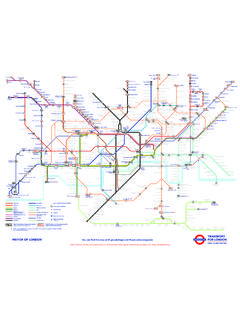
You can find this map at tfl.gov.uk/maps and tfl.gov.uk ...
content.tfl.gov.ukLocations of non-Transport for London managed toilets at Transport for London stations Opening hours vary. If you need to use the toilet but find it locked please contact a member of staff for access. This map only shows public toilets at London Underground, London Overground, TfL Rail, London Trams, bus, Thameslink and major rail stations.
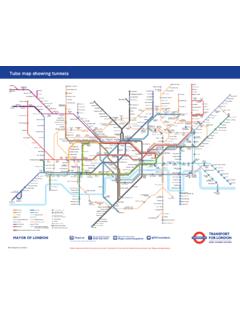
Tube map with Tunnels - Transport for London
content.tfl.gov.ukLondon Overground TfL Rail Victoria Coach Station River Thames Regent’s Park Bayswater Warren Street Aldgate Farringdon Barbican High Street Kensington Old Street Green Park Baker Street Notting Hill Gate Victoria Mansion House Temple Oxford Circus Bond Street Tower Hill Westminster Piccadilly Circus Charing Cross Holborn Tower Gateway ...

Case Study: The Leadenhall Building London
global.ctbuh.orgCase Study: The Leadenhall Building, London The Leadenhall Building leans back to make way for views to St. Paul’s Cathedral and other historic sites in a crowded section of the City of London, but it also springs forward with an innovative structure and a dynamic street presence. Stopped once during the economic downturn, the tower is rising

Covid-19 testing sites - North East London Health & Care ...
www.eastlondonhcp.nhs.ukThe following drive-through testing sites are available outside of north east London. To book an appointment please go online at nhs.uk/coronavirusor phone 119or 0300 303 2713. ALL Drive through testing sites: Appointment required. Greenwich:TFL Car Park, Edmund Halley Way, Greenwich Peninsula, London. SE10 0PH