
Browser Print User Guide - Zebra Technologies
Aug 01, 2016 · Zebra Browser Print is a set of scripts and an end-user application that allows web pages to communicate with Zebra Printers. The application lets a web page communicate to Zebra devices ... Network Connection and by selecting “Broadcast Search” on the settings screen. 2. In the “sample” (typically located: “C:\Program Files (x86 ...
Download Browser Print User Guide - Zebra Technologies

Information
Domain:
Source:
Link to this page:
Documents from same domain

NOTICE OF EXPANSION - Zebra Technologies
www.zebra.comPSUs that serve as the power source for ZP models of Zebra printers ... http://www.zebra.com/power-supply-recall. ... It is strongly recommended that …

LS1203 Product Reference Guide - Zebra …
www.zebra.comASCII Character Set for USB ... The LS1203 Product Reference Guide provides general instructions for setting up, operating, maintaining, and

LS2208 PRODUCT REFERENCE GUIDE - Zebra …
www.zebra.comvi LS2208 Product Reference Guide ... ASCII Character Set ..... 5-16 Chapter 6: RS-232 Interface Introduction ...

ZC300 Card Printer - zebra.com
www.zebra.commost sensitive data during printing, such as account numbers. BOOST VALUE WITH NEW CAPABILITIES ... GLOBAL CONTACT DIRECTORY AT WWW.ZEBRA.COM/CONTACT. ... ZC300 CARD PRINTER FOR NORTH AMERICA, EUROPE, MIDDLE EAST AND AFRICA ZC300 Card Printer Specifications Continued on back MEDIA SPECIFICATIONS …

ZXP Series 9 Retransfer Card Printer Spec Sheet
www.zebra.comZXP Series 9 Retransfer Card Printer PAIRING OUTSTANDING PRINT QUALITY WITH THE FASTEST PRINT SPEEDS IN THE INDUSTRY Extending Zebra’s line of card printers, the ZXP Series 9™ is a retransfer card printer specifically engineered for high-security applications.

2022 HOSPITAL VISION STUDY - Zebra Technologies
www.zebra.comdynamic staff workflows 83% ... them with digital solutions that increase the accuracy of patient ... Enriching Staff Communications

3 Overlook Point - Zebra Technologies
www.zebra.com3 Overlook Point Lincolnshire, IL 60069 USA T: +1 847 634 6700 F: +1 847 913 8766 www.zebra.com Zebra Technologies Announces ARM® mbed™ IoT Starter Kit for Zatar IoT Starter Kit To Use Atmel®/ SMART Xplained board and kit

ZT200 Series Parts Catalog - Zebra Technologies
www.zebra.comAmericas Customer Service +01 877‐275‐9327 Page 1 November 29, 2017 ZT200 Series Parts Catalog _____ Outer Casing Components Item Number Description Part Number

ZT400 Series Parts Catalog - Zebra Technologies
www.zebra.comZT400 Series Parts Catalog _____ Replacement Components for Media Rewind Options Item Number Description Part Number Quantity 1 Media Guard for Media Rewind Spindle ZT400 Series P1058930-057 1 2 Media Rewind Spindle (includes Motor and PCBA) ZT410 (This item is only for replacing an existing media rewind spindle on a printer that shipped from ...

Technical Paper: Zebra ZXP Series 3 Linux Printer Driver
www.zebra.comA Zebra Technologies Technical Paper 2 ... language/format of the printer via a series of filters. In this implementation, the CUPS filter converts the document from raster format to a Card printer family specific format. ... required to convert that job into something the printer understands. CUPS includes filter programs for many common ...
Related documents

Simple Invoicing Desktop Database with MS Access 2013/2016
web.pdx.edu2.1.8 Print Customer Data Printing from Access is the same as from any application. Make sure the window is open and selected, with the data in view, here from the Datasheet view. Then, from the Office Button choose the Print option. When nished entering customers, right-click the yellow Customer tab above the ID eld and Save and then Close the ...

The Impact of ebooks on the Reading Motivation and ... - ed
files.eric.ed.govboys and girls reading in print outside school (boys 55.4%; girls 68.3%) narrowed significantly in relation to reading on screen (boys 65.7%; girls 72.2%) 9. • In 2012, the gap between children from different socioeconomic backgrounds reading outside school was also more pronounced in print than it was on screen. 54.8% of children

SECURE PRINT SETUP WINDOWS 10 - University of Toronto
www.utsc.utoronto.cascreen, colors Update & security Windows Update, recovery, backup Find a setting Accounts Your account, sync settings, work, other users Jeffrey Crabb Most used ... 2-Sided Print Finishing - No Stapling - No Hole Punching — Print Quality Toner Saver Output Destination Automaticalþy Select Saved Settings Driver Defautts Advanced .

Carer's Allowance claim form: to fill on on screen - and ...
assets.publishing.service.gov.ukLanguage, a hearing loop, translations, large print, audio or something else please contact us. Please see details below. About this form • Use this form to claim Carer’s Allowance. • Check if you can get Carer’s Allowance by using the checklist on page 2 of the notes. • If you cannot get Carer’s Allowance, go to . www.gov.uk

Prediabetes Risk Test - Centers for Disease Control and ...
www.cdc.govYounger than 40 years (0 points) 40–49 years (1 point) 50–59 years (2 points) 60 years or older (3 points)

LabelWriter Print Server - DYMO
download.dymo.com1 Insert the LabelWriter Print Server CD into your CD-ROM drive. After a few seconds, the installation screen appears. If the installation screen does not appear: a. Click Start, then Run on the Windows taskbar. The Run dialog box appears. b. Enter D:\install.exe (where D is the letter assigned to the CD-ROM drive) and click OK.

User's Guide - WF-7710/WF-7720
files.support.epson.com4 Using AirPrint ..... 39
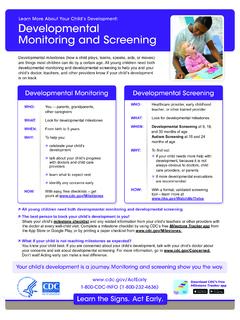
Dev Mon and Screen English and Spanish
www.cdc.govLearn More About Your Child’s Development: Developmental Monitoring and Screening All young children need both developmental monitoring and developmental screening. The best person to track your child’s development is you! Share your child’s milestone checklist and any related information from your child’s teachers or other providers with

COVID-19 Immunization Screening and Consent Form*
coronavirus.health.ny.govJan 07, 2022 · Recipient Name (please print) Preferred Name DOB Current Gender ID Key: W – Woman/Girl TW – Transgender Woman/Girl M – Man/Boy Indicate ID Below: TM – Transgender Man/Boy NB – Non-Binary Person GNC – Gender Non-Conforming Q – Not Sure/Questioning NR – Chose not to Respond GNL - Gender not Listed (write-in)
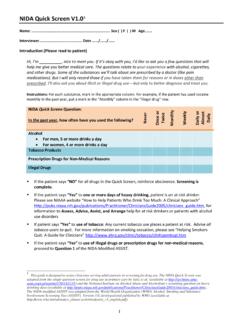
NIDA Quick Screen V1.0 1
nida.nih.govGiven the patient’s response to the Quick Screen, the patient should not indicate “NO” for all drugs in Question 1. If they do, remind them that their answers to the Quick Screen indicated they used an illegal or prescription drug for nonmedical reasons within the …