Chapter 1
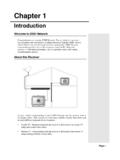
Remote Control 2 IR Remote Control To gain a better understanding of your DISH Network satellite receiver, look at the picture above. This receiver is a two-tuner satellite receiver that allows you to watch different programs in two locations:
Download Chapter 1

Information
Domain:
Source:
Link to this page:
Documents from same domain

2009 Satellite Technology Primer 20070115MJO
www.dbsinstall.comPage 1 of 18 SATELLITE TECHNOLOGY PRIMER SUMMARY This Installation Job Aid covers: BROADBAND SATELLITE BENEFITS TRUE BROADBAND SATELLITE INTERNET ARCHITECTURE
DIRECTV Standard Professional Installation Guidelines
www.dbsinstall.com1 INTRODUCTION All employees, contractors or agents, working for a DIRECTV dealer/retailer/sales agent, are required to follow the practices, procedures and standards found in this manual.

DIRECTV Home Services - DBSInstall.com
www.dbsinstall.com2/1/2006 Page 3 of 19 The information contained on this page is confidential, proprietary DIRECTV business information and is intended for

DIRECTV HD RECEIVER USER GUIDE - DBSInstall.com
www.dbsinstall.comDigital TV is a newer system for broadcasting TV signals delivering higher quality audio and video. “Digital TV” refers to a television that can receive and display digital images.
Chapter 4
www.dbsinstall.comChapter 4 Dish Antenna Installation ... provides the most expansive high definition programming offering from DISH Network. The SuperDISH installation must be completed by a qualified professional ... Make sure that the remote control batteries are fresh, and are installed properly. If
Related documents

below - Bloomingdale Communications
bloomingdalecom.netAim the remote control at the TV and press the [PWR] button once. 5. Press and release the [CH+] button continuously, then stop when the TV turns off. 6. NOTE: In the search mode, the remote control will send IR codes from its library. to the selected device, starting with the most popular code first.
Set Up Two Device Universal - LS&S Products
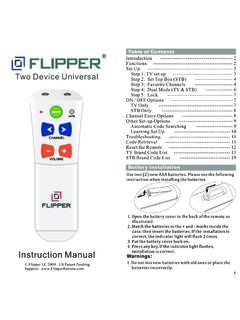
cdn.lssproducts.comto lock the set up of your remote control, set-up is complete. Enjoy using your Flipper remote!: 1. In Dual mode, press and hold ADD. The light will flash once then turn solid. Release the button, and enter 955. The light flashes twice. 2. In TV mode, press and hold TV. The light will flash

DISH Remote Access - dbstv.com
dbstv.comto setup and use DISH Remote Access for your DISH DVR. Introduction • Access your dishnetwork. com account (or mobile. ... (refer to Home Network Installation Instructions on dishnetwork.com). ... press MENU on the remote control, select System Setup, Installation, Broadband Setup, ...

Hopper Joey System Activation and Setup
dbstv.comHopper Joey System Activation and Setup ... 1. Select the Blue Short Cut Button on the remote control 2. Select the “Tests” tile ... 2. Sling Adapter (Ensure to select the correct receiver in Dish online.) 3. External hard drives Issue: Unable to access Pandora or Facebook in the Apps tile. These are future scheduled enhancements.
Pay Per Programs - DISH Network™ Cable TV Provider
dishnetwork.wsthe receivers on your DISH Network account. Using the remote control, you can order the ... Pay Per Programs 37 Tips ... If you’re using the remote control, you won’t be charged more than once as long as it is the same exact event (for example, at the same time or All Day events).

AVR Remote Control Preset Codes (AVR-X4300H) - Denon
manuals.denon.com1 AVR Remote Control Preset Codes (AVR-X4300H) D Denon 73347 AVR CBL A AT&T 00858 B Bright House 01376, 01877 C Cable & Wireless 01068 Cable One 01376, 01877 Cablevision 01376, 01877 Charter 01376, 01877 Cisco 01877, 00858, 02378
5.3 IR REMOTE - Solid Signal
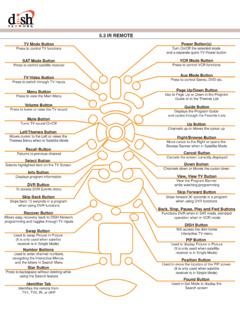
manuals.solidsignal.com5.3 IR REMOTE SAT Mode Button Press to control satellite receiver TV Mode Button Press to control TV functions ... DISH Button Will access the dish home Interactive TV menu ... Recover Button Allows easy recovery back to DISH Network programming and toggles through TV inputs PIP Button Used to display Picture in Picture (It is only used when ...

Programming Remote Control Brand Codes Satellite Receivers
www.artelco.netProgramming Remote Control Brand Codes The following codes are used when configuring the remote control. First find the manufacturer of your equipment and then try the codes one by one. Audio Amplifiers Adcom 0577, 1100 Bose 0674 Durabrand 1561 Elan 0647 GE 0078 Harman/ Kardon 0892 JVC 0331 Left Coast 0892
Chapter 4
www.dbsinstall.comChapter 4 Dish Antenna Installation ... provides the most expansive high definition programming offering from DISH Network. The SuperDISH installation must be completed by a qualified professional ... Make sure that the remote control batteries are fresh, and are installed properly. If
DISH NETWORK CHANNEL DIRECTORY - dishstoreonline.com
www.dishstoreonline.comAdditional fees may apply for existing DISH Network customers to upgrade their dish antenna. 2 = May require purchase of additional dish antenna to view. ... IT’S EASY AND ALL YOU NEED IS YOUR REMOTE CONTROL! 4ADD PROGRAMMING 4PAY YOUR BILL 4CHECK LOCAL & NATIONAL WEATHER ... DISH NETWORK CHANNEL DIRECTORY ...
Related search queries
REMOTE CONTROL, Set Up Two Device Universal, Remote, DISH Remote Access, Dish, Network, Hopper Joey System Activation and Setup, Pay Per Programs, DISH NETWORK, Remote Control Preset Codes AVR-X4300H, 5.3 IR REMOTE, Control, Programming Remote Control Brand Codes, Chapter 4 Dish Antenna Installation