
Flash Player Local Settings Manager - help.adobe.com
1 Last updated 8/27/2015 Using the Local Settings Manager Storage Use the settings on the Storage panel to control how (or whether) websites use Flash Player to store data on your computer. The settings in this section are not applicable to Google Chrome or Chromium based browses (PPAPI).
Download Flash Player Local Settings Manager - help.adobe.com

Information
Domain:
Source:
Link to this page:
Documents from same domain

Help and tutorials - Adobe
help.adobe.comRelease Notes | Dreamweaver 12.1 | Creative Cloud To the top To the top To the top This release is available for Creative Cloud members and point product subscribers only.

Developing Mobile Applications with Flex and Flash …
help.adobe.comThe Flex Developer Center contains many resources that can help you start building mobile applications using Flex: † Getting Started articles, links, and tutorials † Samples of real applications built in Flex

Help and tutorials - Adobe
help.adobe.comRender out content to create digital dailies for review, proxy media for offline editing, or masters for final delivery. 1. Start with the content you want to render on the Timeline and click the Output tab to display the Output panel.

Learning ActionScript 3 - Adobe Help Center
help.adobe.comLEARNING ACTIONSCRIPT 3.0 2 Introduction to ActionScript 3.0 Last updated 5/2/2011 What’s new in ActionScript 3.0 ActionScript 3.0 contains many classes and features that are similar to ActionScript …

ActionScript 3.0 の学習 - Adobe Help Center
help.adobe.comACTIONSCRIPT 3.0 の学習 2 ActionScript 3.0 の概要 最終更新日2011/5/11 コア言語機能 コア言語は、ステートメント、式、条件、ループ、型などのプログラミング言語の基本的な要素を定義します。

Help and tutorials - Adobe
help.adobe.comImproved user interface To the top To the top Improved and efficient user interface User interface color and brightness Panels The new user interface framework leverages performance enhancements and advantages like native 64-bit support to render a cleaner interface,

Help and tutorials
help.adobe.comVideo tutorial series: After Effects CS6: New features workshop Video tutorial: New features workshop: Overview of new and changed features in After Effects CS6 Blog: What's new and changed in After Effects CS6 Global performance cache Cached frames are restored in many scenarios for a faster workflow

Help and tutorials
help.adobe.comkeyboard shortcuts once more to return to the interface. Resources: Source Monitor and Program Monitor overview Video tutorial: Toggle full screen Dropped Frame indicator Both the Source and the Program monitor now have the option to display an icon that indicates if frames are being dropped during playback. Resources: Dropped Frame indicator (CS6)

Elements Organizer Help and tutorials
help.adobe.comViews in Elements Organizer There are four views in Elements Organizer. The Views tab helps you organize and view your media based on the people present in the photos, places they were taken, and the events that are associated with the photos. Initially, when you import media, the files are displayed in the Media view.
Related documents
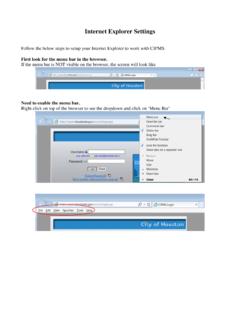
Internet Explorer Settings - Houston
cipms.houstontx.govI. Double click on Internet Explorer to open it. Once opened, click on Tool -> Internet Options to open Internet Options windows. II. From Internet Options window, click on “Security” tab, click on “Trusted Sites” to highlight

Internet Explorer Settings for Finger Print Recorder
ihrms.raj.nic.inInternet Explorer Settings for Finger Print Recorder 1. Go to Tools-->Internet Options 2. Select security tab 3. Click on Trusted Sites (or Local Intranet depending on whether your site is trusted or not) 4. Click on Custom Level 5. Ensure that "Initialize and script active x controls is not marked safe for scripting" is enabled - this comes under Activex controls and plug-ins section

DoD Instruction 5200.44, November 5, 2012; Incorporating ...
www.esd.whs.milDepartment of Defense . INSTRUCTION . NUMBER 5200.44. November 5, 2012 . Incorporating Change 2, July 27, 2017 . DoD CIO/USD(AT&L) SUBJECT: Protection of Mission Critical Functions to Achieve Trusted Systems and Networks

Trusted Sites - LowesLink
www.loweslink.comRevised March 2018 1 Trusted Sites The website ww3.loweslink.com needs to be added to your Trusted Sites. With the Internet Explorer browser open Click on: Tools Internet Options Click on the Security Tab Then click Sites

Internet Explorer 7 and 8 Security Settings
www.nsapp.fordtechservice.dealerconnection.comInternet Explorer 7 and 8 Security Settings This document applies to IE 7, and 8. All graphics were taken from Internet Explorer 8, similar to IE 7.
Oracle Partitioning Policy
www.oracle.comTitle: Server/Hardware Partitioning Author: Oracle Corporation Subject: The purpose of this policy document is to define which of these partitioning technologies is deemed to be Soft, Hard or an Oracle Trusted Partition, and under what conditions Oracle permits them as a means to determine or limit the number of Oracle Proces sor licenses required for a given server, i.e., to license a sub ...
Why does my Downloadable Content freeze at 50%?
www8.garmin.comWhy does my Downloadable Content freeze at 50%? 01/26/2016 If Downloadable Content (DLC) fails or freezes at 50%, there is a problem copying files to the device's

CA/Browser Forum Baseline Requirements for the Issuance ...
www.cabforum.orgJul 01, 2012 · Forum Guideline CA / Browser Forum Baseline Requirements, v. 1.0 1 1. Scope The Baseline Requirements for the Issuance and Management of Publicly-Trusted Certificates describe a …