
Forcepoint VPN Client
VPN Client can connect to Forcepoint NGFW Firewall/VPN gateways only. Virtual IP addresses for the Forcepoint VPN Client The primary access method for production use is the Virtual Adapter feature. This feature allows the Forcepoint VPN Client to have a second, virtual IP address that is independent of the end-user computer address in the local ...
Download Forcepoint VPN Client

Information
Domain:
Source:
Link to this page:
Documents from same domain

TRITON Appliances Getting Started Guide - …
www.websense.comTRITON Appliances 2 TRITON Appliances: Getting Started Supported software TRITON appliances support: TRITON AP-EMAIL with integrated data loss prevention TRITON AP-WEB with integrated data loss prevention Web Filter & Security — V5000 and VMware virtual appliance TRITON AP-DATA Protector Mobile Agent Email Gateway for …
Websense: PAC File Best Practices
www.websense.comProxy Auto-Configuration Best Practices 2 component) and is required to support the hybrid web filtering feature of Web Security Gateway Anywhere. A PAC file is a JavaScript function definition for FindProxyForURL(url, host).
PAC File Best Practices for TRITON AP-WEB
www.websense.comPAC File Best Practices 3 TRITON AP-WEB PAC File Best Practices Why use a PAC file? In explicit proxy and Web Hybrid module deployments of TRITON AP-WEB, using a

Endpoint Solutions Installation and Deployment …
www.websense.comInstallation and Deployment Guide 3 a hotspot, but the user has not finished registration, it removes its proxy settings until the gateway has successfully opened.

Creating Custom Block Pages - Forcepoint
www.websense.comCreating Custom Block Pages 3 The block page is created from a multiple files that are stored with each instance of Filtering Service in your network.

Installation and Deployment Guide - Forcepoint
www.websense.comInstallation and Deployment Guide 3 For supported browsers, TRITON AP-ENDPOINT Web manipulates proxy settings in real time. For example, if TRITON AP-ENDPOINT Web detects it is at a hotspot, but the user has not finished registration, it …
Introduction to machine learning - Forcepoint
www.websense.comMachine learning is a branch of artificial intelligence, comprising algorithms and techniques that allow computers to learn from examples instead of pre-defined rules. As a user of Websense ® Data Security, you can provide examples that train the

Introduction to Forcepoint DLP Machine Learning
www.websense.comIntroduction to Machine Learning for Forcepoint DLP 3 ensemble of documents as counterexamples. (See Negative examples consisting of “All documents”, page 4, and Positive examples, page 3.) For text-based data, some of the algorithms automatically create an optimal “weighted
Installation Instructions: Forcepoint Web Security
www.websense.comGuide and gather information as instructed under “Gather data for firstboot”. Step 2: Start the management server installation Before installing management server components on a supported Windows server,
Stonesoft VPN Client 2.0 for Mac User Guide - websense.com
www.websense.comIntroduction | 3 Introduction This guide provides end-user instructions for installing and using Stonesoft® VPN Client for Mac OS X. The Stonesoft VPN Client is a software application that runs on your Mac.
Related documents

How to Connect to VPN: Cisco AnyConnect Secure Mobility …
www.aims.wisc.eduVPN: Cisco AnyConnect Secure Mobility Client June 13, 2016 For help with any of the instructions below, please contact the AIMS Help Desk at 265-6900 or email help@aims.wisc.edu . TABLE OF CONTENTS

Virtual Private Network (VPN) Connection Setup Guide for ...
www.cityu.edu.hkVirtual Private Network (VPN) Connection Setup Guide for Windows 10 This manual shows the procedures to set up a Cisco AnyConnect VPN Client on Windows 10. You should have the following items before you can establish a VPN connection. 1. Internet connection such as your broadband or 4G network

How to connect to VPN using the Pulse Secure client for ...
www.cu.eduHow to connect to VPN using the Pulse Secure client for Windows 8 –To verify you are connected, locate the Pulse Secure icon in the system notification tray. There should be a green arrow pointing upwards, which indicates you are connected. You are now connected to the System VPN and can connect to network resources (shared drives, terminal

1. Downloading VPN Client
www.mumbaicustomszone1.gov.inAfter downloading the VPN Client and installing it, a window will pop-up asking the VPN Server Name where the following server name has to be filled in: VPN server name: custvpn.rcil.gov.in 3. Then the User ID and the password have to be filled in. User ID will be the .gov.in
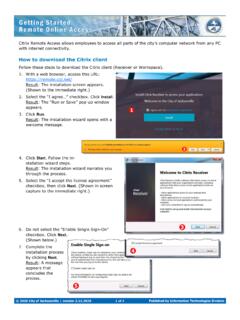
How to download the Citrix client - COJ.net
remote.coj.netHow to upgrade to a newer version of Citrix receiver Follow these steps to upgrade your current version of the Citrix client (Receiver or Workspace).

Installing GlobalProtect VPN Client (Ubuntu)
www.odu.eduVPN Client (Ubuntu) page 5 4. Once installed, you can view the available commands with globalprotect help. Connecting to the ODU VPN (CLI) 1. Connect to the VPN with globalprotect connect --portal vpn2.odu.edu. 2. You can see the status of your VPN connection with globalprotect show --status and globalprotect show --details.
SonicWall™ Global VPN Client 4
www.sonicwall.comSonicWall Global VPN Client 4.10 Administration Guide Introduction to Global VPN Client 8 •Default VPN Connections File ‐ Enables the SonicOS administrator to configure and distribute the corporate VPN connections with the Global VPN Client software to …