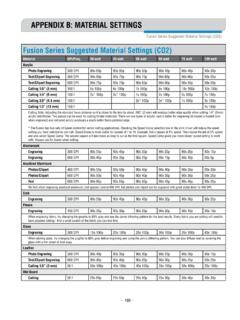
Fusion Material Settings - Epilog Laser
* The Fusion has two sets of Speed control for vector cutting applications. Checking the Speed Comp selection box in the print driver will reduce the speed setting you have selected by one half. Speed Comp is most useful for speeds of 1 to 10. Example: Cut a square at 5% speed. Then repeat the job at 5% speed and also select Speed Comp.
Download Fusion Material Settings - Epilog Laser

Information
Domain:
Source:
Link to this page:
Documents from same domain

Settings for Success: Techniques for most popular ...
www.epiloglaser.comDepending on the wattage of your laser, the best approach is to set the laser power at 100 percent and adjust the speed to obtain the desired depth. Wood is a very easy material to work with and you can produce very nice detail with as little as 300 DPI engraving. 600 DPI engraving into wood produces even better results.
MINI 18/24 & HELIX - Epilog Laser
www.epiloglaser.comthat turn the laser off if the door is opened during operation, and no special precautions are necessary to operate the high-power laser safely. However, the visible output beam of the Laser Diode Pointer (Red Dot Pointer) is accessible to the operator.

ZING 16 / 24 - Epilog Laser
www.epiloglaser.comThe laser cabinet has safety interlocks that turn the laser off if any access door is opened during operation, and no special precautions are necessary to operate the high-power laser safely. However, the visible output beam of the Laser Diode Pointer (Red Dot Pointer) is …

APPENDIX B: MATERIAL SETTINGS - Epilog Laser
www.epiloglaser.comyour settings by engraving a small square or cutting a small circle. You can fine tune your settings in these areas. • Similar materials use similar settings: When you are working with a material you aren’t familiar with, think about a similar material and what settings you would use with that product.
Section 5: Connecting the Laser to Your Computer
www.epiloglaser.comSection 5: Connecting the Laser to Your Computer 26 The data port connections are on the back of the machine, towards the bottom right. The drawing below shows the location of the data ports on the laser system. USB Port A USB cable is included in the accessory kit. The USB port is located on the right side of the machine, near the rear.
SECTION 3: DRIVER INSTALLATION - Epilog Laser
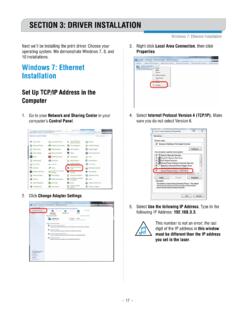
www.epiloglaser.comWindows 8 and 10: Ethernet Installation SECTION 3: DRIVER INSTALLATION 4. Select Create a new port, then Standard TCP/IP Port. Click Next. 5. Enter the IP Address to match the IP Address you set at the laser in “Setting the IP Address” on page …

Windows 7: Ethernet Installation - Epilog Laser
www.epiloglaser.comWindows 7: Ethernet Installation SECTION 3: DRIVER INSTALLATION 13. Click Next. 14. Click Replace the current driver if requested, then click Next. 15. You can rename your printer here. We have not changed it for this document, but many users like to associate the driver name with the IP Address they are using, for example Epilog Helix 192.168.3.4.
Related documents
![Untitled-2 [www.columbia.edu]](/cache/preview/3/d/6/3/d/0/d/0/thumb-3d63d0d0343f66e2d86c238c9f8a44b3.jpg)
Untitled-2 [www.columbia.edu]
www.columbia.eduAcrosomal vesicle fusion is the membrane fusion event of this stage. 2. Binding: Species-specific interaction of gametes. 3. Fusion: Merging of sperm and egg plasma membranes is the membrane fusion event of this stage. 4. Activation (of the zygote): Cortical reaction (fusion of cortical vesicles with the egg plasma membrane) and pronuclear fusion.

40 Colors Available In All Grouts - Custom Building Products
www.custombuildingproducts.com* Fusion Pro will not effloresce, mottle, fade or color shade within the grout joint when installed per manufacturer’s directions. Cured Fusion Pro will not stain when exposed to most common, non-corrosive household goods and cleaning agents. All spills should be immediately cleaned from the grout. See website for details.

Chapter 14 NUCLEAR FUSION
personal.ems.psu.eduthe repulsive forces, fusion of the two nuclei into a stable heavier nucleus will take place and a large amount of energy will be released. The net energy output is potentially larger in the case of fusion than in the case of fission. The reaction described in Illustration 14-1 (fusion of deuterium and tritium into helium)

Military-Civil Fusion
www.state.govU.S. DEPARTMENT of STATE “Military-Civil Fusion,” or MCF, is an aggressive, national strategy of the Chinese Communist Party (CCP).Its goal is to enable the PRC to develop the most technologically advanced military in the world. As the name suggests, a key part of MCF is the elimination of barriers between China's civilian research and commercial

Oracle Fusion Cloud Service Global Price List
www.oracle.comFusion Payroll for ERP Cloud Service for United States Fusion Payroll for ERP Cloud Service for United Kingdom This document is the property of Oracle Corporation. Any reproduction of this document in part or in whole is strictly prohibited. For educational purposes only. Subject to change without notice.

CERVICAL FUSION POST-SURGICAL REHABILITATION …
orthonc.comCERVICAL FUSION POST-SURGICAL REHABILITATION PROTOCOL POST-OP DAYS 1 – 30 • C-collar – Per surgeon, wear at night for comfort Sit in chair for all meals • Sit at 30+ minute intervals throughout the day • Posture education – Use lumbar roll when sitting • Pelvic tilts

HALLUX 1ST MTP ARTHRODESIS (big toe fusion)
tcomn.comOnce fusion is successful, you will be able to wear most shoes, including a high heel if desired of about one and a half inches. Most patients can tolerate nearly any activity after fusion of the big toe, especially since their arthritis pain in the joint is relieved. Activities that require a lot of motion in the big toe, such