
Getting Started - Garmin
inReach Explorer Online Manual Download the PDF version of the inReach Explorer Manual to use when you're not connected to the internet. Store the PDF on your tablet or smartphone for access anywhere.
Download Getting Started - Garmin

Information
Domain:
Source:
Link to this page:
Documents from same domain

EDGE® 1030 Owner’s Manual - Garmin International
static.garmin.comCharging the Device NOTICE To prevent corrosion, thoroughly dry the USB port, the weather cap, and the surrounding area before charging or connecting to

Owner’s Manual - Garmin International
static.garmin.comIntroduction WARNING See the Important Safety and Product Information guide in the product box for product warnings and other important information.

Lidar Lite v3 Operation Manual 2 and Technical …
static.garmin.com1 Lidar Lite v3 Operation Manual and Technical Specifications Laser Safety WARNING This device requires no regular maintenance. In the event that the device

Printing a Mounting Template - Garmin
static.garmin.comPrinting a Mounting Template Notice It is not recommended that you print a mounting template on your own. Use the template that came in the product box.

GPSMAP 62 series - Garmin
static.garmin.comGPSMAP 62 Series Quick Start Manual 3 3. Replace the battery cover. For best results, after you install new batteries, update the battery type in the

Important Safety and Product Information 2 …
static.garmin.comIMPORTANT SAFETY AND PRODUCT INFORMATION WARNING Failure to heed the following warnings could result in an accident or collision resulting in death or

Important Safety and Product Information 2 …
static.garmin.comImportant Safety and Product Information 2 Informations importantes sur le produit et la sécurité 3 guida Informazioni importanti sulla sicurezza e sul

Instructions - Garmin
static.garmin.com1 GLO™ GLONASS and GPS Sensor Instructions August 2012 190-01492-00_0B Printed in Taiwan

GNS 430(A) - Garmin International
static.garmin.com190-00140-00 Rev. P GNS 430(A) Pilot’s Guide and Reference i RECORD OF REVISIONS Revision Date of Revision Description A 12/98 Initial Release B 4/99 Update to conform to recent SW changes

GNS 530(A) - Garmin International
static.garmin.com190-00181-00 Rev. H GNS 530(A) Pilot’s Guide and Reference i RECORD OF REVISIONS Revision Date of Revision Description A 5/00 Initial Release B 5/01 Update to reflect software changes through 2.06
Related documents
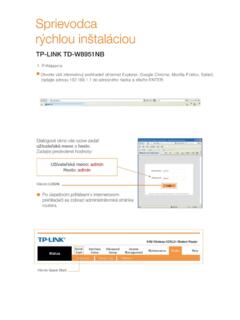
Otvorte váš internetový prehliadač (Internet …
img.orange.skTP-LINK' Quick Start The 1B'izard vvill guide through these four quick steps- Begin by Clicking on NEXT Step I. Choose your time zone Step 2. Set your Internet connection

STEP BY STEP Guide for - Indian Institute of …
sps.iitd.ac.inPRE-REQUISITES FOR USING CPP PORTAL The following are the minimal requirements. • A computer system with at least 1 GB RAM and Internet Connectivity.

TRANS-TASMAN ANZ TRANSACTIVE GETTING …
www.anz.comDISCLAIMER > References to “Australia(n)” or “AU” with respect to any payments, products, services and/or accounts means payments made by, accounts held with and products and services provided by Australia and New Zealand Banking Group Limited from or within Australia.

How to Remotely View Security Cameras Using the …
www.ezwatch.comSetting Up Internet Access Using EZWatch IP Service Step #1: First make sure the EZWatch Pro DVR/Camera Server has a connection to the internet.
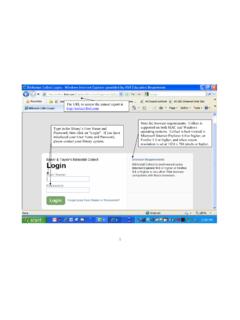
The URL to access the annual report is Note the …
www.nysl.nysed.govBy clicking on “Show Last Year’s Answers”, last year’s data (if available) will appear above the data entry fields (see next page). “Survey Navigation” has …
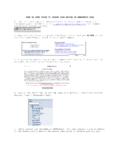
STEP BY STEP GUIDE TO UPDATE YOUR RECORD …
www.public.navy.milSTEP BY STEP GUIDE TO UPDATE YOUR RECORD OF EMERGENCY DATA . 1. Open internet explorer and proceed to the Navy …
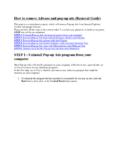
How to remove Adware and pop-up ads (Removal …
www.tnstate.eduHow to remove Adware and pop-up ads (Removal Guide) This page is a comprehensive guide, which will remove Pop-up Ads from Internet Explorer…
Accessing DoD Enterprise Email, AKO, and other …
militarycac.comOpen Internet Explorer (IE) [Make sure the page you are having problems accessing is NOT open in any tabs or another IE browser], Select the gear