Help and tutorials - Adobe Inc.
Acrobat Reader Help / Fill and sign PDF forms To the top Fill out your PDF form Sign or Initial your form Easily fill, sign, and send forms fast from your desktop, browser, or tablet device. The Fill & Sign tool gives you an easy way to work with paper forms or PDFs that haven’t been optimized for form filling.
Download Help and tutorials - Adobe Inc.

Information
Domain:
Source:
Link to this page:
Documents from same domain

Adobe Acrobat 9.0 Troubleshooting
helpx.adobe.comLast updated 11/3/2015 Legal notices Legal notices For legal notices, see http://help.adobe.com/en_US/legalnotices/index.html. A note to our customers

Adobe Acrobat X Troubleshooting
helpx.adobe.comLast updated 11/4/2015 Legal notices Legal notices For legal notices, see http://help.adobe.com/en_US/legalnotices/index.html. A note to our customers
Adobe Photoshop CS3 Troubleshooting
helpx.adobe.com1 Last updated 11/12/2015 ZoneAlarm causes Photoshop CS3 installer to fail Issue When you attempt to install Adobe Photoshop CS3, ZoneAlarm denies the installer access to the Registry, and the

Using Designer - Adobe
helpx.adobe.comiii Applying master pages to forms whose number of pages vary . . . . . . . . . . . . . . . 64 To use the first master page one time only .

ACROBAT DC ヘルプ - helpx.adobe.com
helpx.adobe.com新機能の概要 Adobe Acrobat DC 2016 リリース(5 月および 1 月) ポップヒントやウォークスルーで基本を学ぶ 最新のユーザーインターフェイス - 新しいダークグ レーテーマ
Adobe Photoshop Lightroom 3 Troubleshooting
helpx.adobe.com4 Choose Lightroom > Preferences > Presets (Mac OS) or Edit > Preferences > Presets (Windows). 5 Select Show Lightroom Presets Folder, and open the selected Lightroom folder. 6 Copy the config.lua file into the Lightroom folder.

Adobe Photoshop Lightroom 5 Troubleshooting
helpx.adobe.comIf you purchased Adobe Lightroom 4 from the Mac App Store and want to upgrade to Lightroom 5, purchase the upgrade from Adobe or another vendor. (For example, get the upgrade from Amazon, Best Buy, B&H, and so on.)

ADOBE ELEMENTS ORGANIZER
helpx.adobe.comEasily create, customize, and share creative slideshows using the enhanced Slideshow feature. Improved overall performance in Elements Organizer 2018 helps you work faster and more efficiently, even with large catalogs.

Adobe InDesign CS3 Troubleshooting
helpx.adobe.comWhen you try to print to a non-PostScript Epson printer from Adobe Illustrator or InDesign, the file appears in the printer's list of jobs, but one of the following problems occurs: The file doesn't print.
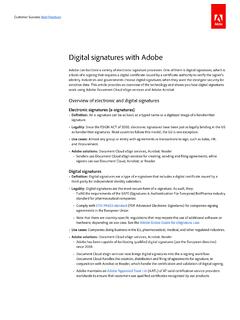
Digital signatures with Adobe
helpx.adobe.com– Document Cloud eSign services now brings digital signatures into the e-signing workflow: Document Cloud handles the creation, distribution and filing of agreements for signature, in conjunction with Acrobat or Reader, which handle the certification and validation of digital signing.
Related documents

More reporting formats .3 Writing effectively
www.fao.orgCatchy: It should grab the reader’s attention. Try to include relevant key words, or find an unusual turn of phrase that sticks in the mind. Also consider using a question as a title. To the point: It should be relevant to the topic.
Microsoft Word Basics - NOBLE Web
www.noblenet.orgBreak your chapter or subheading of text to the next page Create a table of columns and rows Insert image files saved to your computer Search images when connected to the internet with a Bing image search Add shapes such as arrows Add infographics Grab a screenshot (for PCs press the Prtscn key, then paste your clipboard contents. For Macs

R-Blends - Reading Horizons
www.readinghorizons.com8. Spell the word grab. She reached to grab the monkey bar. 9. Change the Blend to spell the word crab. The crab dug in the sand. 10. Spell the word frog. The frog jumped into the pond. Beat the Clock Ask students to use the sound cards from this lesson to form as many words as they can in a specific amount of

SAMPLE BUSINESS MEMORANDUM DATE: TO: FROM
www.csun.eduyour memo and should (like a newspaper headline) grab the reader’s attention. Note a headline does not contain detailed results such as cost of Product X is $3.45 per unit.). The rest of this memo explains the basis of our conclusions. We will present our analysis in four parts. The first part deals with product cost under the existing system.

Mark Haddon - The Curious Incident Of The Dog In The …
innerline.chat.ruSiobhan said that the book should begin with something to grab people's attention. That is why I started with the dog. I also started with the dog because it happened to me and I find it hard to imagine things which did not happen to me. Siobhan read the first page and said that it was different. She put this word into inverted

DIVERSITY DOWNLOAD 8 5 X 11 no-borders - Cloudinary
res.cloudinary.comdifferent PDF reader and may have issues reading PDFs. Adobe Acrobat PDF Reader is available free online. • If you are having issues with pages being cut off, then as you select “print” go ahead and check the box “fit” from the print dialogue box that pops up. • For best results, print on cardstock to add to your papercrafts.
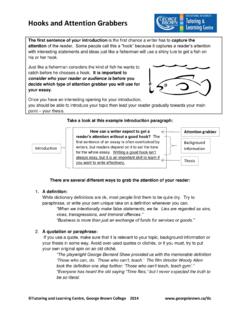
Hooks and Attention Grabbers - George Brown College
www.georgebrown.capoint – your thesis. Take a look at this example introduction paragraph: There are several different ways to grab the attention of your reader: 1. A definition: While dictionary definitions are ok, most people find them to be quite dry. Try to paraphrase, or write your own unique take on a definition whenever you can.

Five Paragraph Essay Requirements for Fifth Grade …
www.writingcnep.weebly.comRestate your thesis sentence in new words (retell the thesis in a new way Œnot the same way) 2. Choose the MOST significant fact about your essay/subject and state it. You need to use the word most in your sentence. See the Most Important worksheet. 3. End with a statement, a comment, idea, observation, quote or question that leaves the reader ...

Business Plan: www.sba
www.business.rutgers.eduThis section tells your reader where your company is and where you want to take it. It's the first thing your readers see; therefore it is the thing that will either grab their interest and make them want to keep reading or make them want to put it down and forget about it. More than anything else, this section is