Installation and Deployment Guide
2 Websense Endpoint Solutions See System requirements, page 3 for information about the hardware requirements for endpoint client components. About this guide This guide describes how to deploy Websense software on endpoint client machines across your enterprise.
Download Installation and Deployment Guide

Information
Domain:
Source:
Link to this page:
Documents from same domain

TRITON Appliances Getting Started Guide - …
www.websense.comTRITON Appliances 2 TRITON Appliances: Getting Started Supported software TRITON appliances support: TRITON AP-EMAIL with integrated data loss prevention TRITON AP-WEB with integrated data loss prevention Web Filter & Security — V5000 and VMware virtual appliance TRITON AP-DATA Protector Mobile Agent Email Gateway for …
Websense: PAC File Best Practices
www.websense.comProxy Auto-Configuration Best Practices 2 component) and is required to support the hybrid web filtering feature of Web Security Gateway Anywhere. A PAC file is a JavaScript function definition for FindProxyForURL(url, host).
PAC File Best Practices for TRITON AP-WEB
www.websense.comPAC File Best Practices 3 TRITON AP-WEB PAC File Best Practices Why use a PAC file? In explicit proxy and Web Hybrid module deployments of TRITON AP-WEB, using a

Endpoint Solutions Installation and Deployment …
www.websense.comInstallation and Deployment Guide 3 a hotspot, but the user has not finished registration, it removes its proxy settings until the gateway has successfully opened.

Creating Custom Block Pages - Forcepoint
www.websense.comCreating Custom Block Pages 3 The block page is created from a multiple files that are stored with each instance of Filtering Service in your network.
Introduction to machine learning - Forcepoint
www.websense.comMachine learning is a branch of artificial intelligence, comprising algorithms and techniques that allow computers to learn from examples instead of pre-defined rules. As a user of Websense ® Data Security, you can provide examples that train the

Introduction to Forcepoint DLP Machine Learning
www.websense.comIntroduction to Machine Learning for Forcepoint DLP 3 ensemble of documents as counterexamples. (See Negative examples consisting of “All documents”, page 4, and Positive examples, page 3.) For text-based data, some of the algorithms automatically create an optimal “weighted
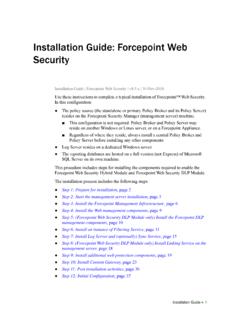
Installation Instructions: Forcepoint Web Security
www.websense.comGuide and gather information as instructed under “Gather data for firstboot”. Step 2: Start the management server installation Before installing management server components on a supported Windows server,
Stonesoft VPN Client 2.0 for Mac User Guide - websense.com
www.websense.comIntroduction | 3 Introduction This guide provides end-user instructions for installing and using Stonesoft® VPN Client for Mac OS X. The Stonesoft VPN Client is a software application that runs on your Mac.
Installation Instructions: Forcepoint Web Security
www.websense.comUse these instructions to complete a typical installation of Forcepoint™ Web Security. ... Policy Server before installing any other components. ... (including downloading the installer file) as described in Prepare your Windows servers, page 2.
Related documents

Juniper Networks NetScreen-ISG 2000 - cpssales.com
cpssales.comJuniper Networks NetScreen-ISG 2000(1) Maximum Performance and Capacity(2) Firewall performance 2 Gbps 3DES performance 1 Gbps Deep Inspection performance 300 Mbps